What is IFTTT
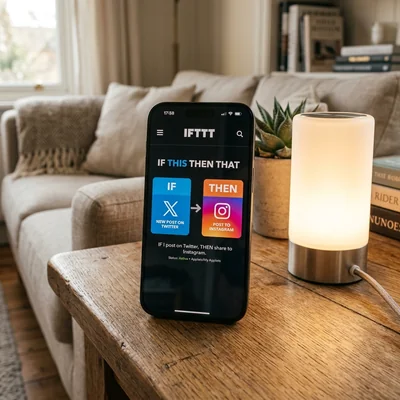
IFTTT is a cloud automation service for "if this, then that": you connect two services or a device without code, and when an event occurs, a simple action runs. A classic example — a new Instagram photo is automatically posted to Twitter, or a Philips Hue lamp turns on at sunset. For a business owner, it's a way to handle small routine tasks — notifications, cross-posting, alerts — without hiring a developer or paying for an expensive business automation platform. Below is what the platform is, how an Applet works, who it's a good fit for, and how IFTTT differs from Zapier, Make, and n8n.
What is this project
IFTTT (If This Then That) is a SaaS platform for personal and home automation, founded in 2010 by Linden Tibbets in San Francisco. The name reflects the core logic: if something happens in one service, then do something in another.
Initially IFTTT was pitched as "glue for the internet" — a way to link services without official integrations. Over time the focus shifted to consumer scenarios: smart home, social media, weather, fitness trackers, phone notifications. For business automation with CRM, multi-step pipelines, and complex logic, IFTTT is usually weaker than Zapier or Make — but for the small, targeted tasks a small business runs into (a reminder, a notification, a duplicated post), that's often all you need.
The platform runs only in the cloud, so there's no backend to install or administer — a plus for a business owner without an IT department. You connect accounts via OAuth, enable ready-made Applets, or build your own. The IFTTT mobile app is a major strength: many scenarios can be set up from a phone in minutes, with a fast, self-serve setup and no contractor required.
How an Applet is structured
The basic unit in IFTTT is an Applet (formerly called a Recipe). It is a pair of:
- Trigger (If) — the event that starts the scenario: a new RSS post, rain in the forecast, a button press on the phone, a smart home sensor firing.
- Action (Then That) — one response action: send a notification, publish a tweet, turn on a light, save a file to Dropbox.
Unlike Zapier, where one workflow can have dozens of steps, a classic IFTTT Applet is one trigger and one action. Paid plans add multi-action Applets (several actions in sequence) and filter code for conditions, but the platform philosophy stays simple: minimal setup, maximum "turn on and forget." For a business owner, that means a fast start with no need to train a team — set it up once, and the scenario runs itself.
Data between services is passed as ready-made fields: post text, image URL, temperature. You rarely need expressions or code — the interface targets non-technical users.
Key features
Services and ready-made Applets
IFTTT supports hundreds of services: Google, Twitter/X, Instagram, Telegram, Spotify, Philips Hue, Google Assistant, Alexa, Nest, Fitbit, Notion, Slack, and more. Popular pairings have an Applet gallery — ready scenarios in one click: "save a liked tweet to Pocket", "notify when a stock drops below a threshold." For a small business, the same gallery has practical options: cross-post from Instagram to Twitter/X for marketing, log brand mentions to a spreadsheet, or send yourself a notification about a new review.
Business SaaS coverage is smaller than Zapier (7,000+ apps): no deep Salesforce, HubSpot, or complex CRM pipelines. Strengths are smart home and mobile triggers (location, in-app button, SMS) — handy for a small office, showroom, or storefront that needs simple physical-world automation without buying a dedicated system.
Webhooks and Maker
On Pro and Pro+ plans, Webhooks are available — inbound and outbound HTTP requests. This bridges to your scripts, Raspberry Pi, Home Assistant, and any REST API. Maker tools let developers publish their own services in the IFTTT ecosystem.
For simple "my server got a webhook — turn on the outlet" that is enough. For a business owner, the same idea works with your own site or a lightweight CRM — for example, "new lead on the site — notify me in Telegram." For enterprise ETL or branching logic, n8n or Make is a better fit.
Smart home and IoT
IFTTT has historically been strong in smart home: linking weather to a thermostat, motion to a camera, voice commands to lighting scenes. For a business, that translates to an office or storefront — automatic lighting, an after-hours motion alert, climate monitoring in a storage room. Many brands (iRobot, TP-Link, Wyze) once connected through IFTTT as a universal layer — though some have since limited free access.
Mobile app
The IFTTT app for iOS and Android is a full client: activity feed, enabling Applets, trigger buttons on the home screen. For personal automations on the go — and for a business owner who manages their own social media and notifications from a phone — it is more convenient than Zapier's web UI.
IFTTT vs Zapier, Make, and n8n
| Criterion | IFTTT | Zapier | Make | n8n |
|---|---|---|---|---|
| Model | SaaS, consumer | SaaS, business | SaaS, business | Self-host + cloud |
| Entry barrier | Minimal | Low | Medium | Higher |
| Steps per scenario | 1 trigger + 1-2 actions | Multi-step Zaps | Complex scenarios | Full node graph |
| Integrations | Hundreds, smart home | 7,000+ apps | 1,500+ apps | 400+ nodes |
| Code | Almost none | Limited | Functions | JS/Python |
| Price | Freemium, Pro from ~$3/mo | From ~$20/mo | From ~$9/mo | Self-host free |
| Audience | Personal, IoT | Business, ops | SMB, marketing | DevOps, self-host |
IFTTT is the best pick for "social + smart home + phone notifications" without learning automation and without budgeting for a paid business platform. Zapier and Make when you need CRM, forms, and multi-step business flows. n8n when your own server and arbitrary code logic matter.
IFTTT for business owners: is it worth adopting
For the owner of a small business or a solo entrepreneur who runs their own social media, answers leads, and keeps track of a dozen small things, IFTTT covers exactly those targeted tasks — without hiring a developer and without spending time learning a complex platform. Typical business scenarios:
- Marketing and social media — cross-posting between platforms (where APIs still allow it), auto-saving posts and brand mentions to Google Sheets for reporting.
- Customer communication — a Telegram or email notification about a new lead from the website via a Webhook, or about a new review or brand mention.
- Competitor and market monitoring — an alert when a competitor's price changes or a news item matches a key search term.
- Office and storefront automation — automatic lighting, an after-hours motion alert, weather-based reminders for logistics.
- The owner's own personal productivity — saving articles and notes, syncing tasks across services, reminders.
Less suited for: multi-step sales pipelines, lead processing with filters and branches, strict requirements to keep data on your own infrastructure, high-frequency API calls with detailed debugging — there Zapier, Make, or n8n are more practical.
The decision rule: if you have fewer than a dozen tasks, each one is "one event → one action," and your team has no CRM with multi-step processes — IFTTT is enough, and it will cost $0-5 a month. If your scenarios grow, start branching, or hinge on a CRM or sales process, it's time to budget for Zapier or Make, so you don't lose leads or end up stitching processes together by hand.
How to get started
Minimal path:
- Sign up at ifttt.com or install the mobile app.
- Find a ready Applet in the gallery (e.g. "Android Battery Low — notification") or tap Create.
- Choose If — service and trigger, connect the account via OAuth.
- Choose Then That — action and fill fields (notification text, folder, etc.).
- Turn on the Applet and verify on a test event.
The whole setup takes about 10-15 minutes even with no technical background — you can do it yourself, without hiring a contractor. For your own scripts: on Pro, connect Webhooks — IFTTT sends POST to your URL on trigger, or your server calls an IFTTT webhook for an action. Watch Applet limits on the free tier and note that some integrations are Pro-only.
Documentation: ifttt.com/docs. Ready Applet gallery — on the homepage and in the app.
Summary
IFTTT is one of the simplest automation platforms: one trigger, one action, minimal setup. It grew from the idea of linking "the whole internet" and remains strong for personal use, smart home, mobile notifications, and small-business automation for targeted tasks. For business with CRM, complex workflows, and hundreds of daily operations, Zapier, Make, or n8n are better.
If the task is "turn on lights at sunset and save a liked tweet to Pocket" or "notify me about a new lead from the website" — IFTTT is often optimal and needs no implementation budget. If the task is "enrich a form lead, branch it, and write to three systems" — look at Zapier or Make.
If you need help with development, AI implementation, or website support for your project - contact me.
Frequently asked questions
Is IFTTT free?
There is a free tier with a limited number of active Applets (limits change — check the site for current numbers). Pro and Pro+ offer more Applets, multi-action, Webhooks, and priority support — from about $3-5 per month. A few personal scenarios often fit the free plan; smart home with dozens of links usually needs Pro.
What is an Applet in IFTTT?
An Applet is a ready-made or custom automation of a trigger (If) and an action (Then That). Formerly called a Recipe. You enable an Applet from the gallery or create your own by connecting two services. One Applet = one "when X, do Y" scenario.
How is IFTTT different from Zapier?
IFTTT is simpler and aimed at personal use: one or two steps, smart home, social media. Zapier is a business tool with thousands of integrations, filters, branches, and multi-step Zaps. Zapier is pricier and more powerful; IFTTT is faster to set up for everyday tasks but weaker for CRM and ops.
Do you need to know how to program?
No for typical gallery Applets: pick services, connect accounts, enable the scenario. For Webhooks and custom HTTP on Pro, basic understanding of URLs, JSON, and POST requests helps. You do not write full code inside the platform — unlike n8n.
Is IFTTT suitable for small businesses?
Yes, if the tasks are simple and few: lead notifications, cross-posting, alerts about competitors or reviews. The cost is minimal (from $0 to about $5 a month), and setup takes hours, not days of development. Once processes start requiring a CRM, branching, or working across dozens of systems at once, IFTTT stops being the optimal choice, and it's worth looking at Zapier or Make.
Is it safe to connect accounts to IFTTT?
IFTTT requests OAuth access to services — grant only the permissions you need. Data passes through IFTTT's cloud. For banking, corporate email, and sensitive CRM, review the privacy policy and consider self-hosted alternatives. Enable 2FA on source accounts; do not rely on IFTTT for critical production processes without a fallback when the service fails.
Terms in this article
Zapier — SaaS that connects apps with no-code automations
n8n — open-source workflow automation platform
SaaS — Software as a Service
consumer — queue/stream consumer
glue — integration layer that connects systems without owning business logic
CRM — Customer Relationship Management
backend — server-side logic, APIs and data layer
OAuth — Open Authorization
Salesforce — enterprise CRM cloud platform
HubSpot — CRM and marketing platform for inbound growth
storefront — customer-facing shop UI
webhooks — HTTP callbacks when events happen
REST API — HTTP API that exposes resources via URLs and verbs
ETL — Extract, Transform, Load
DevOps — Development and Operations
IoT — Internet of Things
SMB — Small and Medium Business
self-hosted — software you run on your own servers
production — live environment serving real users
fallback — backup path used when the primary option fails
2FA — Two-Factor Authentication