What is RAG

RAG is an approach where a language model finds relevant fragments from your knowledge base before answering, then generates text. Instead of "memorizing" all documents in model weights or loading them entirely into context, the system searches for the right pieces and injects them into the prompt. Below - what RAG is, how the pipeline works, and when the method makes sense in production.
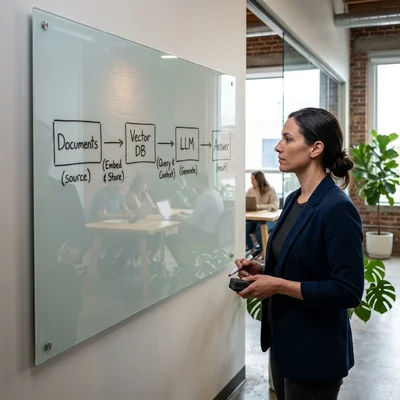
Definition in plain terms
Retrieval-Augmented Generation combines two stages:
- Retrieval - for the user's query, the system finds the most suitable text fragments in a corpus: wiki, PDFs, tickets, code, policies.
- Generation - the LLM receives the retrieved fragments as context and formulates an answer based on them.
The term became standard after Lewis et al. (2020) and quickly spread to enterprise chatbots, support systems, and internal assistants. RAG does not replace the model - it augments it with up-to-date data that was not in training or changed yesterday.
How RAG works: a typical pipeline
┌──────────┐    ┌─────────────┐    ┌──────────────┐    ┌─────────┐
│ Documents│───▶│ Chunking +  │───▶│ Vector DB    │    │         │
│ (PDF, MD)│    │ Embeddings  │    │ (index)      │    │   LLM   │
└──────────┘    └─────────────┘    └──────┬───────┘    │         │
                                          │            │         │
User query ──▶ Embedding ──▶ Top-K ──▶ Prompt + context ──▶ Answer
1. Data preparation (offline)
- Ingestion - parsing PDF, HTML, Markdown, Confluence, Notion, repositories.
- Chunking - splitting into 256-1024 token fragments with overlap so meaning is not cut at paragraph boundaries.
- Embedding - each chunk becomes a vector via an embedding model (OpenAI text-embedding-3, Cohere, open-source BGE, E5).
- Indexing - vectors stored in a vector store: Pinecone, Weaviate, Qdrant, pgvector, Chroma, Milvus.
This stage runs when documents are added or updated, not on every user query.
2. Query (online)
- The user's question is embedded with the same encoder.
- The vector DB returns Top-K nearest chunks (usually K = 3-10).
- Optionally - reranking: a second model reorders candidates for relevance more accurately than cosine similarity alone.
- Retrieved fragments go into the system/user prompt with an instruction to "answer only from context".
- The LLM generates the answer; citations to chunk id or source page are often added.
RAG quality is ~80% retrieval quality: if the right fragment is not in Top-K, the model either hallucinates or honestly says "I don't know".
Key components
| Component | Role | Examples |
|---|---|---|
| Embedding model | Text → vector for semantic search | text-embedding-3-large, bge-m3, voyage-3 |
| Vector database | Storage and fast ANN search | Qdrant, Pinecone, pgvector, Weaviate |
| Chunking strategy | Balance detail vs noise | Fixed size, semantic split, by headings |
| LLM | Final answer with reasoning | GPT-5.6, Claude Fable 5, Gemini 3.1, local models |
| Orchestrator | Pipeline glue, cache, logging | LangChain, LlamaIndex, Haystack, custom code |
In 2026 many frameworks (LlamaIndex, LangGraph) and products (Cursor @Codebase, Notion AI, Glean-like enterprise systems) implement RAG under the hood, but understanding the basic pipeline is needed for debugging and tuning.
Practical use cases
- Support and FAQ - answers from article base and past tickets without manual search.
- Internal wiki - "how to request leave", "where is the incident runbook".
- Legal and compliance - search contracts and policies with clause references.
- Code assistants - semantic repo search (file index + embeddings), complementing full context in the IDE.
- Document analytics - questions over reports, research, meeting transcripts.
Common pattern: large corpus, frequent updates, source citations needed - RAG fits better than a one-off file upload to chat.
RAG vs fine-tuning vs long context
| Approach | When it fits | Limitation |
|---|---|---|
| RAG | Fresh documents, transparent sources, updates without retraining | Depends on search quality |
| Fine-tuning | Style, format, domain terms, stable knowledge | Expensive to update when data changes |
| Long context | Whole document or codebase in one session | Cost, latency, "lost in the middle" |
These approaches are not mutually exclusive. A typical 2026 setup: RAG for corpus search + long context for a few full files + light fine-tuning or system prompt for company tone.
Limitations and common failures
RAG solves access to knowledge, but not:
- guaranteed factual accuracy (the model may ignore context)
- complex multi-step actions (tools / MCP needed)
- automatic index freshness (ETL required when documents change)
Typical failures:
- Bad chunking - table split in half, formula lost its heading.
- Wrong K - too few chunks → missed facts; too many → noise in the prompt.
- Stale index - document updated, embedding not recomputed.
- Hybrid search not configured - pure semantic search misses exact SKUs, IDs, dates; hybrid (BM25 + vectors) helps.
For production add: retrieval hit rate monitoring, A/B tests on chunk size, human feedback on answers, guardrails "if confidence is low - do not answer".
How to improve a RAG system
- Metadata - department tags, date, document version; filter before vector search.
- Hybrid search - keyword (BM25) + semantic; especially for technical docs.
- Reranker - cross-encoder after primary Top-20 → final Top-5.
- Query transformation - question rephrasing, multi-query, HyDE (hypothetical document).
- Graph RAG - for linked entities (people, projects, dependencies) on top of flat chunks.
- Evaluation - question/gold-answer dataset; faithfulness, context recall metrics (RAGAS, DeepEval).
Start with a simple pipeline (chunk → embed → Top-5 → GPT), measure baseline, then add complexity only where metrics improve.
RAG and the agent ecosystem
RAG often pairs with MCP and tool calling: RAG pulls knowledge from documents, tools perform actions (create ticket, query account balance). In Cursor, semantic @Codebase index is a RAG variant over project files; enterprise stacks scale the same pattern to Confluence, Slack, and CRM.
| Layer | Task |
|---|---|
| RAG | "What do the documents say?" |
| MCP / tools | "What is in the system now? Take action" |
| LLM | Synthesize answer and plan steps |
When RAG doesn't fit
RAG adds engineering complexity and needs upkeep, so it is not always worth adopting:
- Small, rarely changing knowledge base - just paste the text into the system prompt once; no search or vector DB needed.
- No resources to maintain the pipeline - the index must be updated whenever documents change and search quality must be monitored; without a dedicated team or vendor, the system goes stale fast and starts giving wrong answers.
- Guaranteed accuracy required - for calculations, legal wording, and other tasks where errors are unacceptable, deterministic systems and human review are more reliable than model generation.
- The task is about actions, not document search - creating a ticket, updating a record - RAG alone will not help; you need tools/MCP (see below).
Before starting, estimate the volume of documents, how often they change, and who will own the index - that is what determines whether RAG pays off or a simpler solution is enough.
Summary
RAG is the standard way to connect an LLM to your data without retraining: documents are indexed, relevant fragments are retrieved per query, the model answers grounded in them. The approach scales from a Chroma + OpenAI prototype to a cluster with hybrid search, reranking, and quality monitoring.
For a first project: pick one corpus (e.g. a 50-page FAQ), tune chunking and Top-K, measure whether the right paragraph lands in context - that is the main predictor of system success.
If you need help with development, AI implementation, or website support for your project - contact me.
Frequently asked questions
How is RAG different from fine-tuning?
Fine-tuning changes model weights on your examples - good for style, format, and stable patterns. RAG does not touch weights: each request pulls fresh fragments from the index. Documents that change weekly are easier to update via RAG (reindexing) than via retraining. Fine-tuning works when the model should "know" a procedure by heart without search; RAG when freshness and source citation matter.
Do I need RAG if the model has a million-token context?
Long context (1M+ tokens on Claude, Gemini, GPT-5.6) lets you load a lot of text in one session, but does not replace RAG for large corpora: a 100 GB PDF base will not fit in a prompt, and cost and latency grow linearly. RAG picks relevant pieces; long context suits a few full files after retrieval or current repo code in the IDE. In practice teams combine both.
Which vector database should I choose for RAG?
Depends on scale and infrastructure. pgvector - if you already have PostgreSQL and up to millions of vectors. Qdrant, Weaviate, Milvus - self-hosted or managed as you grow and need metadata filters. Pinecone - managed without cluster ops. Chroma - fast prototype start. What matters most is embedding quality, chunking, and monitoring; many production systems started on Chroma and migrated to pgvector or Qdrant without changing app logic.
Why does RAG sometimes give wrong answers?
Main causes: (1) retrieval miss - the right chunk was not in Top-K; (2) model ignored context and filled from "memory"; (3) stale index - the document already has a different number; (4) contradictory chunks - the model averaged them. Fix with better search (hybrid, reranker), strict prompts ("if not in context - say I don't know"), source citations, and an eval set for regressions.
Can I build RAG on local models?
Yes. Embedding models (bge-m3, nomic-embed) and LLMs (Llama, Qwen, Mistral via Ollama) run offline; the vector store can be local too. Limits - retrieval and generation quality on modest hardware; pick model size for your GPU/RAM. For confidential data (healthcare, finance, government) local RAG is common: documents stay in the perimeter, pipeline architecture matches the cloud.
Terms in this article
RAG — Retrieval-Augmented Generation
knowledge base — structured repository of answers/docs
pipeline — sequence of processing stages
production — live environment serving real users
retrieval — finding relevant context before generation
LLM — Large Language Model
Confluence — Atlassian wiki for team documentation
chunking — splitting documents into retrieval-friendly pieces
embedding — numeric vector that captures text meaning
overlap — shared tokens between adjacent chunks
vector store — database optimized for similarity search over embeddings
Pinecone — managed vector database for similarity search
pgvector — PostgreSQL extension for vector search
cosine similarity — score of how close two vectors point in the same direction
vector db — database for similarity search over embeddings
Qdrant — vector database for similarity search
reranking — reordering search results by relevance
Chroma — open-source embedding database for RAG apps
chunks — small text pieces indexed for retrieval
top-k — keep only the k most likely next tokens when sampling
semantic search — search by meaning, not exact keyword match
orchestrator — component that coordinates steps/services
LlamaIndex — framework for connecting LLMs to private data
LangChain — framework for building LLM applications
ANN — Approximate Nearest Neighbor
glue — integration layer that connects systems without owning business logic
fine-tuning — additional training of a model on domain data
long context — model that can take a very large prompt in one go
runbook — step-by-step playbook for incidents and operations
system prompt — hidden instructions that steer the model for a task
hybrid search — keyword plus vector search together
latency — delay before a response arrives
vector search — finding nearest neighbors in embedding space
cross-encoder — rerank model that scores query and document together
guardrails — rules and filters that keep AI outputs safe and on-policy
faithfulness — how well an answer sticks to the retrieved sources
hit rate — share of requests served from cache
tool calling — model invoking external tools or APIs
reranker — model that reorders search hits by relevance
baseline — reference measurement before changes
human review — manual check by a person
MCP — Model Context Protocol
CRM — Customer Relationship Management
self-hosted — software you run on your own servers
GPU — Graphics Processing Unit