PHP and Your Website: What It Is If You Run WordPress, Bitrix, or OpenCart

PHP is the language behind most websites on the internet. If you use WordPress, 1C-Bitrix, or OpenCart, PHP is the engine under the hood: it assembles the page, talks to the database, handles forms and the shopping cart. You do not need to learn PHP as a business owner, but understanding its role means you will not overpay for maintenance, you will update hosting on time, and you can tell "install a plugin" apart from "write code". Below is what PHP means in the context of three popular CMS platforms, how they differ, and when you need a developer.
- PHP - server-side language: code runs on hosting, the user sees finished HTML
- WordPress - blog and corporate site on PHP + MySQL, plugin ecosystem
- 1C-Bitrix - PHP business CMS for the Russian market, 1C integration
- OpenCart - PHP store with catalog, cart, and payments
- Main risk - outdated PHP version, unpatched plugins, and undocumented custom code
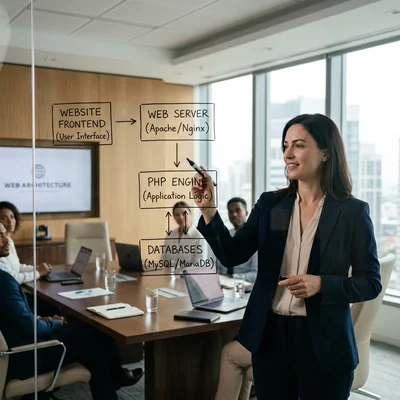
PHP in Plain Language
PHP (Hypertext Preprocessor) is a programming language for the web. It runs on the server, not in the user's browser. The flow is simple:
- The user opens a URL.
- The server (Apache or Nginx + PHP) runs the PHP script.
- The script reads data from MySQL/PostgreSQL and injects it into a template.
- The browser receives a finished HTML page.
PHP does not replace HTML (markup) or JavaScript (browser interactivity). It is the layer of logic and data: authentication, cart, catalog filters, email sending, CRM integration.
| Technology | Where it runs | Role |
|---|---|---|
| HTML/CSS | Browser | Layout and appearance |
| JavaScript | Browser | Sliders, form validation, SPA |
| PHP | Server | Business logic, DB, API |
| MySQL | Server | Content, orders, users |
Important: if hosting shows "PHP 7.4" or "PHP 8.2", that is the engine version. Outdated PHP is a security hole and a common reason plugins break after a CMS update.
How PHP Connects to Your Website
Any PHP CMS is a set of ready-made PHP files plus your data in the database:
- CMS core - WordPress, Bitrix, or OpenCart code (updated by platform developers).
- Theme (template) - PHP/HTML/CSS for design.
- Plugins/modules - extra PHP code: SEO, forms, payments, shipping.
- Custom code - edits in
functions.php, custom modules, 1C or API integrations.
When you change text in the admin panel, PHP fetches it from the DB on the next request. When a customer places an order, PHP creates a record, sends email, and calls the payment gateway.
Without PHP, these CMS platforms do not work. Even a "WordPress builder" with Elementor still generates pages through PHP on the server.
WordPress: PHP Under the Hood
WordPress is the most widespread CMS in the world (~40%+ of sites). Written in PHP, database is usually MySQL or MariaDB.
What PHP does in WordPress:
- URL routing (
/blog/,/product/,/page/2/); - post loop, categories, tags, media library;
- plugins: WooCommerce, Contact Form 7, Yoast SEO, cache;
- REST API and cron jobs (newsletters, backups).
Typical stack: PHP 8.0+, MySQL 5.7+/8.0, Nginx or Apache, Redis/Memcached for cache.
Pros for business: fast start, thousands of plugins, low barrier for content managers.
Cons: as logic grows (complex e-commerce, integrations, roles), PHP code spreads across plugins and technical debt grows. When WordPress hits its ceiling, see migration from WordPress/PHP to Django/Python.
When you need a PHP developer on WordPress: custom theme, non-standard WooCommerce, ERP integration, speed optimization, plugin conflict fixes.
1C-Bitrix: PHP for Business Websites
1C-Bitrix is a CMS popular in Russia and the CIS for corporate sites, intranet, and online stores. Also PHP + MySQL, but architecture and licensing differ.
What PHP does in Bitrix:
- "Information blocks" module (catalog, news, services);
- online store: cart, discounts, payment, delivery;
- 1C integration (products, stock, orders);
- access rights, workflow, corporate portal.
Typical stack: PHP 8.1+, MySQL, Bitrix Framework, often Bitrix24 for CRM.
Pros: ready modules for the Russian market (1C, EDI, legal entities), enterprise features out of the box.
Cons: license and customization costs are higher than WordPress; customization needs a certified or experienced Bitrix developer; closed core code is harder to move to another stack.
When you need a PHP developer on Bitrix: design template, catalog customization, 1C exchange, non-standard discounts, high load.
OpenCart: PHP for Online Stores
OpenCart is an open-source CMS for e-commerce only. Lighter than Bitrix, simpler than WooCommerce in basic setup, popular with small and mid-size e-commerce.
What PHP does in OpenCart:
- catalog, attributes, filters, product variants;
- cart, checkout, order statuses;
- payment modules (Robokassa, Stripe, PayPal) and shipping;
- multi-currency, multi-language, API.
Typical stack: PHP 7.4-8.2, MySQL, OpenCart 3.x / 4.x.
Pros: focused on stores, clear structure for PHP developers, no extra "blog" features.
Cons: weaker enterprise integrations out of the box than Bitrix; complex B2B and marketplaces often hit custom limits; security depends on updates and marketplace modules.
When you need a PHP developer on OpenCart: custom checkout, warehouse integration, marketplace sync, migration from OpenCart 3 to 4.
Comparison: WordPress vs Bitrix vs OpenCart
| Criterion | WordPress | 1C-Bitrix | OpenCart |
|---|---|---|---|
| Main use case | Blog, landing, light store | Corporate site, RU e-commerce | Online store |
| Language | PHP | PHP | PHP |
| Database | MySQL | MySQL | MySQL |
| License | Open source (GPL) | Commercial | Open source |
| 1C integration | Via modules | Native | Via customization |
| Entry barrier | Low | Medium | Medium |
| Customization budget | $500 - $15,000 | $2,000 - $50,000+ | $1,000 - $20,000 |
| Growth to custom backend | Django/Python | Full rewrite | Full rewrite |
Takeaway: all three are PHP CMS platforms. The choice is not "PHP or not PHP" but which CMS fits your market, budget, and integrations.
PHP Versions and Hosting
PHP is updated every year. Support for old versions ends - no security patches.
| PHP version | Status (2026) | WordPress | Bitrix | OpenCart |
|---|---|---|---|---|
| 7.4 | EOL, do not use | - | - | outdated |
| 8.0 | EOL | minimum | - | - |
| 8.1 | security fixes | OK | OK | OK |
| 8.2 | active | recommended | recommended | OK |
| 8.3 | active | OK | check modules | OK |
On shared hosting, switch PHP version in the panel (cPanel, ISPmanager). On VPS - php-fpm package + Nginx. Before upgrading from 7.x to 8.x - use staging and test all plugins: incompatible code is a common cause of the "white screen".
Symptoms of outdated PHP: warnings in CMS admin, plugins won't install, site breaks after hosting update.
When You Need a PHP Developer
Not every task needs a programmer. The split is simple:
| Task | Who does it |
|---|---|
| Text, photos, menus | Content manager |
| Install plugin from catalog | Webmaster / integrator |
| Layout in theme | Frontend + PHP (templates) |
| 1C, CRM, API integration | PHP developer |
| Fix "broke after update" | PHP developer |
| Speed optimization under load | PHP + DevOps |
| Move to Django/Python | Backend team |
Signs you cannot do without a PHP developer:
- "Just a small tweak" - and a list of 15 business logic items;
- plugins conflict and there is no alternative;
- orders or payments fail under load;
- code was edited by "someone who left three years ago".
Security and Updates
PHP CMS platforms are vulnerable not "because PHP is bad" but because of lots of third-party code (plugins, nulled themes):
- Update CMS core - within 1-2 weeks of a security patch release.
- Update PHP to a supported version.
- Remove unused plugins - each is a potential hole.
- Backups - files + DB daily, test restore once a quarter.
- WAF and HTTPS - minimum for a store with payments.
WordPress with 30 plugins and PHP 7.4 on cheap hosting is a typical hack scenario. Bitrix and OpenCart suffer from outdated marketplace modules.
When a PHP CMS Is Not the Right Choice
PHP and ready-made CMS platforms cover most business needs, but not every one:
- A brochure site with no catalog, forms, or database - a simple static landing page is enough; a full CMS adds unnecessary maintenance cost.
- A product with real-time load and logic (market data, streaming, heavy on-the-fly computation) - PHP CMS platforms are not built for this; you need a separate backend.
- A mobile app as the main product, with the website secondary - a CMS gives you a storefront and content, but it will not replace native or cross-platform app development.
- You already know the logic will be unique and extensive from day one (non-standard roles, workflows, dozens of integrations) - a ready-made CMS will slow development down more than it helps; it makes more sense to design a custom backend from the start.
In these cases, a PHP CMS is not a wrong choice - it is simply the wrong tool: savings at the start usually turn into a more expensive rebuild later.
Summary
If you run WordPress, Bitrix, or OpenCart - you have a PHP site. PHP is the server language that connects template, database, and business logic. You do not need to write code, but you should:
- keep current PHP and CMS versions;
- know where "admin settings" ends and development begins;
- pick CMS for the job: content (WordPress), RU enterprise (Bitrix), pure store (OpenCart).
When a PHP CMS hits its ceiling, the logical next step is a custom backend on Django/Python, not endless plugin patches.
If you need help with development, AI implementation, or website support for your project - contact me.
Frequently Asked Questions
Can I run WordPress, Bitrix, or OpenCart without knowing PHP?
Yes, for day-to-day work. Publishing posts, products, promos, changing banners, basic module settings - that is the CMS admin, no PHP needed. PHP is needed for custom logic: non-standard discounts, 1C or CRM integration, fixing errors after updates, moving to new hosting. It makes sense to have a contractor or in-house developer on call rather than learning PHP yourself.
Which PHP version do WordPress, Bitrix, and OpenCart need?
For 2026, aim for PHP 8.1 or 8.2. WordPress officially supports 8.x; for Bitrix and OpenCart - check your version and installed modules. PHP 7.4 and below - do not use: no security patches, higher hack risk. Before changing the version on hosting, make a staging copy and run key flows: home, catalog, cart, payment, lead form.
How is PHP different from HTML and JavaScript?
HTML describes page structure (headings, blocks, links). JavaScript runs in the browser: animations, sliders, dynamic loading without reload. PHP runs on the server before the page is sent: fetches products from the database, checks login, calculates cart total, sends email. Users never see PHP code - only the result in HTML. All three technologies complement each other; none replaces the others.
Do I need to change PHP when redesigning the site?
Usually no. A redesign is a new theme (template): HTML, CSS, sometimes a little PHP for blocks. The PHP version on hosting stays the same. Exception: an old theme written for PHP 7.x uses deprecated functions - then when moving to PHP 8.x a new theme or fixes are required. For Bitrix/OpenCart redesign, budget for template adaptation, not "changing the language".
When is it time to leave a PHP CMS for Django/Python or another stack?
Signals: business logic no longer fits in plugins; 10+ integrations with workarounds; site is slow after optimizations; you need API, mobile app, complex roles; security and audit require code control. WordPress to Django is a typical path for growing e-commerce and SaaS - see the migration article. Bitrix and OpenCart are more often rewritten entirely than "migrated with a button". Payback is 12-36 months with higher conversion and lower plugin maintenance costs.
Terms in this article
OpenCart — open-source PHP e-commerce platform
plugin — installable extension module
server-side — logic that runs on the server, not in the browser
CMS — Content Management System
CRM — Customer Relationship Management
SPA — Single Page Application
contact form — web form for inbound messages
Yoast SEO — WordPress plugin for on-page SEO checks and sitemaps
REST API — HTTP API that exposes resources via URLs and verbs
technical debt — shortcuts in code that cost extra work later
Memcached — in-memory key-value cache for fast lookups
ERP — Enterprise Resource Planning
Bitrix24 — suite with CRM, tasks, chat, and site tools
open-source — software with publicly available source code
e-commerce — online selling of goods or services
B2B — Business to Business
backend — server-side logic, APIs and data layer
staging — pre-production environment for final checks
EOL — end of life / end of support
VPS — Virtual Private Server
frontend — client-side UI of a site or app
DevOps — Development and Operations
landing page — page built for a single conversion goal
restore — recover data from backup/snapshot
real-time — processed with minimal delay
storefront — customer-facing shop UI
WAF — Web Application Firewall
in-house — done by the company's own team
SaaS — Software as a Service