VPS or Shared Hosting: What an Online Store Owner Should Choose

Shared hosting is like "a room in a dormitory": your site shares a server with hundreds of neighbors, and the provider updates PHP and handles basic security. VPS (virtual private server) is like "your own apartment": you get a guaranteed slice of CPU, RAM, and disk, but you or your contractor usually manage the OS, updates, and backups. For WordPress/WooCommerce, OpenCart, and Bitrix, the choice affects checkout speed, stability during sale seasons, and how many orders you lose when a shared "neighbor" overloads the server.
- Shared - cheap ($3-15/mo), fast start, little control, risk of "noisy neighbors"
- VPS - from $5-40+/mo, predictable resources, needs an admin or DevOps
- Critical for stores - SSL, MySQL backups, PHP 8.x, cron, transactional email
- Shared is enough - up to ~500 orders/mo, light catalog, one site
- VPS is needed - heavy WooCommerce, integrations, traffic spikes, multiple projects
- Main mistake - saving on hosting and losing conversion because of a slow cart
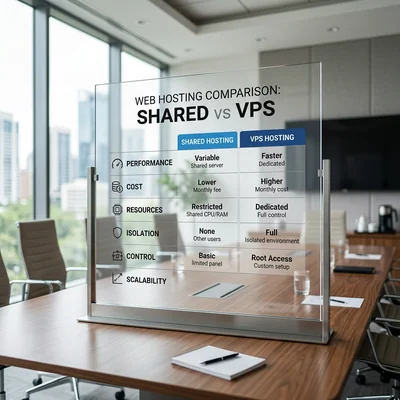
What Shared Hosting and VPS Are
Shared hosting
On shared hosting, one physical server serves many clients. The provider gives you:
- a panel (cPanel, ISPmanager, Plesk);
- ready-made PHP, MySQL, email;
- one-click WordPress install;
- support for typical questions.
You do not choose the Linux kernel version and cannot install arbitrary software - only what the plan allows. Resources are limited: CPU, RAM, PHP process count, database size, inodes (file count).
VPS
A VPS is a virtual machine with a guaranteed share of resources. You usually get root access or a managed panel. You can:
- run your own stack (Django, Node.js, Redis);
- tune nginx + php-fpm for WooCommerce;
- isolate staging and production;
- scale RAM/CPU without changing the domain.
The price story "VPS is cheaper than shared" is misleading: add administration, monitoring, backups, and sometimes separate managed MySQL.
Comparison for an Online Store
| Criterion | Shared | VPS |
|---|---|---|
| Starting price | $3-15/mo | $5-40+/mo |
| Checkout speed | Depends on neighbors | More stable when tuned well |
| Black Friday peak | Often throttling | RAM can be added in advance |
| Security | Basic from provider | Your responsibility + hardening |
| DB backups | Often daily, 7-14 days | You configure or buy managed |
| SSL | Let's Encrypt in panel | Let's Encrypt / Cloudflare |
| Order email | Shared SMTP often hits spam | Your SMTP / SendGrid / Mailgun |
| Migration | Easier "one-click move" | MySQL dump + rsync + DNS |
| When it breaks | Open a support ticket | You or your contractor |
Owner takeaway: shared is renting a ready kitchen; VPS is your own kitchen on your responsibility.
When Shared Hosting Is Enough
Shared makes sense if:
- up to 300-500 orders per month and a catalog up to 5-10K SKUs without heavy filters;
- one site per account, no "zoo" of 15 PHP projects;
- standard WordPress + WooCommerce or OpenCart without custom integrations;
- no PCI requirements beyond redirect to a payment gateway;
- minimal IT budget, only a contractor for tweaks.
Signs of good shared for a store:
- PHP 8.1+, MySQL 8.0 / MariaDB 10.6+;
- daily backups with downloadable
.sql; - limits that are not "512 MB RAM for the whole account" but adequate for WooCommerce;
- cron every minute or at least every 5 minutes;
- Redis/Memcached on higher plans - a plus.
When You Need VPS (or Cloud)
Moving to VPS is justified if:
| Symptom | Why shared fails |
|---|---|
| Cart loads in 4-8 sec | Low RAM, slow disk, neighbors |
| 502/504 in peaks | PHP worker limit exhausted |
| Database > 2-5 GB | Shared throttles or slows queries |
| Need Redis, Elasticsearch, queues | Not on cheap shared |
| Several sites / staging | Isolation and predictability |
| Strict security requirements | Your firewall, WAF, audit log |
| 1C, CRM, webhooks 24/7 | Stable cron and API |
Rule of thumb: if site revenue is $5,000+/mo and checkout is slow, saving $20/mo on shared costs more than a $40 VPS and 2-4 hours of contractor setup.
Hidden Costs of Both Options
Shared
- "Unlimited" traffic - often with fair use policy;
- Paid backups and restore "from yesterday";
- Paid SSL on old plans (rare, but happens);
- Poor email delivery - SendGrid/Mailgun needed ($15-50/mo);
- Paid migration when moving to another provider.
VPS
- Administration - $50-200/mo or one-time setup $200-800;
- managed MySQL, snapshot backups, monitoring;
- DDoS protection and CDN (Cloudflare Pro, etc.);
- Panel licenses (cPanel on VPS is expensive);
- Time for updates - missed security patch = risk of order data leak.
Calculate TCO (total cost), not only the "Hosting" line in Excel.
How to Choose a Provider: Owner Checklist
- Server location - closer to your main audience (EU, US, CIS).
- SLA uptime - 99.9% desirable for a store; read fine print on "scheduled maintenance".
- Backups - automatic, 14-30 day retention, test restore once a quarter.
- Support - response time, languages, do they help with MySQL or only "reboot"?
- Scaling - can you add RAM without changing IP and long downtime?
- Reputation - reviews specifically for WooCommerce/OpenCart, not only landing pages.
- Exit - DB dump and file export without lock-in.
Do not pick hosting only by lowest first-year price - check renewal and limits.
Migrating from Shared to VPS Without Losing Orders
Typical safe scenario:
- Full backup - files + MySQL dump on old hosting.
- Staging on VPS - deploy copy, test checkout, payment in test mode.
- DNS TTL sync - lower TTL to 300 sec in advance.
- Final dump in a low-traffic window (night).
- Switch A record - monitor errors for 24-48 hours.
- Verify - test order, emails, payment webhook, cron.
Do not migrate on the first day of a sale. Do not copy FTP only without the database - orders stay on the old server.
More on store data in the MySQL article. If your contractor claims "it will just work on VPS" without upgrading an outdated PHP version - treat that as a red flag and ask for the migration plan.
Managed VPS and Cloud: A Third Path
Between shared and "bare" VPS there is managed WordPress / managed cloud (Cloudways, Kinsta, some plans from regional providers):
- provider handles updates and cache;
- you pay more than shared but spend less time on admin;
- CDN, staging, backups often included.
For a store with $10,000+/mo turnover, managed is often cheaper than bare VPS + freelance support.
Summary
Shared is the right start for a small online store with a familiar CMS and moderate traffic. VPS is when you hit limits, need peak stability, custom backend, or several environments. Decide not by plan name but by metrics: checkout load time, cart abandonment, 5xx rate in logs, database size, and 12-month growth plan.
Good hosting is invisible - bad hosting shows up in lost orders and "your site is down" emails during the season.
If you need help with development, AI implementation, or website support for your project - contact me.
Frequently Asked Questions
Can I start on shared and move to VPS later?
Yes, most people do. Launch on shared, watch metrics. When orders grow or speed drops, order VPS, set up staging, move files + MySQL dump, switch DNS. Main points - do not skip backups and do not lock the business into hosting without database export.
Is VPS always faster than shared?
No. An empty or poorly tuned $5 VPS can be slower than good shared with NVMe and Redis. Speed comes from: enough RAM, fast disk, php-fpm/opcache, page cache, CDN for static assets. On VPS you can tune this; on shared - only pick a higher plan and cache plugins.
How do I know shared no longer handles my store?
Signals: checkout over 3 sec, regular 503 in peaks, provider emails about CPU overuse, database near limit, support says "optimize plugins" instead of fixing the issue. Enable monitoring (UptimeRobot, Google PageSpeed) and watch Core Web Vitals - rising LCP often matches hosting limits.
Do I need a separate database server?
Not at the start. WooCommerce on one VPS with MySQL on the same disk is fine for a medium store. A separate DB server makes sense with a large database, heavy reporting, and high write load - usually cloud (RDS, managed MySQL), not "another manual VPS".
Who administers VPS if I have no developer?
Three options: managed VPS (provider or Cloudways/Kinsta), contractor retainer ($50-200/mo), or stay on high-tier shared with SLA. "Bare" VPS without an admin is risky: missed updates, open ports, no backups. For a store owner without an IT team, managed is often cheaper than risk than saving on the plan.
Terms in this article
OpenCart — open-source PHP e-commerce platform
DevOps — Development and Operations
production — live environment serving real users
staging — pre-production environment for final checks
Black Friday — peak retail shopping day
Let's Encrypt — free automated TLS certificate authority
hardening — security baseline: updates, least privilege, locked configs
PCI — Payment Card Industry
Memcached — in-memory key-value cache for fast lookups
audit log — chronologically recorded trail of who did what
worker — background job processor
webhooks — HTTP callbacks when events happen
WAF — Web Application Firewall
CRM — Customer Relationship Management
restore — recover data from backup/snapshot
snapshot — point-in-time copy of state
landing pages — pages built for conversion goals
DDoS — Distributed Denial of Service
retention — keeping users/customers over time
CDN — Content Delivery Network
TCO — Total Cost of Ownership
uptime — share of time a service stays available
downtime — period when the service is unavailable
SLA — Service Level Agreement
lock-in — hard to leave a vendor or stack without costly rewrite
backup — copy kept for recovery
FTP — File Transfer Protocol
backend — server-side logic, APIs and data layer
Core Web Vitals — Google metrics for loading, interactivity, and visual stability
CMS — Content Management System
managed VPS — VPS where the provider handles OS updates and basics
retainer — fixed monthly fee for ongoing support
LCP — Largest Contentful Paint