Linux for Business: Why Your Website Needs a "Linux Server," Not "Just Hosting"
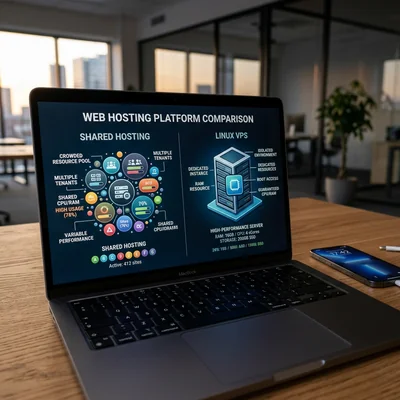
"Just hosting" is a provider plan: you pay $5-30 per month, click "Install WordPress," and your site runs on someone else's server alongside hundreds of other clients. A Linux server (VPS, cloud VM, dedicated server) is your virtual machine with the Linux operating system, where you (or your contractor) decide which software is installed, how backups, SSL, and load limits are configured. For a business owner, the difference is not "love for the penguin" but control, scale, and responsibility: when shared hosting stops being enough and a move to Linux is postponed "until better times," the site goes down during peak sales and recovery costs more than a year of VPS.
- Shared hosting - cheap start for WordPress, landing pages, blogs; minimal setup, maximum limits
- Linux VPS - from $10-50/mo: your own IP, root access, MySQL, Nginx, cron, Docker
- When hosting is enough - up to 5,000-10,000 visits/day, simple catalog, no heavy integrations
- When you need a Linux server - custom backend, Django/Python, API, queues, multiple sites, strict SLAs
- Main advantage of Linux - flexibility and predictable cost as you grow; open-source stack without Windows licenses
- Main risk - without an admin or managed service, you are responsible for updates, backups, and security
"Just Hosting" vs "Linux Server" - What Is the Difference
Shared hosting means the provider gives you a panel (cPanel, ISPmanager, Plesk), disk space, and CPU/RAM limits. Dozens or hundreds of sites share one physical server. You do not see the operating system: you cannot install an arbitrary PHP version, your own Redis, or a separate worker for background jobs without provider approval.
Linux VPS/VDS is a virtual server with Ubuntu, Debian, AlmaLinux, or similar. You have root (full access), your own IP, firewall, and you install Nginx or Apache, PostgreSQL or MySQL, Python, Node.js, Docker yourself. The provider handles hardware and the hypervisor; everything inside the OS is the client's or contractor's responsibility.
Dedicated server - an entire machine in a datacenter. Needed at very high load or under strict regulatory requirements; mid-size businesses usually start with VPS and scale up.
| Criterion | Shared hosting | Linux VPS | Dedicated |
|---|---|---|---|
| Starting price | $3-15/mo | $10-80/mo | $80-500+/mo |
| Control | Minimal | Full (root) | Full |
| Server neighbors | Many sites | Only your VMs | None |
| Typical stack | PHP + MySQL, WordPress | Anything: PHP, Python, Go, Docker | Same, more resources |
| Who administers | Provider (partially) | You or contractor | You or contractor |
| Scaling up | Plan change, often migration | More RAM/CPU in panel | New hardware |
Important: "Linux server" in contractor conversations often means a cloud VPS (Hetzner, DigitalOcean, AWS, Yandex Cloud) - not necessarily a rack in your office.
Why Linux Is So Often Chosen for the Web
Linux is a family of free (open-source) server operating systems. For a site owner this means:
- No OS license fee - unlike Windows Server, where licensing adds $50-200+/mo to the bill.
- Industry standard - Nginx, Apache, PHP, MySQL, PostgreSQL, Redis, Docker, Kubernetes are built for Linux; more documentation and specialists.
- Stability and uptime - servers can run for months without reboots with proper administration.
- Security - with regular updates and closed unnecessary ports, Linux is not "magically safer" than Windows, but easier to automate patches and monitoring in the cloud.
Windows Server makes sense when the stack is already Microsoft: ASP.NET, MS SQL, Active Directory, 1C on Windows. For a typical e-commerce site, Django site, or Node.js API, Linux is almost always cheaper and more familiar to developers.
When "Just Hosting" Is the Right Choice
Not every business needs its own server. Shared hosting is logical when:
- Site on WordPress, Tilda, or a builder - content, blog, lead form, catalog up to 1,000-3,000 products without heavy customization.
- Moderate traffic - up to a few thousand visits per day without sharp peaks (ads at prime time).
- No in-house development - an agency updates via admin panel, not Git and CI/CD.
- Minimal IT budget - $10-30/mo total, no "server administration" line item.
- Data not critical at infrastructure level for GDPR-style rules - standard hoster contract is enough (check with legal for your industry).
Signals hosting still works: site loads in 1-3 seconds, orders go through, hoster support answers tickets, you are not denied "non-standard" setup more than once a year.
When It Is Time for VPS or Linux Cloud
Moving to your own Linux server (or managed Kubernetes later) becomes economically and technically justified when:
Performance and limits
- Hoster throttles CPU or reports "process limit exceeded" at peak hours.
- Catalog 50,000+ SKUs, complex search, price imports - shared cannot cope.
- You need Redis, Elasticsearch, separate worker for order queue or mailings.
Custom development
- Backend on Django/Python, FastAPI, Laravel with non-standard modules.
- REST/GraphQL API for mobile app, marketplace, partner portal.
- Microservices or Docker containers - unavailable on typical shared hosting.
Security and isolation
- Other sites on the same server; one compromised neighbor can theoretically threaten others (rare, but few guarantees in the contract).
- You need a dedicated IP, your own WAF, strict firewall for PCI DSS or internal policies.
- Multiple environments: dev, staging, production - cheaper on one VPS than three hosting accounts.
Integrations and automation
- Cron every minute, webhook server, sync with ERP/CRM without hacks via external services.
- CI/CD - deploy from Git on every commit; SSH and long processes are often forbidden on shared.
| Symptom | What the owner does | Typical solution |
|---|---|---|
| "Site slows down in the evening" | Check metrics, talk to hoster | VPS 2-4 GB RAM, Nginx + PHP-FPM or Gunicorn |
| "Need Python, hoster is PHP only" | Do not rewrite everything in PHP "for the plan" | VPS with Ubuntu + Django + PostgreSQL |
| "One hoster outage - no sales" | Demand SLA or leave | VPS + backup in another DC, monitoring |
| "Contractor asks for root" | Normal for a serious project | VPS or managed cloud, admin contract |
What Runs on a Typical Business Linux Server
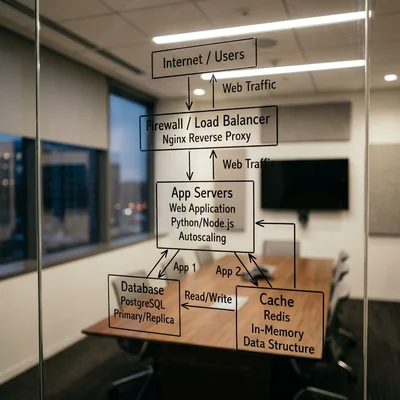
Simplified scheme without diving into the terminal:
Internet → DNS → Nginx (web server, SSL)
                    ↓
              PHP-FPM / Gunicorn (application)
                    ↓
              MySQL or PostgreSQL (data)
                    ↓
              Redis (cache, optional)
- Nginx - accepts HTTPS requests, serves static (HTML, CSS, JS), proxies dynamic traffic to the app.
- Database - orders, users, products; scheduled
.sqlbackup to another disk or S3-compatible storage. - Let's Encrypt - free SSL certificates; on a well-configured VPS they renew automatically.
- fail2ban / firewall - blocks SSH brute force and unnecessary ports.
The owner does not need to configure all of this - but should require documentation from the contractor: which services, where backups are, who gets the alert at 3 a.m.
How Much a Linux Server Costs for Business
2026 ballpark figures (vary by region and provider):
| Level | Configuration | For what | Budget/mo |
|---|---|---|---|
| Starter VPS | 1-2 vCPU, 2 GB RAM, 40 GB SSD | Landing, small WordPress, test | $10-20 |
| Production | 2-4 vCPU, 4-8 GB RAM, 80 GB SSD | E-commerce, Django, API | $25-60 |
| High load | 4-8 vCPU, 16+ GB RAM | Traffic peaks, heavy reports | $80-200+ |
| Managed DB | Cloud MySQL/PostgreSQL | Separate from app | +$15-100 |
Hidden budget lines:
- Administration - $50-300/mo from freelancer or agency (patches, monitoring, recovery).
- Off-site backups - $5-30/mo for object storage.
- CDN and DDoS protection - from $0 (basic Cloudflare) to hundreds for large stores.
Compare 3 years: shared $20/mo = $720 without admin; VPS $40 + admin $100 = $5,040 - but you get control you cannot buy on shared. The mistake is taking a $5 VPS and not paying for monitoring: savings turn into downtime.
Managed VPS vs "Bare" Server: What Owners Should Choose
| Option | Essence | Pros | Cons |
|---|---|---|---|
| Shared hosting | All-in-one plan | Cheap, simple | Growth ceiling |
| Unmanaged VPS | VM and network only | Cheap, flexible | Admin needed |
| Managed VPS | Provider installs OS, sometimes panel | Less pain | More expensive, not everything allowed |
| PaaS (Railway, Render, Heroku-like) | Deploy from Git | Fast SaaS start | Costlier at scale, lock-in |
| Kubernetes | Container orchestration | For large teams | Overkill for landing page |
Practical advice: if you have no in-house DevOps, choose managed VPS from a provider with good support or a contractor contract: "server + 5 admin hours per month + SLA recovery within N hours."
What Owners Should Control (Without Knowing Linux)
Access
- Who has SSH/root? A list of 2-3 names, not "all developers forever."
- Contractor left - key and password rotation the same day.
- Two-factor authentication in cloud panel (AWS, Hetzner, Yandex).
Backups
- Daily - database and files; copy not on the same disk as production.
- Quarterly - test restore (bring up site copy on staging).
- RPO/RTO in contract: how much data can be lost and how many hours of downtime are acceptable.
Updates and security
- OS security auto-updates - enabled or monthly schedule.
- Ports closed except 80/443 and SSH restricted by IP (if possible).
- SSL valid, does not expire unnoticed (monitoring).
Monitoring
- Alert if site unavailable for 5 minutes (UptimeRobot, Better Stack, cloud built-in).
- Disk 85%+ full - time to clean logs or expand volume.
When a Linux Server Is Overkill
Honest list to avoid overpaying for "serious infrastructure":
| Situation | Why hosting or SaaS is enough | Alternative |
|---|---|---|
| Landing on Tilda, Webflow | Hosting is on the platform | Platform plan |
| WordPress blog without store | Shared + cache plugin | Hosting $5-15 |
| MVP testing hypothesis 3 months | Speed beats architecture | Shared or PaaS |
| No admin budget | VPS without admin is risky | Managed WordPress hosting |
| Full Microsoft stack | Linux not needed for .NET+MS SQL | Windows Server / Azure |
Opposite case: you plan migration from WordPress to Django, marketplace, or mobile app with API - budget for a Linux server (or cloud equivalent) in the spec from day one, not "we will move from hosting over the weekend later."
Linux, Data, and the Big Picture
The server is not the goal but the place where code and database run. Business logic is the same: order must reach CRM, email must reach customer, stock must decrease. Linux gives where to run it cheaply and flexibly; SQL and app architecture decide how data is not lost.
Typical growth path:
- Landing on builder or shared WordPress.
- E-commerce on hosting, slowdowns in season.
- Linux VPS, same WordPress + Redis + CDN.
- Rewrite to Django/custom - same VPS or cloud, separate DB.
- Multiple servers, load balancer, managed PostgreSQL.
At steps 3-5 Linux is the standard base; the debate is usually not "Linux or not" but which provider, who administers, and where backups live.
Summary
"Just hosting" is the right start for a simple site and low traffic. A Linux server is needed when you hit limits, custom development, integrations, security, or SLAs - and are ready to pay for VM and administration (in-house or outsourced).
Owners should:
- not push VPS "for growth" for a static landing - shared or builder is cheaper;
- not stay on shared when the contractor has spent three months "optimizing" slowness - calculate Linux migration;
- demand backups, monitoring, and access list as strictly as the development estimate;
- choose managed or contractor with SLA if there is no in-house DevOps.
A good Linux server for business is invisible - fast site, green SSL, recovery after failure tested for real. A bad one - paying for VPS for years while the last working backup is three months old and sits on the same disk as production.
Current guides on service pricing - on the pricing page.
If you need help with development, AI implementation, or website support for your project - contact me.
Frequently Asked Questions
Can we skip Linux if the site is on WordPress?
Yes, often. WordPress historically lives on shared hosting with PHP and MySQL - the provider runs Linux "under the hood," you do not need root. Your own Linux VPS is needed when resources are insufficient, you need Redis, non-standard PHP, multiple environments, or strict isolation. For a blog and catalog up to a few thousand visits per day, a separate server is not mandatory.
How is a Linux VPS different from regular hosting?
Hosting is a shared "apartment": CPU, RAM limits, you cannot install anything, neighbors on the server. VPS is a separate "room" with guaranteed resource share and root access: you choose OS (Linux), web server, PHP/Python versions, cron, firewall. Price is higher; responsibility for updates and backups is on you or your contractor, not only on "abstract support."
Do we need a Linux server for an online store?
Depends on scale and engine. Small WooCommerce on shared often starts fine. With tens of thousands of products, heavy imports, ERP integration, custom discounts, and ad peaks, Linux VPS (or managed cloud) is usually better than fighting hoster limits. Custom store on Django/Python - almost always own server, not shared.
How much does a Linux server cost for a company without an IT department?
Minimum - $15-40/mo for VPS 2-4 GB RAM plus $50-150/mo for contractor administration (patches, backups, monitoring). Total $65-190/mo is a realistic range for a working store or API. Saving only on VPS without admin is risky: one open port or full disk without alert = sales downtime.
Who should administer Linux if the developer "only writes code"?
A separate role - DevOps, sysadmin, or agency with "infrastructure" in the contract. A developer can deploy the app, but backups, firewall, OS updates, SSL, disk monitoring are better owned by someone with SLA. Option for small business - managed VPS from provider or managed WordPress/cloud PaaS where some tasks are handled for extra fee.
Terms in this article
VPS — Virtual Private Server
landing pages — pages built for conversion goals
backend — server-side logic, APIs and data layer
open-source — software with publicly available source code
worker — background job processor
VDS — Virtual Dedicated Server
uptime — share of time a service stays available
Active Directory — Microsoft directory for users, groups, and access policies
e-commerce — online selling of goods or services
Tilda — block-based website and landing page builder
in-house — done by the company's own team
CI/CD — Continuous Integration / Continuous Delivery
FastAPI — modern Python framework for APIs
GraphQL — query language for APIs with a typed schema
PCI DSS — Payment Card Industry Data Security Standard
production — live environment serving real users
staging — pre-production environment for final checks
webhook — HTTP callback when an event happens
WAF — Web Application Firewall
ERP — Enterprise Resource Planning
CRM — Customer Relationship Management
PHP-FPM — PHP FastCGI Process Manager for serving PHP apps
backup — copy kept for recovery
SLA — Service Level Agreement
Let's Encrypt — free automated TLS certificate authority
off-site — SEO signals from other sites (links, mentions)
CDN — Content Delivery Network
DDoS — Distributed Denial of Service
downtime — period when the service is unavailable
unmanaged VPS — VPS where you fully manage the OS and stack yourself
managed VPS — VPS where the provider handles OS updates and basics
orchestration — coordinating multiple services or workflow steps
landing page — page built for a single conversion goal
PaaS — Platform as a Service
lock-in — hard to leave a vendor or stack without costly rewrite
SaaS — Software as a Service
DevOps — Development and Operations
restore — recover data from backup/snapshot
RPO — Recovery Point Objective
RTO — Recovery Time Objective
Webflow — visual website builder with hosting and CMS
plugin — installable extension module
MVP — Minimum Viable Product