VPS or Dedicated Server: What a Business Owner Should Choose
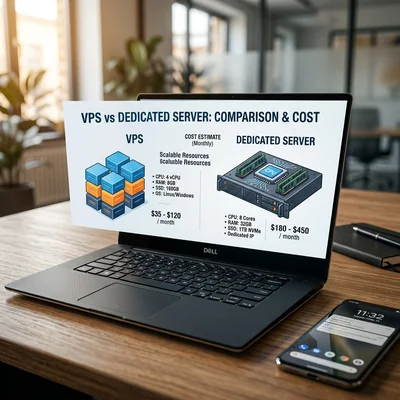
VPS (virtual private server) is your isolated virtual machine on shared physical hardware: you pay for a guaranteed share of CPU, RAM, and disk, get root access and your own IP. A dedicated server is an entire physical machine in a datacenter just for you: no neighbors at the hypervisor level, maximum performance and control, but a higher price. For a business owner, the choice is not "what ranks higher in benchmarks" - what matters is traffic, budget, SLA, and who will administer the server. The mistake of "we took dedicated for future growth" wastes $200-400/mo; the mistake of "we stay on VPS when disk and IOPS are not enough" means downtime during peak sales and reputational damage.
- VPS - from $10-80/mo: e-commerce, API, several sites, start of custom development
- Dedicated - from $80-500+/mo: high load, strict isolation requirements, predictable I/O
- When VPS is enough - up to 50,000-100,000 visits/day (depends on stack), no extreme peaks
- When you need dedicated - heavy databases, video, 1C on server, compliance requiring "our hardware only"
- Main VPS advantage - flexible scaling in the panel in minutes; easier backup and migration
- Main dedicated advantage - stable performance without "noisy neighbors" on the hypervisor
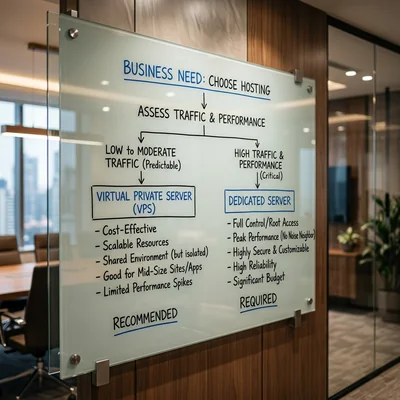
VPS vs Dedicated - The Difference in Plain Language
VPS/VDS - the provider splits one physical server into dozens of virtual machines using a hypervisor (KVM, VMware, Hyper-V). Your VM is logically isolated: own IP, own OS (usually Linux), own processes. But disk and network are ultimately shared with other clients on the same host - on a cheap plan or overloaded neighbor, IOPS dips are possible.
Dedicated server - you rent entirely the CPU, memory, disks, and network card. No one "eats" resources through a hypervisor. You configure RAID, install your OS, and if needed run several VMs inside your machine.
| Criterion | VPS | Dedicated server |
|---|---|---|
| Starting price | $10-80/mo | $80-500+/mo |
| Resources | Share of vCPU/RAM, often burst | 100% of hardware |
| Scaling up | Slider in panel, sometimes reboot | New hardware, migration |
| Neighbors | Other VPS on host | None |
| Typical provisioning time | Minutes | Hours to a day |
| Who administers | You, contractor, or managed | Same |
Important: cloud VMs (AWS EC2, Yandex Compute, Hetzner Cloud) are essentially VPS too. "Bare metal" or dedicated instances in the cloud are closer to dedicated hardware, but by contract and price.
When VPS Is the Right Choice for Business
VPS covers most mid-size business tasks if you have an admin or managed plan:
- Corporate site and blog - WordPress, landing, portfolio; 2-4 GB RAM is enough with proper caching.
- Mid-size e-commerce - WooCommerce, OpenCart, custom on Django/Python up to tens of thousands of SKUs with a well-tuned database.
- REST/GraphQL API for mobile app or customer portal - one 4-8 GB RAM VPS often handles the start.
- Several environments - dev, staging, production on different VPS is cheaper than one dedicated.
- Variable load - Black Friday: temporarily increase RAM/CPU in the panel, revert after the peak.
Signals VPS still fits: average CPU below 60-70%, disk not full, site survives ad peaks, monitoring shows no constant swap.
When It Is Time for a Dedicated Server
Dedicated makes sense when VPS hits the ceiling or the business requires physical isolation:
Performance and I/O
- PostgreSQL or MySQL database hundreds of GB, heavy reports, complex analytics - NVMe on dedicated gives stable IOPS.
- Video streaming, file processing, CPU ML inference - shared storage VPS does not cope.
- Constant CPU load above 80% even after vertical VPS upgrade.
Security and compliance
- Contract or regulator requires dedicated hardware (finance, healthcare, government - check with your lawyer).
- No hypothetical neighbor on the same host allowed (rare, but appears in specs).
- Own firewall, HSM, strict perimeter - easier on dedicated with dedicated network.
Licenses and specific software
- Windows Server + MS SQL on a powerful config is sometimes cheaper on dedicated than equivalent cloud VM.
- 1C, terminal farms, heavy ERP - often run on dedicated or bare metal.
| Symptom | Typical solution |
|---|---|
| "VPS is slow only on disk" | Dedicated with NVMe RAID or separate managed DB |
| "Peak once a year, rest is quiet" | VPS with temporary upgrade, not dedicated |
| "Need 128+ GB RAM constantly" | Dedicated or VPS cluster + load balancer |
| "Audit requires bare metal" | Dedicated from provider with proper documentation |
Cost Comparison: Not Just Rent
Ballpark figures for 2026 (region and provider matter a lot):
| Level | VPS | Dedicated | Use case |
|---|---|---|---|
| Start | $10-25/mo, 2 GB RAM | $80-120/mo, 32 GB RAM | Landing vs heavy 1C/DB |
| Working | $30-60/mo, 4-8 GB | $150-300/mo, NVMe | Store, API |
| High load | $80-200/mo, 16+ GB | $300-800+/mo | High traffic, video |
Hidden line items for both:
- Administration - $50-300/mo (patches, backups, monitoring, recovery).
- Off-site backups - $5-50/mo; larger volumes on dedicated.
- IP, DDoS protection, CDN - from $0 to hundreds of dollars.
- Downtime - one hour of store unavailability can cost more than a month of VPS.
Calculate 3-year TCO, not just the monthly rent: VPS $40 + admin $100 = $140/mo → $5,040 over 3 years; dedicated $200 + admin $150 = $350/mo → $12,600 over 3 years. The gap is real, but on dedicated you often pay for capacity that sits idle - compare against actual load, not "for growth."
Managed VPS vs Unmanaged Dedicated: What to Choose Without an IT Department
| Option | Essence | Who it fits |
|---|---|---|
| Unmanaged VPS | VM and network only | Contractor with SLA |
| Managed VPS | Provider installs OS, sometimes panel | Small business without DevOps |
| Unmanaged dedicated | "Bare" hardware | Own admin or integrator |
| Managed dedicated | Provider watches hardware and OS | Critical prod without staff |
Practice: if you have no in-house admin, do not take the cheapest unmanaged dedicated "to be powerful." Better managed VPS or dedicated with contract items: backups, monitoring, recovery within N hours.
Scaling: VPS Is More Flexible, Dedicated Is More Stable
Vertical VPS scaling - increase RAM/CPU in the dashboard, sometimes reboot needed. Fast, no hardware purchase.
Horizontal - several VPS behind a load balancer (nginx, cloud LB). Cheaper than one huge dedicated with uneven load.
Dedicated scales slower: new server, data migration, DNS switch. But performance is predictable - no surprises from neighbors on the host.
Typical growth path:
- Shared hosting or small VPS.
- VPS 4-8 GB, Redis, CDN.
- Separate VPS for DB or managed PostgreSQL.
- Several VPS + load balancer or move to dedicated if you hit I/O and RAM limits.
Jumping straight to dedicated "for growth" only makes sense with known constant load (you already have production metrics).
What the Owner Should Control (Checklist)
Access and contract
- Who has root/SSH? List of names, not "all contractors forever."
- In provider contract: SLA uptime, compensation, who replaces disk on failure.
- Contractor left - key rotation the same day.
Backups and recovery
- Daily DB and files; copy not on the same disk as production.
- Quarterly - test restore on staging.
- RPO/RTO agreed with business: how many orders can be lost and how many hours of downtime are acceptable.
Monitoring
- Alert when site unavailable 5+ minutes.
- Disk 85%+ full, RAM into swap, CPU 90%+ for over an hour - review with admin.
- On dedicated additionally: disk SMART, temperature (if provider gives IPMI).
Security
- Firewall, unnecessary ports closed; SSH by key, not password.
- SSL does not expire unnoticed; Let's Encrypt auto-renewal.
- Regular OS security updates - on schedule, not "when we remember."
Typical Owner Mistakes
| Mistake | Consequence | What to do |
|---|---|---|
| Dedicated "for the future" without load | $150-300/mo idle | Start with VPS, metrics 3-6 months |
| $5 VPS without admin | Hack, full disk, no backups | Managed or contractor |
| One VM for DB, files, and mail | Everything fails at once | Split roles or managed DB |
| No restore test | "Backup exists" but won't open | Quarterly restore drill |
| Ignoring ad peaks | VPS in swap at prime time | Temporary upgrade or CDN |
VPS, Dedicated, and the Big Picture
A server is not the goal but where the site, API, and database run. Choosing VPS vs dedicated does not replace decisions about stack (Linux vs hosting, WordPress vs custom, MySQL vs PostgreSQL). First - metrics: CPU, RAM, disk I/O, API response time under load. Then - budget for admin and SLA.
For most business owners VPS is the practical entry point and a long growth stage. Dedicated is a deliberate step when resource shortage is proven, compliance requires it, or stable high I/O is needed - not "to look more solid in negotiations."
Summary
VPS - flexible, cheaper to start, scales in minutes; fits e-commerce, API, and custom development with proper administration. Dedicated server - when you need all hardware resources, strict isolation, or constant heavy disk and CPU load.
The owner should:
- not buy dedicated without numbers from monitoring;
- not save on admin on either VPS or dedicated;
- require backups, restore tests, and access list in the contract;
- consider several VPS + load balancer as an alternative to one expensive dedicated.
Good infrastructure is invisible - fast site, peaks handled, recovery tested for real. Bad infrastructure - paying for dedicated for years at 15% load, or staying on VPS without backups and surprised by downtime during sales season.
If you need help with development, AI implementation, or website support for your project - contact me.
Frequently Asked Questions
How is VPS different from a dedicated server?
VPS is a virtual machine on shared physical hardware: you get a guaranteed share of CPU, RAM, and disk, root access, and your own IP, but hardware is shared with other provider clients. Dedicated server is the entire physical machine just for you: maximum performance and isolation, higher price and slower scaling up. For mid-size business, VPS is usually enough until you hit I/O or RAM limits.
When is VPS not enough and dedicated is needed?
Typical signs: constant CPU/RAM above 80% after plan upgrade, disk or DB hitting IOPS limits, audit requiring dedicated hardware, heavy reports and video on one server. If load is seasonal - temporary VPS upgrade or a second server behind a load balancer is often cheaper than dedicated right away.
How much do VPS and dedicated server cost for business?
VPS - from $10-25/mo for start (2 GB RAM) to $80-200/mo for working load (8-16 GB). Dedicated - from $80-150/mo for basic config to $300-800+/mo for powerful NVMe hardware. Add $50-300/mo for administration if you have no IT department - otherwise tariff savings turn into downtime.
Can you run an e-commerce store on VPS?
Yes, it is a standard scenario. Small and mid-size stores on WooCommerce, OpenCart, or custom backend on 4-8 GB RAM VPS with proper cache, CDN, and separate or managed DB usually run stably. Dedicated is needed for very large catalogs, heavy analytics, and constant peaks when VPS is exhausted.
Who should administer VPS or dedicated without an IT department?
Contractor with SLA (DevOps, sysadmin, agency) or managed plan from provider: OS patches, backups, monitoring, recovery after failure. A developer "code only" should not be the only one holding root - otherwise when the contractor leaves, access and procedures are lost. For small business, managed VPS is often cheaper than "bare" dedicated without an admin.
Terms in this article
SLA — Service Level Agreement
IOPS — Input/Output Operations Per Second
downtime — period when the service is unavailable
e-commerce — online selling of goods or services
backup — copy kept for recovery
VDS — Virtual Dedicated Server
RAID — Redundant Array of Independent Disks
bare metal — dedicated physical server hardware
OpenCart — open-source PHP e-commerce platform
production — live environment serving real users
Black Friday — peak retail shopping day
GraphQL — query language for APIs with a typed schema
staging — pre-production environment for final checks
inference — running a trained model to get predictions
ML — Machine Learning
HSM — Hardware Security Module
ERP — Enterprise Resource Planning
off-site — SEO signals from other sites (links, mentions)
unmanaged VPS — VPS where you fully manage the OS and stack yourself
managed VPS — VPS where the provider handles OS updates and basics
DDoS — Distributed Denial of Service
CDN — Content Delivery Network
TCO — Total Cost of Ownership
in-house — done by the company's own team
DevOps — Development and Operations
dashboard — metrics/status panel
Let's Encrypt — free automated TLS certificate authority
uptime — share of time a service stays available
restore — recover data from backup/snapshot
RPO — Recovery Point Objective
RTO — Recovery Time Objective
backend — server-side logic, APIs and data layer