MS SQL for Business Owners: When Your Business Lives in the Microsoft Ecosystem

Microsoft SQL Server (often called "MS SQL" or simply SQL Server) is the database at the center of Microsoft's ecosystem: Dynamics 365, Azure, Power BI, .NET, SharePoint, and 1C on Windows. If you already have Active Directory, Exchange mail, Microsoft CRM, and Power BI reports, there is a high chance that your core business data lives in MS SQL - not in MySQL on a Linux host and not in Google Sheets. You do not need to write T-SQL, but understanding why a contractor proposes SQL Server, how much licensing costs, and what happens when you migrate to Azure cloud means making decisions without budget surprises.
- MS SQL - Microsoft's relational DBMS: tables, relationships, transactions, reports
- Where it appears - Dynamics 365, 1C (standard setups), .NET sites, Power BI, internal ERP
- Ecosystem - single sign-on (Azure AD), integration with Excel, Teams, Power Platform
- Options - SQL Server on your own server (on-prem) or Azure SQL in the cloud
- Main advantage - "everything from one vendor": fewer integrations, faster rollout in MS environments
- Main risk - licenses, vendor lock-in, migration to another DBMS costs more than from MySQL
What Is MS SQL in Plain Language
SQL Server is server software (Windows or Linux) that stores data in tables and answers queries from applications. Like MySQL or PostgreSQL, it is a relational database: orders link to customers, order lines link to products, employees link to departments.
The difference for an owner is not "tables" but context:
| Aspect | MS SQL in the Microsoft ecosystem | MySQL on typical hosting |
|---|---|---|
| Typical client | Corporation, manufacturing, distribution with Dynamics/1C | E-commerce on WordPress, OpenCart |
| Server OS | Windows Server, Azure VM | Linux, shared hosting |
| Reports | Power BI, Excel, SSRS | phpMyAdmin, custom dashboards |
| Employee login | Azure AD / Active Directory | Separate login per application |
| Licensing | Per CPU core, edition (Standard/Enterprise) | Often free in hosting plan |
Important: MS SQL is not universally "better" or "worse" than MySQL. It is a logical choice when your entire IT landscape is already on Microsoft: simpler integrations, one contractor knows the stack, fewer debates about "why not PostgreSQL".
When Your Business "Lives" in Microsoft
Check yourself against this list. If three or more items match, MS SQL likely already exists or will be proposed as the primary database:
- CRM/ERP - Dynamics 365 Sales, Business Central, Navision (historically).
- 1C - standard configurations on MS SQL, not PostgreSQL (common in CIS markets).
- Website and customer portal - built on .NET (C#, ASP.NET), not PHP.
- Mail and files - Exchange Online, SharePoint, OneDrive for Business.
- Sign-in - employees log in with a corporate Microsoft account (Azure AD).
- Analytics - reports built in Power BI directly from the database or via an Azure data warehouse.
- Infrastructure - servers in Azure or on Windows Server in office/datacenter.
In this picture, the database is the center where orders, stock, finance, and KPIs converge. Power BI does not "invent" numbers - it reads MS SQL (or a synchronized copy in Azure Synapse). If the database goes down or ages without backups, both CRM and executive reports fail.
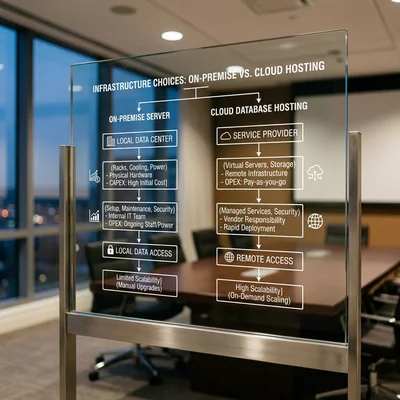
SQL Server On-Prem and Azure SQL
Microsoft offers two main ways of "where the database physically lives":
On-prem (your own server)
SQL Server is installed on your hardware or a Windows VPS. Pros: data in a known datacenter, predictability for regulators (banking, public sector). Cons: you (or your contractor) handle patches, backups, disks, high availability.
Azure SQL (cloud)
A managed service in Azure: Microsoft updates the engine, scales resources, offers geo-redundant backup. Pros: fast start, pay-as-you-go, tight integration with other Azure services. Cons: the monthly bill grows with data volume and load; without solid architecture, cloud can cost more than on-prem.
| Criterion | SQL Server on-prem | Azure SQL Database |
|---|---|---|
| Capital expense | Server, SQL licenses, Windows | No own hardware |
| Operating expense | Admin, power, datacenter | Azure subscription |
| Scale up | Buy RAM/CPU, downtime | Slider in Azure portal |
| Backups | Your admin configures | Built-in, retention configurable |
| Leaving the ecosystem | Hard, but data is yours | Export possible, but Azure habit remains |
For owners: the question is not "cloud or not" but who is responsible for downtime on Friday evening. On-prem - your contractor and contract SLA (response- and recovery-time guarantees). Azure - Microsoft ticket + architect who did not leave a single database without a replica.
Licensing and Budget: What to Ask Before Signing
MS SQL is one of the few databases where license cost can match a year of development. Do not sign a project without answers:
Editions
- Express - free, 10 GB per database limit; suitable for small apps and tests, not heavy ERP.
- Standard - typical mid-market choice: Always On (limited), core features.
- Enterprise - large volumes, advanced analytics, expensive; often excessive for companies under 200 employees.
Payment models
- Per core - pay for CPU cores on the server running SQL (on-prem).
- Server + CAL - server license plus "client" licenses per user/device (less common on new projects).
- Azure - vCore or DTU, per-minute/per-month billing.
Practical tip: ask for three line items in the estimate - SQL licenses, Windows licenses (if on-prem), and administration cost (backup, monitoring, patches) for 12 months. Compare with the Azure SQL calculator for the same period.
How Data Flows in the Microsoft Ecosystem
A simplified diagram for an owner without an IT department:
Employee → Dynamics / 1C / .NET site → MS SQL (order, stock write)
                                              ↓
                                    Power BI (dashboard for director)
                                              ↓
                                    Excel / Teams (alert "sales -20%")
- Operational layer - real-time transactions: order, payment, stock deduction.
- Analytics layer - often a separate database or data mart (nightly ETL) so reports do not slow checkout.
- Identity - Azure AD knows who opened a report; MS SQL knows what they saw.
If a contractor says "we will connect Power BI directly to production without a replica" - clarify the risk: a heavy Monday morning report can slow down order entry for sales staff.
What Owners Should Control (Without Knowing SQL)
Backups and recovery
- Is there a daily full backup and transaction log (point-in-time restore)?
- When did you last test restore on a test server - not "file exists" but "database came up in N hours"?
- Where is the copy stored - not on the same disk as production?
Access
- Who has sysadmin rights (full control)? Should be 2-3 names, not "all developers".
- Contractor left - change service and SQL logins the same day.
- Separation: finance sees finance, warehouse sees stock, not "one sa login for everyone".
Version and support
Microsoft ends support for old SQL Server versions. SQL Server 2014 and older in 2026 is a red flag: no security patches, harder Azure AD integration. Plan upgrades 1-2 years ahead in the budget.
Performance
Signs it is time to call a DBA, not buy "another server":
- "Sales for the month" report takes more than 5 minutes every day.
- During peak hours, CRM freezes on order entry.
- Database server disk is 90%+ full with no log cleanup or archive plan.
When MS SQL Is Not the Best Choice
An honest list so you do not overpay for a "corporate" stack:
| Situation | Why MS SQL is excessive | What is often used |
|---|---|---|
| Landing page + lead form | No complex relationships or reports | Tilda, cloud CRM |
| WordPress / WooCommerce on shared | PHP stack + MySQL | MySQL in hosting plan |
| Startup with no Microsoft in office | Licenses and Windows raise entry cost | PostgreSQL, MySQL on Linux |
| Team only on Linux/open source | No T-SQL and Windows expertise | PostgreSQL |
| Need multi-cloud "without vendor" | Tied to Azure and licenses | Vendor-neutral cloud DBs |
Opposite case: you already pay for Dynamics 365 and Microsoft 365 E3/E5 - the "MySQL or MS SQL" debate for internal ERP usually favors MS SQL: integrations exist, one Microsoft partner supports it.
MS SQL and the Bigger Data Picture
It helps directors to connect MS SQL with databases and SQL in general: regardless of vendor, a single source of truth matters more than brand. In the Microsoft ecosystem that source is often one or two SQL Server databases (operational + analytics), not ten Excel files on different drives.
Typical evolution of a mid-size business:
- Excel and 1C on one accountant's PC.
- 1C on MS SQL in the office, backup on external disk.
- VPN, remote branches, server load grows.
- Migration to Azure SQL or hybrid: production in datacenter, reports in cloud.
- Power BI for the owner, alerts in Teams.
At each step data stays in MS SQL - only where the server sits and who administers changes. Plan migrations in advance, not after a disk failure on Friday.
Summary
MS SQL is a natural choice when the business is already in the Microsoft ecosystem: Dynamics, 1C on SQL Server, .NET, Azure AD, Power BI. You pay for licenses and vendor tie-in, but gain faster rollout and fewer integration points between systems.
Owners should:
- understand on-prem vs Azure SQL and full 3-year cost, not just "server price";
- require tested backups and a list of people with full database access;
- not force MS SQL onto a simple WordPress store - MySQL is more logical and cheaper there;
- as the company grows, plan an analytics copy of data so Power BI does not choke the operational database.
Good MS SQL in a Microsoft environment is invisible - while reports match the cash register and recovery after failure was tested, not just promised. Bad MS SQL means paying licenses for years while the last working backup turns out to be three months old.
If you need help with development, AI implementation, or website support for your project - contact me.
Frequently Asked Questions
Are MS SQL and MySQL the same thing?
No. Both MySQL and MS SQL are relational databases, but from different companies with different licenses, syntax (T-SQL vs MySQL SQL dialect), and typical environments. MySQL is more common on Linux and PHP sites; MS SQL in Windows, Dynamics, 1C, and .NET. Moving an application from one to the other is a project, not an "export in one evening".
Do we need MS SQL if we bought Microsoft 365?
Not always. Microsoft 365 (mail, Teams, cloud Excel) does not automatically include SQL Server for your orders and warehouse. MS SQL is needed when there is an application that uses it: 1C, Dynamics, a custom .NET system. For leads from a landing page in Excel or SharePoint lists, a separate MS SQL may not be required.
How much does MS SQL cost for a 50-person company?
It varies a lot by model. Express - $0, but with a 10 GB limit. Standard on-prem - from several thousand dollars in licenses (cores) plus Windows Server and admin. Azure SQL - from $50-300+/month for a modest database to much more as vCore (virtual cores, Azure's billing unit) and storage grow. Ask your integrator for an on-prem vs Azure estimate comparison over 36 months - a one-time server purchase is not always cheaper than cloud.
Can we move a 1C database from MS SQL to PostgreSQL?
Theoretically yes, practically rare. 1C officially supports several DBMS options, but migration means downtime, data transfer, testing all reports and integrations, retraining the contractor. Done when consciously leaving the Microsoft stack or requiring Linux. If the goal is only "save on licenses" - calculate full downtime and risk cost; often staying on MS SQL and optimizing hardware is cheaper.
How do we verify the contractor actually backs up MS SQL?
Ask once per quarter: (1) screenshot or log of successful backup jobs for the last 7 days; (2) test restore on a separate server with you on a video call; (3) size of the latest full backup - it should grow with data, not stay suspiciously small for years. Put RPO (how much data you can lose) and RTO (acceptable downtime in hours) in the contract - without numbers, "we do backups" guarantees nothing.
Terms in this article
BI — Business Intelligence
Active Directory — Microsoft directory for users, groups, and access policies
CRM — Customer Relationship Management
DBMS — Database Management System
ERP — Enterprise Resource Planning
on-prem — software hosted in your own infrastructure
vendor lock-in — hard to leave a vendor without costly rewrite
e-commerce — online selling of goods or services
OpenCart — open-source PHP e-commerce platform
data warehouse — central store of cleaned historical data for analytics
VPS — Virtual Private Server
backup — copy kept for recovery
downtime — period when the service is unavailable
retention — keeping users/customers over time
SLA — Service Level Agreement
real-time — processed with minimal delay
ETL — Extract, Transform, Load
production — live environment serving real users
restore — recover data from backup/snapshot
landing page — page built for a single conversion goal
open source — software with publicly available source code
Tilda — block-based website and landing page builder
VPN — Virtual Private Network
RPO — Recovery Point Objective
RTO — Recovery Time Objective