Structured Data and Schema.org for AI Overviews in Search

Structured data is markup on your pages that tells search engines and AI systems who you are, what the product is, which prices apply, what the FAQ answers are, and what to treat as fact. The Schema.org vocabulary and JSON-LD format have long supported classic SEO; in 2026 they also improve the odds of appearing in AI Overviews (Google AI Overviews and similar blocks) and being cited accurately by assistants. Below - which markup types actually help businesses, how to ship them without “magic,” and how Schema.org differs from llms.txt.
- Schema.org - a shared entity vocabulary: Organization, Product, FAQPage, Article, HowTo, and more
- JSON-LD - the preferred way to serve markup in
<script type="application/ld+json"> - Goal for AI Overviews - give the model checkable facts: name, price, availability, steps, answers
- No guarantee - markup does not “buy” a slot in AI Overview; without strong content and indexing the effect is weak
- Synergy - Schema.org + clear copy + GEO + crawler access
- Validation - Rich Results Test / Schema Markup Validator before and after release
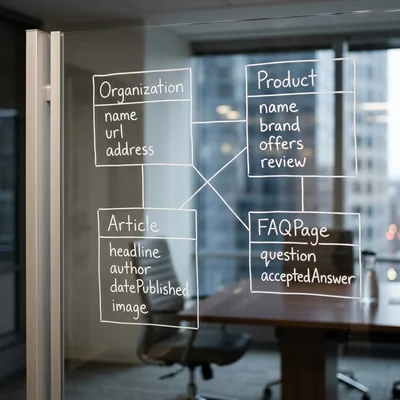
What Structured Data Means in Plain Language
Search and AI summaries read HTML, but HTML is often noisy: menus, scripts, ads, pretty blocks without explicit facts. Structured data is a separate meaning layer: you mark that “this is an organization,” “this is a product with a price,” “this is a question-answer pair.”
| Without markup | With Schema.org |
|---|---|
| The model guesses from prose | Entities are stated explicitly |
| Price may come from an old review | Offer points to current terms on your page |
| FAQ is scattered across a landing | FAQPage supplies Q&A pairs for snippets and summaries |
| Brand lacks connections | Organization + sameAs link site, social, directories |
This is not “another meta tag for rankings.” It is a machine-readable page passport - and both classic search and generative search lean on it when deciding whether a fact from your URL is safe to use.
Why Schema.org Matters Specifically for AI Overviews
An AI Overview in search (AI Overview / AI Mode and peers) builds a short answer on top of results: comparisons, definitions, how-tos, prices, contacts. Models prefer sources where facts are easy to extract and verify.
Markup helps on three levels:
- Extraction - JSON-LD is easier to parse than an arbitrary DOM.
- Entity trust - consistent Organization / Product / Brand reduces mixing you up with a same-named competitor.
- Answer shape - FAQ, HowTo, and Product naturally fit the “ready answer” shown to users.
For a GEO strategy, Schema.org is not optional decoration - it is a technical layer next to answer-first content and indexing. More on ChatGPT and Google AI channels - in the AI visibility and llms.txt overview.
Which Schema.org Types Businesses Should Prioritize
You do not need to mark up everything. Start with types that match customer questions and AI summary formats:
Organization (and LocalBusiness if you have locations)
Who you are: official name, logo, contacts, URL, profiles in sameAs. Without this, the brand easily blurs across mirrors and third-party directories.
Product / Offer / AggregateRating
Product or service with price, currency, availability, SKU. Ratings only if reviews are real and match Google policy (fake stars risk manual actions).
FAQPage
Pages with real customer questions. Each pair must be visible in HTML, not only in JSON - otherwise it is hidden content.
Article / BlogPosting
For blog posts and guides: title, date, author, image. Helps attribution and freshness in summaries.
HowTo
Step-by-step instructions - a common AI Overview format (“how to set up,” “how to apply”).
SoftwareApplication / Service
For SaaS and agencies: what the product does, for whom, on which platforms - if facts match the page text.
JSON-LD: What It Looks Like in Practice
Google has long recommended JSON-LD. A typical FAQ block:
<script type="application/ld+json">
{
  "@context": "https://schema.org",
  "@type": "FAQPage",
  "mainEntity": [{
    "@type": "Question",
    "name": "How much does implementation cost?",
    "acceptedAnswer": {
      "@type": "Answer",
      "text": "A pilot usually takes 2-4 weeks. Exact price depends on integration scope."
    }
  }]
}
</script>
Minimum for an organization:
{
  "@context": "https://schema.org",
  "@type": "Organization",
  "name": "Example Company",
  "url": "https://example.com",
  "logo": "https://example.com/logo.png",
  "sameAs": [
    "https://www.linkedin.com/company/example",
    "https://t.me/example"
  ]
}
Rules without which markup hurts:
- facts in JSON-LD match visible page text;
- no invented prices, ratings, or “reviews from thin air”;
- one canonical URL per entity, no mirror duplicates;
- update markup when pricing and FAQ change - or AI will quote stale facts.
How to Ship It: Sprint Checklist
- Page inventory. Home, about, pricing/catalog, 3-5 FAQ/service pages, key articles.
- Pick types. Organization + FAQ/Product/Article by page meaning - do not mix unrelated types “just in case.”
- Build JSON-LD in the CMS/SSG template or via a plugin (WordPress, Tilda modules, your generator).
- Align with HTML. Answers and prices must be human-readable on the page.
- Validate. Google Rich Results Test, Schema Markup Validator; fix required-field errors.
- Indexing. Allow crawl in
robots.txt, list URLs in sitemap; without indexing markup barely helps. - Monitor. Search Console (enhancements / rich results), spot-check AI summaries on brand and commercial queries every 2-4 weeks.
Common Mistakes
- Adding
AggregateRatingwithout real reviews on the page. - FAQ only in JSON-LD, no questions on screen.
- Organization on every page with different
nameand phone numbers. - Confusing Schema.org with
llms.txt: the first is entity markup for search/rich results; the second is a curated map for LLMs. You need both layers - different jobs. - Promising clients “you will get into AI Overview after Schema” - that sells expectations, not algorithms.
- Copying someone else’s JSON with another brand and prices.
When Schema.org Isn't Required or Can Wait
- The site isn't indexed yet or fails a basic SEO audit. Fix crawler access and the technical basics first - markup on unindexed pages has no effect.
- Pages don't yet have real answers to customer questions in the HTML. JSON-LD doesn't replace missing copy: write the substantive content first, then mark it up.
- Nobody keeps prices, availability, and FAQ current. If the markup won't be maintained, stick to Organization instead of Product/Offer with stale facts - that's a risk, not a benefit.
- A simple one-page site with no catalog or FAQ. Basic Organization is enough; marking up “every type just in case” is extra work with no payoff.
- Expecting a fast slot in AI Overview. Markup doesn't speed up or guarantee inclusion - it's a background technical layer, not a tool with a predictable payback time.
How It Ties to SEO and GEO
Structured data is an amplifier, not a replacement:
- without technical SEO and indexing, nobody reads the markup;
- without answer-first content and GEO, models have nothing solid to fill an overview;
- without fact checks across brand and pages, AI amplifies errors;
llms.txthelps assistants, but does not replace JSON-LD in search.
Practical 2026 order: indexing → strong answer pages → Schema.org → llms.txt → regular fact checks in SERP and chats.
Bottom Line
Schema.org and JSON-LD make company, product, and FAQ facts machine-readable - important for classic snippets and for AI Overviews in search. Mark up what matches customer questions; keep parity with HTML; validate and update. That raises the chance of accurate citation - without promising a “guaranteed slot” in AI Overview.
If you need help with development, AI implementation, or website support for your project - contact me.
Frequently Asked Questions
Is Schema.org markup required to appear in AI Overviews?
No, not required, but helpful. AI Overviews rely on the index, relevance, and source quality. Schema.org speeds up fact extraction and reduces ambiguity - especially for Product, FAQ, and Organization. Without markup you can still appear if content is strong and the page is indexed.
Which format is better: JSON-LD, Microdata, or RDFa?
For most sites choose JSON-LD: easier to maintain in templates and CMS, and Google recommends it. Microdata and RDFa are fine but break more often on layout redesigns. Correctness and match to visible content matter more than exotic syntax.
Do I need to mark up every page on the site?
No. Mark up pages with stable entities and commercial meaning: home/organization, products and services, FAQ, articles, how-tos. Utility landings without facts and catalog filter duplicates usually should not get empty JSON-LD.
Will Schema.org improve rankings in classic Google?
There is no direct “add Schema - positions rise” factor. Markup unlocks rich results (FAQ, product, rating, etc.) and improves entity understanding - which can affect clicks and perception indirectly. Positions still depend on content, links, and technical quality; Schema is a clarity layer, not a boost button.
Where should I start on WordPress / Tilda / a custom stack?
On WordPress - a proven SEO plugin with Schema plus manual checks of key templates. On Tilda - built-in or third-party JSON-LD blocks, or a head insert via settings. On a custom stack - generate JSON-LD from the same data as the page template (price, FAQ, name) to avoid drift. After publish, run Rich Results Test and confirm important URLs are open for indexing.
Terms in this article
JSON-LD — JSON for Linking Data
AI Overviews — Google AI summary box above classic search results
GEO — Generative Engine Optimization
SKU — Stock Keeping Unit
SaaS — Software as a Service
canonical URL — preferred page URL that search engines should index
CMS — Content Management System
plugin — installable extension module
SSG — Static Site Generation
SERP — Search Engine Results Page
Tilda — block-based website and landing page builder