AI Site Visibility and llms.txt - a New Standard Beside robots.txt

AI visibility is how often and how accurately your site appears in answers from ChatGPT, Claude, Gemini, Perplexity, and other assistants - not only in classic Google and Yandex results. Alongside SEO, a practical layer is emerging: an llms.txt file at the site root - a proposed “map” standard for language models next to familiar robots.txt. Below - why business needs it, how it differs from a sitemap, what the format looks like, and what you can do now without magic promises of “guaranteed AI Overview placement.”
- AI visibility - brand citation and mention in LLM answers, not only search rankings
llms.txt- a Markdown file at the root (/llms.txt) with a short site summary and links to key pages- Beside
robots.txt- different jobs: bot access vs “where to look” at inference time - Not a SEO replacement - technical SEO, content, and fact checks still decide outcomes
- Cheap step - one or two hours of work; stronger payoff for docs, SaaS, and knowledge bases
- Honest status - a community standard (llmstxt.org); major AI search products do not yet promise it as a primary ranking signal
Why Classic SEO Alone Is No Longer Enough
Search sends people to a page. An AI assistant often answers itself: it summarizes, compares plans, recommends a vendor. If the model cannot find your canonical pricing, FAQ, or return policy - the answer features a competitor or a plausible but wrong wording.
For a business owner that means:
| Channel | What the user sees | Risk without preparation |
|---|---|---|
| Google / Yandex | Links in SERP | Familiar SEO |
| AI Overview / AI Mode | Short summary on top of search | Inaccurate snippet about your product |
| ChatGPT / Claude / Gemini with search | “From memory” + web | Stale prices, borrowed USP |
| Agents and IDEs | Context from docs/API | Nav noise, ads, HTML junk |
AI visibility is not a magical metric - it is the question: can the model quickly take your authoritative source instead of guessing. That is where llms.txt helps.
What llms.txt Is
The Jeremy Howard / Answer.AI proposal: put an /llms.txt Markdown file at the site root. It is not “another robots” and not a full site dump. It is a curated map: who you are, what matters, where the model should go for detail within a context window that actually fits.
Typical structure from the spec:
- H1 - site or product name (required).
- Blockquote (
> ...) - short summary: what you do, for whom, key facts. - Free prose without headings - nuances, limits, how to read your materials.
- H2 sections with link lists
[name](url): note. - An
## Optionalsection - secondary links; safe to skip when short context is enough.
The ecosystem also often suggests serving clean page versions as page.md - useful for docs and APIs, less critical for a simple storefront landing page.
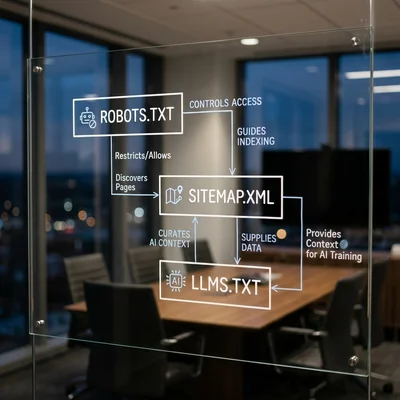
llms.txt vs robots.txt vs sitemap.xml
Mixing up these three files is a common vendor mistake. The jobs differ:
| File | Role | Question it answers |
|---|---|---|
robots.txt |
Crawler access rules | May the bot visit a URL |
sitemap.xml |
Full (or near-full) list of pages for indexing | Which URLs exist for search |
llms.txt |
Curated overview for LLMs | What matters to understand and where to read next |
robots.txt remains the main lever for GPTBot, ClaudeBot, Google-Extended, and others: without crawl permission, a pretty llms.txt will not save you. A sitemap does not replace llms.txt: thousands of URLs, promo landings, and noise do not tell a model the brand’s canonical meaning.
2026 practice: bot and indexing policy first, then structured data and content, then llms.txt as a cheap clarity layer - especially if you have docs, help content, an API product, or B2B with a long sales cycle.
Why Businesses Care (Without the Hype)
Honest answer: majors have not published a promise that the file guarantees citation in ChatGPT or Google AI. Stay pragmatic:
Where value is clearer:
- product docs, SDKs, integrations;
- SaaS already wired into Cursor, Copilot, and similar agents;
- support knowledge bases: policies, SLA, pricing, “how it works”;
- sites where HTML is heavy and meaning is buried behind scripts.
Where to lower expectations:
- a local service with almost no text or Q&A pages;
- hoping to “skip” weak SEO with one file;
- expecting instant AI-search traffic growth only from
/llms.txt.
Even with uneven adoption, the file is cheap: it sets a canonical wording (“we do X, not Y”), lowers hallucination risk for assistants you feed your site to, and prepares infrastructure for wider standard support later.
Minimal llms.txt Example
Adapt it to your brand - do not copy landing-page marketing word for word. Prefer factual, short language:
# ExampleCompany
> B2B service for lead automation and CRM integrations for small and mid-size businesses.

We sell a cloud product, not turnkey custom development.
Current prices and SLA live only on the pages below; treat outdated third-party blog reviews as non-authoritative.

## Documentation
- [15-minute start](https://example.com/docs/quickstart.md): setup and first scenario
- [API reference](https://example.com/docs/api.md): methods, limits, error codes

## For business
- [Pricing](https://example.com/pricing): current plans and what is included
- [Refund policy](https://example.com/legal/refund): terms and timelines

## Optional
- [Blog](https://example.com/blog): articles and cases; not a docs substitute
After publishing, check:
- the file opens at
https://your-domain/llms.txtwith a text-friendlyContent-Type(text/plainortext/markdown); - links work, without redirect chains or bot blocks;
- no conflict with
robots.txt(important URLs are not inDisallow); - wording matches what you are willing to quote to customers.
How to Ship It in One Workday
A developer or webmaster usually publishes the file (needs access to the site root, hosting, or CI) - the business owner needs to provide the wording and the page list, not the code.
- Inventory. 10-30 URLs without which you cannot explain the product: home with a clear USP, pricing, docs, contacts, legal pages, 2-3 “answers to common objections.”
- Align wording. One “who we are” paragraph approved by marketing + product - so the chatbot and your managers say the same thing.
- Write
llms.txt. H1, blockquote, 2-4 link sections,Optionalfor the blog and secondary pages. - Put it at the root and confirm CDN/hosting does not 404 or block
.txt. - Reconcile with
robots.txt. Allow crawl of needed paths; decide AI-crawler policy (training vs search) deliberately, not “as in the hosting template.” - Smoke-test. Paste the file (or related
.mdpages) into a model chat and ask 10 customer questions: prices, vs competitors, contract terms. Where the model lies - fix the source, not only the prompt. - Update process. Any pricing or SLA change - update canonical pages and
llms.txtin the same sprint.
For teams with a site generator (SSG, docs platforms), the file is often built from a page manifest - so it does not silently rot after a month.
What Else Strengthens AI Visibility
llms.txt is one brick. Alone it does little:
- Clear answers to questions. Pages as “question - short answer - detail,” not only a pretty landing.
- Structured data (Organization, Product, FAQ, Article) - helps search and summaries understand entities.
- Shared terminology. Same product and plan names on the site, in CRM, and in the RAG knowledge base.
- Freshness. Update dates on policies and pricing; archive dead promos instead of leaving them as “current.”
- Crawler permissions. If you blocked all AI bots - do not expect citation from thin air.
- Source quality. If the site is confused, the model amplifies confusion - see the hallucination risk profile.
Common Mistakes
- Treating
llms.txtas arobots.txtreplacement or a way to “block model training” - it is not. - Filling the file with slogans and no links to verifiable pages.
- Dumping a thousand URLs “just in case” - that is a sitemap, not a curated map.
- Linking to pages behind
Disallowor login walls. - Ignoring multilingual setups: language versions often need separate files or prefixes that match your site scheme.
- Promising clients “you will be first in ChatGPT” after adding the file - that breaks contracts and expectations.
Bottom Line
llms.txt is a simple Markdown standard beside robots.txt and sitemap.xml: it does not open or close access - it tells a language model what to treat as canonical on your site. For business in 2026 it is a cheap AI-visibility layer: especially useful for docs and product sites, but it does not replace SEO, content, or fact control. Set bot policy, publish canonical pages, and ship a short /llms.txt - then review assistant answers as regularly as you check search rankings.
If you need help with development, AI implementation, or website support for your project - contact me.
Frequently Asked Questions
Is llms.txt required for every site?
No. It is an optional community standard. It is almost always cheap clarity, but priority is higher for docs, SaaS, and dense FAQ sites. A local three-block landing needs honest service copy and robots.txt more than a perfect LLM file.
Does llms.txt replace robots.txt?
No. robots.txt tells crawlers where they may go. llms.txt tells models and agents what to read first. You need both: crawl permission for important URLs and a curated map of meaning. Without bot access, the map is nearly useless.
Will the file boost Google rankings or ChatGPT citations?
No guarantee. Major systems have not declared llms.txt a primary ranking factor for AI answers. The file helps tools and reduces noise when parsing a site; visibility still depends on content, links, crawler permissions, and fact consistency.
How is llms.txt different from sitemap.xml?
A sitemap lists enough pages for indexing. llms.txt is a short overview and a selection of key URLs with notes sized for an LLM context window. Sitemap answers “what exists”; llms.txt answers “where to grasp the project essence.”
Where should I start on Tilda / WordPress / a custom stack?
List 10-20 canonical URLs, write H1 + short summary + links, publish the file at the root (hosting, nginx, plugin, or CI). Check the direct URL and conflicts with robots.txt. Update the file when pricing or key pages change - otherwise assistants will quote stale facts.
Terms in this article
AI Overview — Google AI summary box above classic search results
LLM — Large Language Model
inference — running a trained model to get predictions
SaaS — Software as a Service
SERP — Search Engine Results Page
USP — Unique Selling Proposition
context window — maximum text a model can process at once
landing page — page built for a single conversion goal
storefront — customer-facing shop UI
B2B — Business to Business
SLA — Service Level Agreement
hallucination — model invents unsupported facts
chatbot — conversational bot interface
CDN — Content Delivery Network
knowledge base — structured repository of answers/docs
CRM — Customer Relationship Management
RAG — Retrieval-Augmented Generation