What Is CRM for Business: Plain Language and When It Pays Off

CRM is a system that stores clients, deals, tasks, and the full communication history. In simple terms: instead of Excel spreadsheets, personal Telegram chats, and manager notebooks - one source of truth showing who the client is, what stage the deal is at, and what to do next. Below - what CRM really is without marketing noise, who actually needs it, how much it costs, and when the investment pays back.
- CRM - unified database of clients, deals, tasks, and contact history
- Without CRM leads get lost, calls duplicate, sales forecasts disappear
- Needed when you have 2+ managers, 50+ active clients, or a long sales cycle
- Can wait if you are solo with up to 30-50 repeat clients
- Cost - from $0 (free tiers) to $50-150/user/month for a team
- Payback - usually 6-18 months with a 5-15% conversion lift
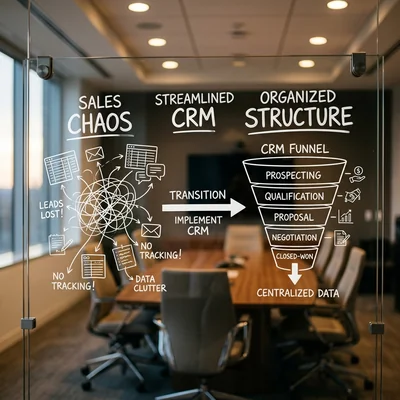
What CRM Means in Plain Language
A CRM system is software for managing customer relationships. Not a "magic sales button," but a workspace for sales and support: client card, deal pipeline, reminders, reports.
A typical client card in CRM includes:
- name, phone, email, company, tags;
- all touchpoints - calls, emails, chats, meetings;
- active and closed deals with amount and stage;
- manager tasks: "call back," "send proposal," "approve contract."
A manager opens CRM in the morning and sees the day's action queue; the owner sees the pipeline: how many leads at each stage, conversion rates, who on the team is not closing deals.
CRM does not replace product and marketing. It removes chaos in the sales process - when leads vanish, clients get three calls from different managers, and the owner learns about problems too late.
Why Business Needs CRM: Typical Problems Without a System
| Problem without CRM | What happens | How CRM helps |
|---|---|---|
| Leads everywhere | Site form, Instagram, phone call - in three chats | Single pipeline, auto-capture from forms |
| No history | New manager does not know prior agreements | Timeline of all touchpoints in the card |
| Missed follow-up contacts | "I'll call tomorrow" - then silence | Tasks, reminders, SLA |
| No forecast | "Sales as they go" | Pipeline, deal amounts, reports |
| Manager conflicts | Two people call the same client | One owner per deal |
| Owner in the dark | No numbers without asking the team | Dashboards, conversion, activity |
If at least two rows describe your business, CRM is not "for show" but a tool that cuts losses at the "lead arrived - lead lost" stage.
What CRM Can Do: Core Modules
Not all CRMs are equal, but the basic module set repeats:
Contacts and companies
Client database with fields for your niche: B2B - company + contacts; B2C - person + order history. Search, filters, segments for campaigns.
Sales pipeline
A deal moves through stages: "new lead" → "qualification" → "proposal sent" → "contract" → "payment." Each stage has its own tasks and close probability. Leadership sees where the flow stalls.
Tasks and calendar
Reminders for managers, meetings, deadlines. Without tasks CRM becomes a passive address book - and does not pay off.
Communications
Integration with telephony, email, messengers (WhatsApp, Telegram), sometimes built-in chat. Conversations attach to the client card automatically or manually.
Reports and analytics
Stage conversion, revenue by manager, average check, deal cycle, lead sources. Reports answer whether CRM pays off.
Automations
Triggers: "new site lead" → create deal → assign manager → send email. Complex chains are set up via built-in CRM automations or n8n (a no-code automation builder).
When CRM Is Already Needed: 5 Signs
- Two or more people sell or manage clients - without a shared database duplicates and losses are inevitable.
- More than 50-100 active clients or leads per month - Excel and notebooks stop scaling.
- Long deal cycle (weeks and months) - without reminders the client goes cold.
- Multiple lead channels - site, ads, messengers, calls, offline locations.
- Owner wants numbers, not "sales seem fine" - pipeline, plan vs fact, forecast.
Extra signal: you already pay for ads but do not know which channel brings paying clients - CRM with UTM tags (link markers that show traffic source) and source tracking closes that gap.
For the full breakdown of every signal, with examples for each point, see "7 Signs Your Business Needs a CRM."
When CRM Can Wait
CRM is not mandatory at launch if:
- you are solo managing up to 30-50 repeat clients;
- the product sells in one touch without long negotiations;
- the business is one-off projects without a base for repeat sales;
- there is no budget even for 2-4 weeks of setup and team training.
Then Google Sheets + a Telegram bot for leads or a simple form → n8n → notification flow is enough. CRM makes sense before hiring a second manager or when ad spend grows - otherwise you scale chaos.
Popular CRMs: Short Overview
| CRM | Best for | Price guide | Strength |
|---|---|---|---|
| amoCRM | SMB, sales teams | from ~$7/user/mo | Pipeline, messengers, easy start |
| Bitrix24 | Tasks + CRM + portal | free up to 12 users | CRM, tasks, site, telephony in one |
| HubSpot | B2B, inbound marketing | free CRM, paid modules | Content, email, pipeline |
| Salesforce | Enterprise, complex processes | from $25+/user/mo | Customization, ecosystem |
| Pipedrive | Sales teams | from $14+/user/mo | Simple pipeline, minimal clutter |
| Free / self-hosted | Technical teams | $0 + VPS | Data control, custom integrations |
Choice depends not on the "most famous" CRM but on niche, sales channels, and what the team already uses (Telegram vs email vs field sales).
A detailed comparison of Bitrix24, amoCRM, and HubSpot by features and price is in a separate article.
How Much CRM Costs
Licenses and subscriptions
- Free tiers - HubSpot CRM, Bitrix24 (limited), Zoho - for start and pilot.
- Small business - $15-50 per user/month; team of 5 - $75-250/mo.
- Mid-market - $50-150/user/mo + telephony, marketing, warehouse modules.
- Enterprise - custom contracts, often $100,000+/year.
Hidden costs
| Item | Guide | Comment |
|---|---|---|
| Implementation and setup | $500-5,000 | Pipeline, fields, permissions, base import |
| Integrations | $1,500-15,000 | Site, ERP, telephony, bots |
| Team training | 4-16 hours | Without this CRM stays empty |
| Support and tweaks | 10-20% per year | New fields, reports, automations |
| Telephony, SMS, email | $20-500/mo | Depends on volume |
Main mistake - buy licenses without budget for setup. Empty CRM costs more than no CRM: the team spends time and sees no benefit.
When CRM Pays Off: Simple ROI Math
CRM payback is not abstract - it is arithmetic of lost leads and manager time.
"Lost leads" formula
Savings = (Leads per month) × (Loss rate without CRM) × (Average deal) × (Margin)
Example: 100 leads/mo, 15% lost without CRM, $500 average deal, 30% margin.
- Loss: 100 × 15% × $500 × 30% = $2,250/mo
- CRM for 5 users: ~$200/mo + $2,000 one-time setup
- One-time payback: $2,000 / ($2,250 - $200) ≈ 1 month
Even at 5% real loss, not 15%, savings of $750/mo - CRM at $200/mo pays back in a quarter.
"Manager time" formula
A manager spends 1-2 hours daily hunting information, chatting in personal apps, and manual reporting. CRM cuts that by 30-50%.
- 5 managers × 1.5 h/day × 22 days × $15/hour (rough) = ~$2,475/mo "chaos tax"
- 40% savings = ~$990/mo - already covers subscription
When ROI (return on investment) is doubtful
- few leads (under 20-30/month) with low ticket;
- team sabotages data entry;
- bought "heavy" CRM without implementation;
- product sells without repeat touchpoints.
Then first tidy one channel (e.g. site leads via Zapier or n8n), then add full CRM.
CRM vs Excel vs Messengers
| Tool | Pros | Cons | When enough |
|---|---|---|---|
| Excel / Google Sheets | Free, familiar | No pipeline, version conflicts, no reminders | 1 person, up to 50 clients |
| Telegram / WhatsApp | Fast, client is already there | No reports, leaves with the manager | Micro-business, one-off services |
| CRM | Pipeline, history, reports, permissions | Cost, needs rollout | 2+ sellers, ads, growth |
| ERP (1C etc.) | Warehouse, finance, documents | Complex, expensive for "just leads" | Manufacturing, wholesale, accounting |
Practical growth path: spreadsheet → lead automation → CRM → accounting integration. Jumping straight to Salesforce for a shop with two managers is typical overpay.
How to Roll Out CRM Without Failure
- Sketch the pipeline on paper - stages from "lead" to "payment," no extra steps.
- Import the base - contacts from Excel, old tables, ad exports.
- Connect lead sources - site forms, telephony, messengers; if needed - Python CRM integration.
- Assign a CRM owner - not "everyone a little," one pipeline administrator.
- Train on real deals - 1-2 week pilot, not theory.
- Set a rule: no CRM card - no deal bonus.
- After a month review reports - conversion, overdue tasks, empty cards.
Rollout in 2-4 weeks with a contractor ($1,000-3,000) is often cheaper than six months of "CRM nobody uses."
Summary
CRM for business is the system where clients, deals, and sales history live. You need it not "because competitors have it" but when leads get lost, there is more than one manager, and the owner needs numbers. Cost ranges from free tiers to hundreds of dollars per month for a team; with typical 5-15% lead loss, payback comes in 6-18 months, sometimes in the first quarter.
Before buying, answer three questions:
- how many leads per month and what average deal size;
- who will daily maintain CRM;
- which integrations are mandatory on day one (site, telephony, ERP).
If answers are vague - start by automating one lead flow, not the most expensive license.
If you need help with development, AI implementation, or website support for your project - contact me.
Frequently Asked Questions
How is CRM different from Excel and why do spreadsheets stop working?
Excel is fine for lists and one-off calculations but does not remind you to call back, does not build a pipeline, and breaks when two managers edit the same file. CRM adds deal stages, tasks, access control, and reports - without which 3+ sellers and paid ads inevitably lose leads. The usual threshold is 50+ active clients or a second manager.
Which CRM should a small business choose?
For messenger-driven sales and a short pipeline, teams often pick amoCRM; for tasks, portal, and telephony in one stack - Bitrix24. B2B with content marketing looks at HubSpot. The criterion is not rankings but ready integrations with your channels and whether the team will actually maintain cards daily. A 2-4 week pilot is cheaper than a year-long contract mistake.
How much does turnkey CRM implementation cost?
Minimum - pipeline setup and base import in-house: $0-500 and 1-2 weeks. With a contractor - $1,000-5,000 for a typical project (fields, permissions, forms, 1-2 integrations). Complex links CRM + site + ERP + telephony - $8,000-25,000 and 1-3 months; detailed ranges - in the article on CRM integration cost.
When will CRM not pay off?
If there are few leads (roughly under 20-30/month with a low ticket), one seller with no growth plans, or the team refuses to enter data - subscription becomes spend without return. CRM also fails as a "contact archive" without tasks and pipeline. First check discipline on simple lead automation, then scale the system.
Can you connect CRM to site, bot, and ERP without a developer?
Simple flows - site form → CRM, Telegram notification - often work with built-in integrations, Zapier, or n8n without code. Two-way sync with ERP, warehouse, custom client portal, or non-standard fields - development on Python or middleware. Rule: one lead stream - no-code; product logic - code.
Terms in this article
CRM — Customer Relationship Management
pipeline — sequence of processing stages
SLA — Service Level Agreement
B2B — Business to Business
B2C — Business to Consumer
n8n — open-source workflow automation platform
UTM — Urchin Tracking Module
amoCRM — CRM popular in CIS markets for sales pipelines
Bitrix24 — suite with CRM, tasks, chat, and site tools
Salesforce — enterprise CRM cloud platform
HubSpot — CRM and marketing platform for inbound growth
SMB — Small and Medium Business
self-hosted — software you run on your own servers
VPS — Virtual Private Server
ERP — Enterprise Resource Planning
SMS — Short Message Service
in-house — done by the company's own team
middleware — code layer between request and business logic
Zapier — SaaS that connects apps with no-code automations
no-code — building apps with visual tools, little or no programming