7 Signs Your Business Needs a CRM

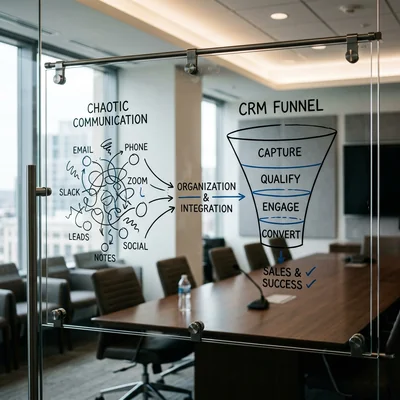
As a company grows, sales chaos builds up quietly: leads come from the website, Instagram, phone, and WhatsApp - while the owner is "somewhere in a chat." Managers call the same client twice, hot leads go cold without follow-up, and the owner learns about a lost deal after the fact. CRM is not trendy software - it is a way to put clients, deals, and tasks in one system and stop losing money at the "lead arrived - lead lost" stage. Below are seven concrete signs that without a CRM you are already paying hidden costs - and it is time to act.
- Sign 1 - leads get lost across channels
- Sign 2 - two or more managers without a shared database
- Sign 3 - follow-ups are regularly forgotten
- Sign 4 - no pipeline or sales forecast for leadership
- Sign 5 - ad spend grows but conversion falls
- Sign 6 - long sales cycle, clients go cold
- Sign 7 - client data in Excel, messengers, and notebooks
Why "it's time" is not about company size
CRM is not only for corporations. The threshold is not a headcount of 100 - it is the moment when sales no longer fit in one manager's head or one spreadsheet. If you spend on ads, hire a second salesperson, or see that some leads "just disappear" - delaying implementation means subsidizing chaos from your marketing budget.
| Situation | Without CRM | With CRM |
|---|---|---|
| 30-50 leads/mo, 1 manager | Excel still works | Can wait if there are no losses |
| 50+ leads/mo or 2+ managers | Duplicates, losses, blind spots | Implement now |
| Ads $1,000+/mo | No channel attribution | CRM + UTM pays for the system |
| Deal cycle 2+ weeks | Clients are forgotten | Tasks and reminders are mandatory |
Rule: if at least three of the seven signs below describe you, CRM will pay off sooner than you think. Average payback at 5-15% conversion growth - 6-18 months.
1. Leads get lost across channels
Website, paid social, messengers, calls to a shared number, offline location - leads arrive in different places. A manager checks Instagram once a day, email when there is time, the site form - if someone reminds them. Some requests never get processed.
How it shows up:
- a client says "I submitted a request yesterday and nobody called back";
- no single list of "new leads today";
- you cannot answer how many leads came in and how many were handled on time.
What CRM gives you: auto-capture from forms, ad and messenger integrations, one pipeline. Every request becomes a deal card with an owner and deadline. Chains can also be set up via business process automation on n8n.
2. Two or more managers without a shared database
Once two or more people sell, personal spreadsheets and chats stop working. One manager tracks a client in Excel, another in Telegram, a third calls the same number without knowing about ongoing talks.
How it shows up:
- clients complain about repeat calls;
- disputes over "this is my client";
- when a manager leaves, the database leaves with them.
What CRM gives you: one contact base, one owner per deal, full touch history in the card. A new hire sees context in minutes, not weeks.
3. Follow-ups are regularly forgotten
"I'll call tomorrow" without reminders turns into silence. It hurts most after sending a quote: the client compares offers while the manager waits for them to reach out.
How it shows up:
- deals stall at "thinking" for weeks;
- no SLA control (reply in 15 minutes, follow-up in 48 hours);
- leadership learns about overdue actions by accident.
What CRM gives you: tasks with deadlines, reminders, reports on overdue actions. A manager opens the system in the morning and sees today's queue, not scrolls through chats looking for "who did I promise to call."
4. No pipeline or sales forecast
The owner asks "how much will we close this month?" and gets "well, seems fine." Without a pipeline there is no forecast, no view of where clients drop off, and no insight into who on the team is not closing.
How it shows up:
- you cannot state "lead to payment" conversion;
- plan vs actual is built manually once a month;
- a broken funnel stage stays hidden until revenue drops.
What CRM gives you: deal stages, amounts in play, close probability, dashboards for leadership. Decisions are made on numbers, not gut feel.
5. Ad spend grows but conversion falls
You increase budget on paid social and search, get more leads - but the share of paying clients does not grow or drops. Without CRM you cannot tie lead source to closed deal: unclear which channel brings money and which brings only noise.
How it shows up:
- CAC rises, ROMI is not calculated;
- no report "leads by UTM - payments by manager";
- marketing and sales argue about lead quality without shared data.
What CRM gives you: "source" field on the card, ad platform integrations, channel reports. You stop paying for leads nobody processes and see where to invest marketing.
6. Long sales cycle - clients go cold
In B2B, real estate, complex services, and large orders, a deal lasts weeks and months. Without a system the client goes to "think about it," the manager switches to hot leads - and contact is lost for good.
How it shows up:
- deals sit on one stage with no movement;
- no touch sequence (call - email - meeting - quote);
- a competitor wins the client during comparison.
What CRM gives you: stages for your cycle, auto-tasks on each transition, reminders N days before deadline. A long deal becomes a managed process, not hope that someone remembers.
7. Client data in Excel, messengers, and notebooks
If a client record is a row in Google Sheets plus chat in personal WhatsApp plus notes on paper, scaling is impossible. Wrong phone numbers, duplicate emails, lost history when a phone changes - daily routine.
How it shows up:
- finding a client takes 5-10 minutes;
- no unified history: "what did we promise them last year";
- backup of the base is "hope nobody deletes the file."
What CRM gives you: structured fields, search, tags, access rights, backups. The database becomes a company asset, not a manager's personal archive.
How many signs mean it's time
| Number of signs | Recommendation |
|---|---|
| 0-1 | A spreadsheet may be enough if the team is not growing |
| 2-3 | CRM pilot for 1-2 managers, free or low-cost plan |
| 4-5 | Roll out to the full sales team, site and telephony integrations |
| 6-7 | Urgent: you lose revenue every month, need a plan in 2-4 weeks |
Do not wait for the "perfect moment." CRM is rolled out iteratively: pipeline and tasks first, then integrations, then automations. For more on what CRM is and when it pays off - see the dedicated article.
When a CRM is not needed or can wait
CRM solves a volume-and-chaos problem, not every business without exception. Hold off on implementation if:
- One manager and a steady flow of clients - fewer than 30-50 requests a month, nothing gets lost, memory and a notebook are enough.
- One-off deals with no repeat sales - no long pipeline, upsells, or follow-up touches worth tracking.
- No resources for rollout and discipline - if nobody will keep deal cards updated, CRM turns into an empty database instead of a tool.
- Your sales model is about to change - no point building a pipeline around a process that will be restructured in a few months.
In these cases a spreadsheet or a simple task list is cheaper. Come back to CRM as soon as at least one of the seven signs above shows up.
Where to start
- Define pipeline stages - how a deal really moves from lead to payment for you.
- Pick a CRM for your scale - amoCRM, Bitrix24, HubSpot, Pipedrive; a basic plan is enough to start.
- Move active deals - not 10 years of history, but what is in play now.
- Connect lead sources - site forms, telephony, messengers.
- Train the team for 1-2 days - without this, CRM becomes "another checkbox form."
Starter budget: $0-50/user/mo on cloud CRM, plus 20-40 hours for setup and migration. Custom site and ERP integration - from $500-3,000 one-time if built-in connectors are not enough.
Summary
Seven signs your business needs a CRM: lost leads, several managers without a shared base, forgotten follow-ups, a blind pipeline for leadership, falling conversion as ads grow, long cycles without reminders, and client data scattered across files. If you see yourself in three or more - delaying means losing deals every month that marketing already paid for.
CRM will not fix a weak product, but it removes chaos that stops good leads from becoming revenue. Start small, measure conversion after 2-3 months - then scale the process.
If you need help with development, AI implementation, or website support for your project - contact me.
Frequently Asked Questions
How many signs are enough to start implementing CRM?
Two or three of seven is already a reason to run a pilot. One sign (for example, only forgotten callbacks) can sometimes be covered with a task app, but "multiple channels + two managers + no pipeline" almost always needs CRM. A critical trigger is paid ads without source tracking: you do not know if marketing pays off.
Can Excel replace CRM?
Short term - yes, with one manager and up to 30-50 active clients without a complex pipeline. Excel has no reminders, access control, site and telephony integrations, conversation history, or real-time reports. Once you have a second salesperson or 50+ leads per month - a spreadsheet costs more than CRM in lost deals.
Which CRM should a small business choose?
Depends on niche and channels. amoCRM, Bitrix24 - popular in CIS, many integrations. HubSpot, Pipedrive - convenient for B2B and English-speaking markets. Selection criteria: lead capture from your channels, mobile app, simplicity for managers, price for the user count you need. Do not buy the "max plan" upfront - start basic for 1-2 months.
How long does CRM implementation take?
Minimum launch (pipeline, 2-3 managers, site form) - 3-7 days. Full rollout with telephony, messengers, database migration, and training - 2-4 weeks. Complex ERP integrations and custom reports - 1-2 months. The main risk is not tech timelines but team resistance: without discipline in keeping cards updated, CRM will not pay off.
When does CRM pay for itself?
Usually 6-18 months with 5-15% growth in lead-to-payment conversion or fewer losses at lead handling. Example: 100 leads/mo, $500 average check, conversion rose from 10% to 12% - that is +$1,000/mo extra revenue vs $200-600/mo CRM subscription. If you lose at least 2-3 deals per month to chaos - the system often pays back in the first quarter.
Terms in this article
CRM — Customer Relationship Management
pipeline — sequence of processing stages
UTM — Urchin Tracking Module
n8n — open-source workflow automation platform
SLA — Service Level Agreement
ROMI — Return on Marketing Investment
CAC — customer acquisition cost
B2B — Business to Business
backup — copy kept for recovery
Bitrix24 — suite with CRM, tasks, chat, and site tools
amoCRM — CRM popular in CIS markets for sales pipelines
HubSpot — CRM and marketing platform for inbound growth
ERP — Enterprise Resource Planning
real-time — processed with minimal delay