Progressive Web App - When You Do Not Need an App and a Site-as-App Is Enough
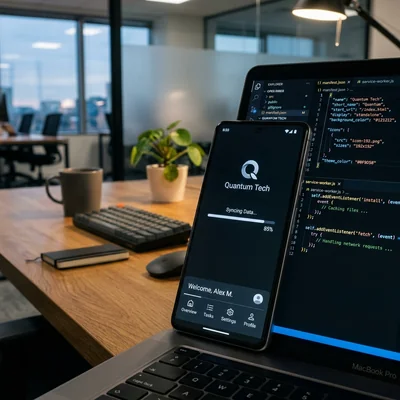
A Progressive Web App (PWA) is a website that can be installed on the home screen, opens almost like a native app, and can work offline or on a weak connection. For many businesses a full App Store and Google Play release is extra months and budget: catalogs, client portals, booking, restaurant menus, and B2B cabinets often solve the job with a PWA built on regular HTML, CSS, and JavaScript. Below - when a “site as an app” is enough, which technologies are required, and where native is still necessary.
- PWA - site + manifest + service worker: icon, fullscreen, cache, sometimes push
- Not a replacement for every app - heavy graphics, deep device access, and hard App Store SLAs stay native
- One codebase - one web version instead of separate iOS/Android teams at the start
- Updates without stores - ship to the server: users get the new version on the next visit
- SEO remains - these are still pages in search, not a closed binary
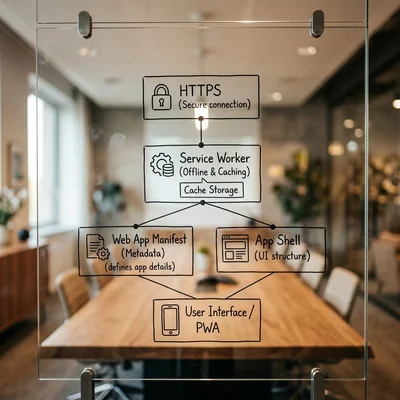
- Starter checklist - HTTPS,
manifest.webmanifest, service worker, responsive UI, and a fast First Contentful Paint
What a PWA Is in Plain Words
PWA is a set of practices and web APIs that make a site behave like an installed application:
- Installs on phone or desktop from the browser (icon, separate window without the usual address bar).
- Opens fast thanks to a cached shell (UI chrome).
- Survives a bad network - shows cached screens or queues actions to “send later.”
- Looks native - splash, theme-color,
display: standalone.
It is not a separate language and not “another framework.” It is your current site, brought up to installability criteria and reliable content delivery. In Chrome, Edge, Safari, and Firefox the basic scenario is mature; nuances remain around push, background sync, and some device APIs.
When a Site-as-App Is Enough
A PWA pays off when the product is essentially a browser UI over data, not a game or a system tool.
Good candidates:
| Scenario | Why a PWA is usually enough |
|---|---|
| Catalog, menu, price list, booking | Content + forms; app stores add little value |
| Client account / B2B portal | Auth, tables, documents, order statuses |
| Internal employee tool | Install on work phones without store publishing |
| Media and feeds (news, blog, docs) | SEO and link sharing matter |
| MVP before marketing a “real” app | Demand check without the cost of two native teams |
If users return several times a week, want a “bank-like” icon, and a stable UX on the subway without network - a PWA meets those expectations without App Store review.
When a PWA Does Not Fit and You Should Plan a Native App Instead
An honest answer beats “PWA will replace everything” marketing - here are the signals that your case is not a PWA case:
- you need hard background tasks, complex Bluetooth / NFC / low-level sensors;
- 3D/AR performance, heavy camera use, and offline games are critical;
- the product must live only in stores (partner showcases, corporate MDM requiring native);
- you need payments and subscriptions strictly via IAP in Apple/Google ecosystems as the main monetization channel;
- the team already runs strong iOS/Android squads, and web is a secondary channel.
A common 2026 compromise: PWA or responsive site for everyone + a native app only where metrics prove demand (retention, mobile traffic share, repeat visits).
What a PWA Is Built From
The minimum without which there is no “progressive” behavior:
1. HTTPS
Service worker and installability require a secure origin. Local localhost is an exception for development.
2. Web App Manifest
A manifest.webmanifest (or JSON) file describes the name, icons (usually 192 and 512), start_url, display, theme colors. Without it the browser will not offer “Install app.”
3. Service Worker
A background script: caches the shell and static assets, serves an offline fallback, sometimes queues POSTs when the network drops. Typical strategies: cache-first for CSS/JS/icons, network-first for API and prices.
4. Responsive and Fast UI
A PWA does not save a slow site. You need responsive layout, image compression, and a reasonable JavaScript bundle. Otherwise people install the “app” once and remove it.
5. Optional: push, Share Target, shortcuts
Push and badges boost retention but complicate consent and notification policy. Manifest shortcuts give quick actions from a long-press on the icon.
Business Impact: Numbers Without Illusions
Compare budget and release cycle, not “trendy / not trendy.”
| Parameter | PWA / site | Native app |
|---|---|---|
| MVP timeline | weeks | often months on both platforms |
| Updates | deploy to server | store review + waiting for users to update |
| Distribution | URL + “add to home screen” | stores, ASO, moderation |
| Search and links | full SEO | limited; traffic often from store and ads |
| Maintenance cost | one frontend | two codebases or cross-platform + web anyway |
Savings are real at hypothesis-check stage and for services where content and forms matter more than hardware access. Savings disappear if you promise a “full native banking feel with complex biometrics and background geo triggers” - there native fits better.
Rollout Checklist for an Existing Site
- Fix base speed and responsiveness - otherwise a PWA only locks in bad UX.
- Ship a manifest and icon set for light/dark themes if needed.
- Register a service worker with a clear cache policy; do not cache personal data without expiration.
- Check installability in Chrome DevTools / Lighthouse (PWA category).
- Test Safari (iOS) - install via “Add to Home Screen”; push and some APIs differ from Android.
- Instrument install analytics and paths “opened from icon” vs “came via link.”
- Do not break indexing - content must stay available as normal URLs; PWA is an overlay, not an SPA dead-end without SSR/prerender.
- Describe offline behavior honestly - what works without network, what does not.
On website builders capabilities depend on the platform: some enable PWA with a switch, others need your hosting and custom code. The principle is the same - manifest + worker + HTTPS.
Common Mistakes
- Calling any responsive site a PWA without a service worker and manifest.
- Caching API prices and stock “forever” - users see yesterday’s price list.
- Promising “App Store quality” while cutting UX and performance budget.
- Ignoring iOS: testing only Android Chrome.
- Shipping a heavy SPA without indexing and losing search traffic.
- Aggressive push on first visit - users block notifications and the brand.
Bottom Line
A Progressive Web App is a pragmatic path when you need “icon on the screen + fast return visits,” not a full native product for both platforms. For catalogs, portals, booking, and internal tools, a site-as-app is often enough. For games, deep hardware, and store-centric monetization - plan native. Start with HTTPS, a manifest, a service worker, and speed; the rest is iteration on retention metrics, not hype.
If you are unsure where to start the conversation with a vendor, answer just two questions: how often does a customer come back to the service, and does it need deep access to phone hardware (camera, sensors, Bluetooth)? That is usually enough to tell a PWA task from a native-app task.
If you need help with development, AI implementation, or website support for your project - contact me.
Frequently Asked Questions
How does a PWA differ from a regular mobile site?
A regular responsive site opens in a browser tab. A PWA adds installability (icon, standalone window), a service worker for cache and offline, and a manifest with app metadata. Visually it may be the same design, but delivery and return-visit model are closer to an application.
Can you publish a PWA in the App Store and Google Play?
Google Play is relatively friendly to Trusted Web Activity / wrappers around PWAs. The App Store is stricter: a plain “site in a shell” is often rejected without clear native value. For most businesses the main PWA channel is the browser and “Add to Home Screen”; stores are a separate product with different requirements.
Does a PWA work fully offline?
Rarely fully. Usually the shell, previously opened pages, and static assets are available offline. Live prices, accounts, and payments need a network. A good PWA honestly shows what is unavailable and, if needed, queues actions until connectivity returns.
Do you need a separate domain or subdomain for a PWA?
A separate domain is not required. What matters more is a stable origin (scheme + host + port), a correct start_url, and service worker updates that do not conflict with an old cache. Teams sometimes put the app on app.example.com, but that is an organizational choice, not a spec requirement.
Where to start if the site is already on WordPress, Tilda, or a custom stack?
Check whether the platform ships a manifest and service worker out of the box. If not - add static manifest files, a minimal shell worker, and icons; on a custom stack this is usually one sprint. Then measure Core Web Vitals, test install on Android and iOS, and set an API cache policy. Do not start with push: first make install fast and reopen stable.
Terms in this article
PWA — Progressive Web App
app store — store of apps for a platform
B2B — Business to Business
worker — background job processor
MVP — Minimum Viable Product
fallback — backup path used when the primary option fails
retention — keeping users/customers over time
frontend — client-side UI of a site or app
Lighthouse — Chrome audit for performance, accessibility, and SEO
SPA — Single Page Application
SSR — Server-Side Rendering
Core Web Vitals — Google metrics for loading, interactivity, and visual stability