CRM and Automation - n8n or Python or Native Integrations
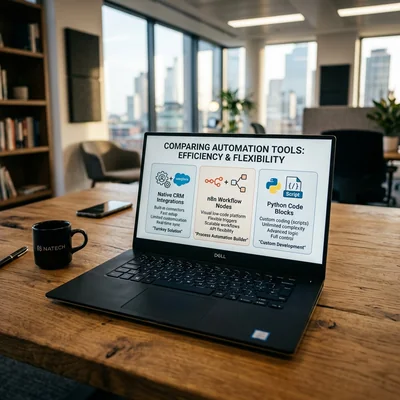
When CRM is already in place, the next step is automation: a site lead becomes a card at once, order status notifies the manager, an invoice goes to ERP, a ping goes to Telegram. The question is not whether you need it, but with what you connect the services. Three working paths - native CRM integrations, no-code/low-code tools like n8n, and custom Python. Below - when each tool pays off, where savings are illusory, and how to build a stack without years of technical debt.
- Native integrations - fastest when the scenario is standard and covered by the vendor
- n8n - flexible orchestrator between services without heavy development
- Python - when you need complex logic, volume, unique APIs, or control
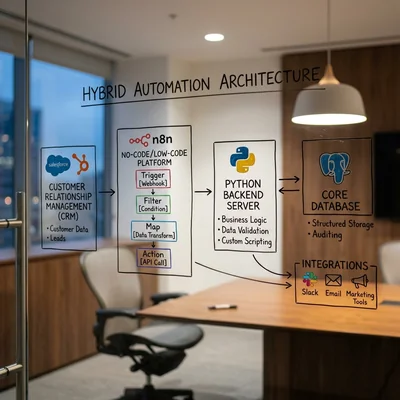
- Hybrid - often the best TCO: native + n8n for edges, Python for the core
- Mistake - scripting everything while ignoring built-in CRM robots
Why CRM Needs Automation
CRM without automation quickly becomes a card catalog that managers fill in when they remember. Automation covers the routine:
- capturing leads from site, ads, messengers;
- routing (who takes the deal, SLA, escalation);
- sync with site, warehouse, 1C/ERP, POS;
- notifications to client and team;
- reports and event triggers (abandoned cart, no activity for N days).
If you are unsure whether to adopt a system at all - first check 7 signs it is time to implement CRM. If CRM is already chosen (for example after comparing Bitrix24, amoCRM, and HubSpot) - the next layer is integrations and robots.
Important: automation does not replace process. First describe the scenario on paper (trigger → condition → action → exception), then pick the tool.
When CRM Automation Can Wait
Not every company needs it right now:
- Lead flow is small, and managers physically keep up with every request by hand - the savings from automation will not cover the cost of building and maintaining it.
- The process is not stable yet - the pipeline, statuses, and owners change weekly. Lock down the process first, then automate it, or you will keep rewriting robots to chase every experiment.
- There is no internal owner - someone to check logs, fix a scenario after the CRM's API changes, and answer for incidents. Without that, even native robots turn into a black box.
- The budget covers launch only, not upkeep - both n8n and Python need ongoing attention: updates, monitoring, response to failures.
If at least two of these describe you, start with a manual process and native CRM robots, and come back to n8n/Python once the routine becomes measurably expensive.
Three Approaches: What It Means in Practice
| Approach | Essence | Strengths | Weaknesses |
|---|---|---|---|
| Native integrations | CRM marketplace, webhooks, robots, vendor workflows | Fast start, support, fewer failure points | Hard limits, rarely covers odd cases |
| n8n (and peers) | Visual workflows between APIs | Flexibility, self-host, hundreds of connectors | Needs hosting and a process owner |
| Python | Scripts, services, queues, workers | Any logic, tests, scale, security | Development and support cost more |
Peers in the same class as n8n - Make, Zapier, Activepieces. The choice logic is the same: ready connectors + visual pipeline vs code.
Native CRM Integrations: When They Are Enough
Almost every mature CRM has:
- robots / automation inside the pipeline (stage change → task, email, tag);
- an app marketplace (telephony, WhatsApp, email, forms);
- webhooks and REST API out of the box;
- sometimes a no-code process builder (as in Bitrix24).
Choose native if:
- the scenario is standard (form → deal, call → card, stage → email);
- the needed link exists in the CRM catalog with decent reviews;
- the team is small, almost no IT;
- vendor support and predictable updates matter.
Do not expect miracles if:
- you must glue 3-5 systems with conditional logic (if A and not B, then C, else D);
- data volume is high, with dedup, queues, retries;
- CRM has no connector for your channel (local POS, internal ERP, custom site);
- CRM API plan limits cut your volume.
Native robots are the best start. Many companies cover 60-80% of needs with them and push the edges outside.
n8n: Orchestration Without Heavy Code
n8n is an open-source workflow engine: nodes (HTTP, CRM, sheets, queues), branches, schedules, webhooks. It works well as glue between CRM, site, Telegram, Google Sheets, email, and 1C via API/proxy.
When n8n Wins
- connecting services faster than writing a microservice;
- scenarios change every week - easier to edit a graph than redeploy code;
- you need self-host (data stays out of someone else's SaaS like Zapier);
- the team is strong in product/analytics, not full-time backend.
Limits
- complex business logic in the UI bloats and is hard to test;
- without monitoring, workflows fail silently after an API change;
- at high volume (tens of thousands of events/hour) code + queue is more reliable;
- you still need a person who owns the schemas and credentials.
Typical n8n + CRM Scenarios
- Lead from Tilda/custom form → dedup → deal in CRM → Telegram alert.
- Status change in CRM → update status on site / in the store.
- Hourly: new paid orders → Sheets row + manager task.
- Client wrote to a bot → find contact in CRM → create a ticket.
Cost ballpark: self-host n8n - server from $5-20/mo + 8-40 hours to set up first scenarios. SaaS peers (Zapier/Make) often run $50-300+/mo at real volumes.
Python: When You Need Control
Python is the custom integration path: scheduled (cron) scripts, FastAPI/Flask services, Celery/RQ, webhook listeners. Use it when a "catalog connector" no longer holds.
When Python Is Justified
- non-standard scoring, routing, directory sync rules;
- large volumes needing queues, idempotency (duplicate protection), retries, DLQ (a queue for messages that failed processing);
- security: audit, secrets, a perimeter without third-party no-code SaaS tools;
- several CRMs/regions, one middleware;
- you need tests, CI/CD, code review like a normal product.
Downsides
- longer time-to-first-automation;
- support depends on a developer (bus factor);
- full TCO is often higher than a "script in one evening" demo suggests.
Budget Ballpark (First Year)
| Level | What Is Included | Ballpark |
|---|---|---|
| Minimum | 1-2 webhooks, simple sync | $800-3,000 |
| Medium | service + queue + 3-5 systems | $3,000-12,000 |
| Complex | middleware, monitoring, SLA, ERP | $12,000-40,000+ |
This echoes the broader picture of CRM implementation cost: licenses are only part of it; integrations often cost more than the subscription.
How to Choose: A Simple Algorithm
- List 5-7 scenarios (not "we want automation" - concrete trigger and result).
- For each scenario ask: is there a native CRM solution? If yes - take it.
- Glue the rest with n8n if logic is linear/branchy and volume is moderate.
- Move to Python if rules, scale, security, or a unique API demand it.
- Budget monitoring: alerts on webhook failure, error logs, manual retry.
- Document the owner: who fixes things when CRM updates its API.
Practical Matrix
| Situation | Recommendation |
|---|---|
| Form → deal, email on stage | Native CRM robots |
| Site + CRM + Telegram + Sheets | n8n |
| Stock/price sync with ERP | Python (or native ERP connector if present) |
| Dedup 50k contacts by rules | Python |
| 2-week pilot | Native + 1-2 n8n flows |
| Enterprise, audit, 99.9% SLA | Python/service + sometimes n8n on the edges |
Hybrid Is Normal in 2026
The real landscape is rarely "only n8n" or "only code":
- inside CRM - stage robots, tasks, emails;
- n8n - fast bridges between SaaS;
- Python - ERP sync core, heavy jobs, analytics.
You do not pay a developer for every "send Telegram message" trigger, and you do not break n8n on a million warehouse transaction rows.
Common Mistakes
- Automating chaos: bad pipeline statuses → robots multiply junk.
- Keeping API secrets in open nodes without vault/env.
- Duplicating the same thing three ways (CRM robot + Zapier + script) with no source of truth.
- Skipping idempotency: one webhook twice = two deals.
- Saving on logs: in six months nobody remembers why a deal appeared "from nowhere".
Conclusion
Native integrations are the first choice for standard scenarios. n8n is the best speed/flexibility compromise between services. Python wins when logic, volume, or control matter more than a visual builder. In most 2026 projects the winner is a hybrid: native for core CRM process, n8n for the periphery, code for heavy sync.
Start with one measurable scenario (e.g. "site lead → deal in under 1 minute"), measure conversion and manager time - then scale automation.
If you need help with development, AI implementation, or website support for your project - contact me.
Frequently Asked Questions
Can you manage with native CRM integrations only?
Yes, if your scenarios are standard and covered by the CRM marketplace/robots. For a small sales team this is often the best TCO. When if/else appears across 3+ systems, webhook limits bite, or there is no connector - you will need n8n or code.
n8n or Zapier/Make - what to pick for CRM?
For data in your own perimeter and cost control, self-hosted n8n is more common. Zapier/Make start faster in the cloud but get expensive at operation volume. The tool is secondary: clear scenarios, webhook owners, and failure monitoring matter more.
When is Python clearly better than n8n?
When you need complex rules, high volume, queues and retries, strict audit, or a "messy" API that needs heavy response processing. Also prefer Python if the integration is part of the product (not one-off glue).
How much does CRM automation cost at the start?
Ballpark: native - often included in CRM setup ($0-2,000 on top). n8n - server + 1-2 weeks of setup ($500-4,000). Python service - from ~$800 for simple webhook links to $10,000+ for ERP middleware. Exact numbers depend on system count and API quality.
How do you keep automation intact when switching CRM?
Keep glue outside the cards: external workflows and middleware should talk to CRM through a stable layer (your API adapter or clear webhook contracts). The less business logic is locked only into the old CRM's robots, the cheaper migration is. Document every external flow before the move.
Terms in this article
CRM — Customer Relationship Management
ERP — Enterprise Resource Planning
no-code — building apps with visual tools, little or no programming
low-code — building apps mostly visually, with some custom code
technical debt — shortcuts in code that cost extra work later
n8n — open-source workflow automation platform
orchestrator — component that coordinates steps/services
TCO — Total Cost of Ownership
POS — Point of Sale
pipeline — sequence of processing stages
webhooks — HTTP callbacks when events happen
Zapier — SaaS that connects apps with no-code automations
REST API — HTTP API that exposes resources via URLs and verbs
open-source — software with publicly available source code
glue — integration layer that connects systems without owning business logic
full-time — full work capacity
backend — server-side logic, APIs and data layer
Tilda — block-based website and landing page builder
idempotency — repeating a request does not change the outcome again
FastAPI — modern Python framework for APIs
SaaS — Software as a Service
middleware — code layer between request and business logic
code review — peer check of a change before it is merged
Celery — Python task queue for background jobs
bus factor — how many people must leave before a project stalls
CI/CD — Continuous Integration / Continuous Delivery
SLA — Service Level Agreement
retry — automatic repeat of a failed request or job
self-hosted — software you run on your own servers