AI in CRM: Chatbot, Lead Scoring, RAG over a Knowledge Base

AI in CRM in 2026 is no longer a “website joke bot” - it is three working scenarios: a chatbot that writes leads and replies into the deal card; lead scoring that ranks requests by probability of payment; and RAG over a knowledge base that answers managers and clients from policies, price lists, and case studies without inventing facts “from thin air.” If you already have a CRM, AI boosts speed and quality - it does not replace the pipeline. Below - what to connect first, what it costs, and where the real ROI is.
- Chatbot - 24/7 qualification, CRM write-back, escalation to a human manager
- Lead scoring - prioritize “hot” leads, spend less time on empty chats
- RAG - answers from your docs, not generic model phrasing
- Start - one channel + one pipeline, then scale
- Risk - bad CRM data makes any AI useless
- Effect - 30-60% less time on first-touch handling with clean data
Why AI in CRM Matters Now
While leads arrive in the evening and on weekends, the manager replies in the morning - and the lead is already with a competitor. While the pipeline holds 200+ active deals, the seller spends hours asking “who is hotter.” While answers to common questions live in PDFs and people’s heads, newcomers reply slower and with mistakes.
AI closes these three pains if the CRM is the single source of truth: contact, deal, chat history, stage, amount, source. Without order in the card, the model amplifies chaos.
| Scenario | What AI does | What stays with humans |
|---|---|---|
| Chatbot | Takes the dialog, qualifies, writes to CRM | Hard objections, pricing, closing |
| Scoring | Estimates deal probability | Priority choice and strategy |
| RAG | Finds answers in the knowledge base | Review of critical promises to the client |
Chatbot in CRM: Not Small Talk - First Line of Sales
A good CRM chatbot does five things:
- Catches the lead on Telegram, WhatsApp, the website, Instagram.
- Asks 3-7 qualifying questions (budget, timeline, task, region).
- Creates or updates a deal in CRM with fields and tags.
- Assigns a manager or creates a task on a “hot” signal.
- Passes context - chat history must live in the card, not in an employee’s personal messenger.
What the Bot Should Ask
A short script beats a long “survey”:
- who you are / company;
- what the task is (buy / implement / consult);
- budget range or volume;
- desired timeline;
- preferred contact channel.
If the bot also captures UTM and ad source - that is already a base for scoring and analytics.
Typical Chatbot Mistakes
- No escalation: the client gets angry, the bot replies with a template.
- Duplicate cards: the bot creates a new contact every time.
- Answers “from the model” without hard boundaries (discounts, delivery dates, legal promises).
- Chat never reaches CRM - the manager works blind.
Rule: the chatbot may collect and route. Promising price and timeline without an approved price list - no (that is RAG + manager territory).
Lead Scoring: Whom to Call First
Lead scoring rates a lead with points or a probability. The goal is not a “magic number” but a queue: the manager starts the morning with the top 20, not a random sort.
Signals to Use
| Signal | Example | Weight (guide) |
|---|---|---|
| Behavior | Opened the proposal, visited pricing, returned to the site | High |
| Fit | Matches segment, budget, region | High |
| Source | Brand ads vs cold parse | Medium |
| Engagement | Replied to the bot in 5 minutes, left a phone number | High |
| Negative | “Just checking price,” spam pattern, wrong segment | Penalty |
You can start with rules (if-then) via built-in CRM robots, then move to an ML model on closed-deal history. For a team of up to 10 managers, rules often deliver 80% of the value at 20% of the complexity.
How to Roll Out in 2 Weeks
- Export 3-6 months of deals: won / lost.
- Find 5-8 features that separate payment from rejection.
- Build a simple score (0-100) and a “priority” column in the pipeline.
- Train the team: “A first, then B, cold leads go to nurture.”
- After 30 days compare conversion before/after by segment.
Scoring is useless if managers do not fill fields and close deals without a loss reason - data discipline first, then AI.
RAG over a Knowledge Base: Answers from Your Documents
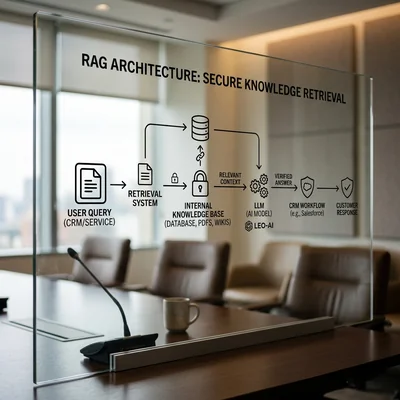
RAG means “first find fragments from your corpus, then generate the answer.” The model does not invent a price list from the open web: it relies on your policies, FAQs, proposals, and product guides.
In a CRM context, RAG is useful for:
- answers to the manager inside the card (“how to process a refund on plan X”);
- helping the chatbot with approved wording;
- an internal support and onboarding assistant for newcomers;
- drafting a client email with a quote from the current policy.
What to Put in the Knowledge Base
- PDFs and Notion/Confluence product docs;
- price table and terms (with version dates!);
- sales scripts and FAQ;
- winning cases and objections;
- internal SLAs, warranties, limits.
Every document needs: version, owner, update date. Otherwise RAG will confidently quote an outdated discount.
Simple RAG Architecture for CRM
- Split documents into chunks.
- Embeddings + vector index (or the CRM’s built-in AI search).
- Manager / bot query → top-k fragments.
- Model answer only from retrieved text + source citation.
- Log unanswered questions - a backlog to improve the knowledge base.
Without “not found” logs, the knowledge base rots within a quarter.
How to Connect Chatbot, Scoring, and RAG
A solid 2026 setup:
- Lead writes → chatbot qualifies and writes fields to CRM.
- The system computes scoring and sets priority / a task.
- Manager opens the card → RAG assistant suggests an answer from the base.
- After the call, result and reason are logged → scoring learns (or rules tighten).
AI should not “live outside the CRM” - it accelerates the same pipeline you configure when choosing Bitrix24, amoCRM, or HubSpot.
Cost and Where to Start
| Stage | Timeline | Budget guide |
|---|---|---|
| Chatbot on 1 channel + CRM write-back | 1-3 weeks | $500-3,000 |
| Rule-based scoring | 1-2 weeks | $300-1,500 |
| RAG over 50-200 documents | 2-4 weeks | $1,500-8,000 |
| ML scoring + tuning | 1-2 months | $3,000-15,000+ |
Launch order: clean data → chatbot on the main channel → scoring → RAG. Otherwise you automate mess.
2-4 week pilot: one lead source, one team, three metrics - first response speed, share of qualified leads, conversion to the next stage.
Common AI-in-CRM Mistakes
- Expecting a “smart CRM out of the box” without training on your data.
- Letting the bot answer legally and financially sensitive questions without RAG and approved copy.
- Treating scoring as a manager replacement instead of a prioritization tool.
- Not logging escalations and knowledge-base gaps.
- Connecting five models and three platforms before one pipeline is stable.
When AI in CRM Is Not Worth Deploying
- Lead flow is small and irregular - if inquiries are one-off and managers already reply without delay, a chatbot and scoring won't pay back the setup and upkeep.
- CRM data is messy - duplicate contacts, empty fields, deals closed with no reason logged. Clean up the cards first, or AI will just automate the chaos.
- Every deal is unique and doesn't fit a pattern - bespoke projects with a highly individual sales cycle score and answer worse than a steady stream of similar leads.
- No one owns the system - a chatbot and RAG need an owner who keeps the knowledge base and scripts current; without that, answer quality drops fast.
- A legally sensitive niche without approved wording - if every client answer needs manual legal review, automating the first line of contact is risky without an approved policy base.
Conclusion
Chatbots, lead scoring, and RAG are the three most practical AI-in-CRM scenarios for 2026. The chatbot speeds capture, scoring focuses the seller, RAG keeps answers accurate from your expertise. Start with one channel and clean fields in the card: without data, AI only dresses chaos nicely. With data - it is a measurable gain in speed and conversion.
If you need help with development, AI implementation, or website support for your project - contact me.
Frequently Asked Questions
Do you need a separate AI platform, or is built-in CRM AI enough?
Built-in is often enough for a chatbot and simple scoring - if the CRM already covers channels and robots. A separate platform (or Python/n8n + LLM) is needed when you want your own RAG over a large corpus, custom scoring models, and integrations outside the ecosystem. Start native; go custom when pain is clear.
How is RAG better than a plain chatbot with a long prompt?
A bot with a long prompt mixes up facts and does not know price updates. RAG first retrieves current fragments from your base and only then writes the answer. For prices, SLAs, refunds, and policies this is a must-have layer, not a nice-to-have.
Can you roll out scoring without deal history?
Yes, with rules: segment, budget, source, reply speed, field completeness. History is needed for ML and precise calibration. At the start, rules plus a manager reviewing top leads deliver fast results without data scientists.
Is it safe to let AI access client data in CRM?
Only with an access policy: which fields go to the model, personal data masking, corporate/on-prem LLM when requirements are strict, ban on training public models on your chats. Legal and security review - before live traffic, not after an incident.
What to implement first: chatbot, scoring, or RAG?
If you lose leads at night and on weekends - chatbot. If managers drown in volume - scoring. If answers have many errors and onboarding is slow - RAG. Universal SMB order: chatbot on the main channel → scoring → RAG over top documents.
Terms in this article
CRM — Customer Relationship Management
chatbot — conversational bot interface
lead scoring — ranking leads by likelihood to buy
knowledge base — structured repository of answers/docs
RAG — Retrieval-Augmented Generation
pipeline — sequence of processing stages
ROI — Return on Investment
UTM — Urchin Tracking Module
if-then — conditional if → then rule
ML — Machine Learning
Confluence — Atlassian wiki for team documentation
embeddings — numeric vectors that capture text meaning
chunks — small text pieces indexed for retrieval
top-k — keep only the k most likely next tokens when sampling
Bitrix24 — suite with CRM, tasks, chat, and site tools
HubSpot — CRM and marketing platform for inbound growth
amoCRM — CRM popular in CIS markets for sales pipelines
must-have — required capability or requirement
on-prem — software hosted in your own infrastructure
LLM — Large Language Model
SMB — Small and Medium Business