AI Agent Security: Access, Secrets, and Human-in-the-Loop

An AI agent can search your CRM, write emails, trigger commands, update tasks, and call external APIs. That is exactly why AI agent security must be designed before launch, not after the first incident. The most common failures are overly broad access, secrets leaking into prompts and logs, and no human-in-the-loop when the agent is allowed to act without human confirmation.
- Access - the agent should only see the systems and fields it actually needs
- Secrets - API keys, tokens, and passwords must not live in prompts, git, or ordinary logs
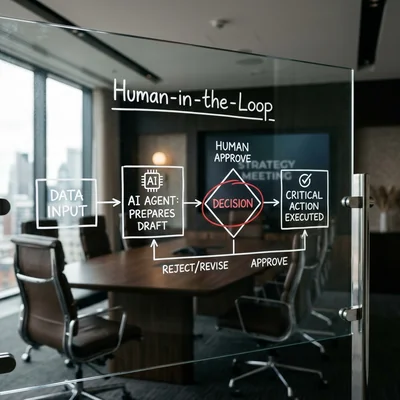
- Human-in-the-loop - critical actions are safer with human approval
- Core principle - give the agent the minimum rights it needs, not "everything just in case"
- Business outcome - lower risk of data leaks, wrong actions, and expensive rollbacks
Why AI Agents Are Riskier Than a Regular Bot
A regular chatbot often just answers questions. An AI agent goes further: it reads documents, calls tools, may edit database records, create invoices, send client messages, and run code. The more autonomy it has, the more expensive its mistakes become.
Typical risks:
- the agent gets access to CRM, email, knowledge base, and payments at once;
- personal data, commercial terms, and internal instructions land in one context;
- an employee pastes a real token into the system prompt "just for testing";
- logging stores full user input together with secrets;
- the agent sends a message, deletes a record, or runs the wrong operation without review.
Takeaway: agent security is not only about "protecting the model." It is about access control, secret handling, logging, and approval flows.
Access: Minimum Privilege Instead of Full Access
The most common mistake is giving the agent an admin account because "it is faster to integrate that way." Convenient at the start, dangerous in production.
How to Limit Access
- Split roles - a support agent should not see finance reports, and an analytics agent should not message clients.
- Limit data scope - not the whole CRM, only the needed entities, fields, and projects.
- Separate read and write - start read-only, add write rights only where justified.
- Use service accounts - do not rely on personal employee logins.
- Set review cycles - permissions should be revisited regularly, not granted forever.
| Approach | What happens | Risk |
|---|---|---|
| Admin access for the agent | The agent can see and change everything | Maximum damage if it fails |
| Read-only for required data | The agent can analyze without breaking the process | Lower risk, easier audit |
| Role + scope + approve | The agent is constrained and writes only after approval | Best balance of speed and control |
Where Mistakes Hurt Most
- CRM - contacts, deals, notes, phone numbers, email;
- email and messengers - risk of external sending;
- file storage - contracts, reports, personal data;
- financial services - invoices, payments, refunds;
- terminal tools - commands, deploys, migrations, data deletion.
If one agent needs access to five systems, ask whether this should instead be several narrow agents with separate responsibilities.
Secrets: Where Leaks Usually Happen
Secrets rarely leak through a "super hack." More often, teams place them where they never belonged:
- in
.envcommitted to git by mistake; - in the system prompt for convenience;
- in screenshots, tickets, and docs sent to contractors;
- in request and response logs;
- in test JSON files and developer notebooks.
Basic Rules for Secret Handling
- Store secrets in a secret manager or protected environment variables, not in prompt text.
- Inject tokens at the tool layer, not the model layer.
- Mask sensitive fields in logs - keys, passwords, cookies, card numbers, access tokens.
- Separate dev, stage, and prod - different keys, scopes, and limits.
- Prepare revocation and rotation - if a secret leaks, replace it fast without breaking the whole system.
Good practice: the model knows it has a tool like create_invoice() or search_crm(), but it never sees the actual API key behind that tool.
Human-in-the-Loop: When a Person Should Confirm
Not every agent action needs manual approval. But there is a class of operations where human-in-the-loop saves more money than it costs in extra time.
Approval is worth enabling for:
- messages sent to clients on behalf of the company;
- changes to price, discount, contract terms, or deal status;
- deletion of data, files, and records;
- server commands and deployments;
- any action with legal or financial consequences.
Practical Control Modes
| Mode | How it works | When it fits |
|---|---|---|
| Full autopilot | The agent decides and acts on its own | Only for low-risk internal tasks |
| Draft mode | The agent prepares an action and a human presses confirm | Support, sales, documents |
| Two-step approval | Dangerous operations require a separate approve step | Money, prod, deletion, permissions |
For most SMBs, the best model is an agent that collects data and prepares drafts, while a person confirms the external or critical step.
When You Can Keep the Setup Simple
Not every project needs the full set of roles, approve steps, and key rotation. A simplified setup - basic access limits and logging without masking - is usually enough if:
- the agent works with public or anonymized data (site FAQ, product info) and never writes to production systems;
- it has no access to money, customer personal data, or production infrastructure;
- a mistake by the agent carries no legal, financial, or reputational consequences.
If even one of these points does not hold, skipping the controls usually costs more than setting them up.
Logs, Audit, and Incident Response
If the agent makes a mistake, the business needs to know:
- what input it received;
- which tool it called;
- what data the tool returned;
- who approved the action or why it ran automatically;
- how quickly the result can be rolled back.
That is why it helps to keep:
- tool-call logs;
- user and session IDs;
- the prompt or agent-config version;
- confirmation records;
- masked error logs without exposed secrets.
Important: logging everything without masking can itself become a leak source. Audit matters, but not at the cost of storing passwords and tokens in plain text.
A Safer AI Agent Architecture
Here is a practical minimum setup that fits many projects:
- A separate service account per agent or per role.
- Narrow tools with limited rights instead of one universal "do everything" tool.
- Secret manager / env instead of keys in prompts and repositories.
- Approve step for external, financial, and destructive operations.
- Logs and monitoring with masking of sensitive data.
- Key rotation and access reviews on a schedule.
What to Check Before Launch
- the agent is not running as admin unless absolutely necessary;
- there are no real tokens or passwords in the repository;
- test data does not contain live personal data;
- critical actions cannot run without confirmation;
- every tool has a clear read/write boundary;
- there is a documented way to disable the agent during an incident.
Common Implementation Mistakes
- One agent for everything - support, finance, and admin in one place.
- Secrets in prompts - because "it is easier to debug."
- No read-only stage - the agent gets write and delete rights from day one.
- No human-in-the-loop - until the first expensive mistake happens.
- No audit trail - after an incident, nobody can reconstruct what happened.
The more autonomous the agent is, the more you need to think like a security engineer, not only an LLM integrator.
Summary
AI agent security comes down to three things: minimum access, proper secret handling, and human-in-the-loop for risky actions. If you limit the scope up front, keep keys away from the model, add approvals, and maintain auditability, AI speeds up the team instead of creating a new incident surface.
As a business owner, you do not need to configure this yourself - but you should require clear answers on these points from your vendor or developer before launch, not after an incident.
Planning to deploy an AI agent into CRM, support, or internal workflows - contact me.
Frequently Asked Questions
How is an AI agent different from a regular chatbot from a security perspective?
An AI agent usually does more than answer. It can call tools, read databases, edit records, send emails, and trigger operations. That raises the stakes: the problem is no longer only a wrong answer, but a wrong action in a real system.
Can an internal agent have admin access?
Usually it should not. Internal use does not remove the risk of mistakes, leaks, or bad tool calls. Even for internal agents, a separate service account, read-only where possible, and narrow write permissions are safer.
Where is the right place to store API keys for agent tools?
In a secret manager or protected environment variables. Do not keep them in the system prompt, markdown docs, source code, or ordinary logs. The model should call a tool, while the key is injected outside the model context.
Does every agent action need human-in-the-loop?
No. Search, drafting, classification, and safe analytics can often run automatically. But outbound messages, money movement, data deletion, status changes, and server commands are much safer with human confirmation.
What should you do if a secret already appeared in a log or prompt?
Treat it as compromised. Revoke or rotate the key, remove it from logs and repositories, inspect connected systems, and fix the root cause in the prompt template, logger, test file, or development workflow.
Terms in this article
CRM — Customer Relationship Management
human-in-the-loop — human approval before risky agent actions
API keys — secret tokens that authenticate API callers
chatbot — conversational bot interface
knowledge base — structured repository of answers/docs
system prompt — hidden instructions that steer the model for a task
production — live environment serving real users
audit trail — verifiable history of actions and changes
LLM — Large Language Model