Multi-Agent Systems: Orchestrator + Subagents in Practice

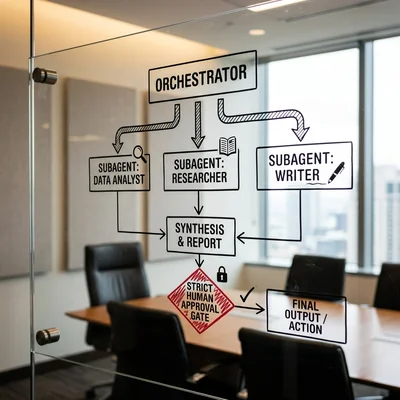
A single AI agent handles a narrow task well. When the scenario grows - tickets, documents, code, CRM, support - one “universal” agent starts mixing roles, bloating context, and getting more expensive on every step. A multi-agent system solves this differently: an orchestrator takes the goal and coordinates the work, while subagents run narrow roles with separate tools and instructions. Below - how this works in practice, when the pattern pays off, and which mistakes kill a pilot.
- Orchestrator - plan, routing, limit control, and result assembly
- Subagents - narrow roles: research, code, review, writing, CRM
- Context - each agent gets only what it needs for its step
- Control - human-in-the-loop on critical actions
- Start - 2-4 roles and one measurable scenario, not an “agent zoo”
- Risk - infinite loops, tool races, and blurred ownership
What a Multi-Agent System Is
A multi-agent system is an architecture where several AI agents jointly solve a task under a coordinator. Unlike one agent with a “fat” prompt for every case, roles are split:
| Role | What it does | What it does not do |
|---|---|---|
| Orchestrator | Understands the goal, decomposes, calls subagents, assembles the answer | Does not touch foreign tools without need |
| Subagent | Executes a narrow subtask with its own tools | Does not replan the whole project |
| Human | Approves risks: money, deletion, publish, client emails | Should not micromanage every tool call |
The same idea is already familiar from workflow automation: there is a dispatcher and workers. The difference is that steps and branches are partly chosen by an LLM, not only by hard if-then rules.
Why Split Orchestrator and Subagents
One agent with access to every API looks convenient - and quickly becomes a problem:
- Context bloats. One dialog mixes logs, draft emails, code chunks, and CRM exports - the model loses focus.
- Cost grows. Every extra token in the “shared” chat is paid on every turn.
- Permissions are too wide. An agent that both writes code and emails the client is riskier than a narrow worker.
- Harder to debug. When everything lives in one loop, it is unclear what broke: the plan, the tool, or the wording.
Role separation gives you:
- A narrow system prompt per subagent - fewer “off-role” hallucinations.
- A separate tool set - a researcher cannot accidentally delete a CRM deal.
- Parallelism - several subagents can work at once (search + draft + fact-check).
- Observability - logs show who was called, with what input, and with what output.
Baseline Design: Orchestrator + Subagent Pool
A practical minimal skeleton:
User / trigger
        │
        ▼
   Orchestrator
   (plan, routes, limits)
        │
   ┌────┼────┬────────┐
   ▼    ▼    ▼        ▼
 Research  Coder  Reviewer  Writer
   │    │    │        │
   └────┴────┴────────┘
        │
        ▼
   Summary + artifacts
   (+ human approval on risk)
What the Orchestrator Does
- accepts the goal and constraints (time, token budget, bans);
- chooses which subagents to call and in what order;
- passes each a compressed brief, not the whole raw chat;
- enforces step limits and stops loops;
- assembles the outcome in the format the business needs (report, diff, deal card).
The orchestrator can be “thin” (routing only) or “thick” (plans and replans itself). For business, a thin orchestrator + strong narrow subagents usually wins: easier to test and cheaper to keep under control.
Typical Subagents in Business and Dev Scenarios
| Subagent | Job | Tools (example) |
|---|---|---|
| Research | Gather facts, docs, competitors | search, RAG, browser, MCP |
| Analyst | Tables, metrics, conclusions | SQL, Excel/Sheets, report warehouse |
| Coder | Patches, scripts, tests | repo, terminal, CI |
| Reviewer | Quality and risk checks | linters, checklists, diff |
| Writer | Emails, specs, release notes, FAQ | templates, brand voice base |
| CRM-agent | Cards, tasks, status | CRM API, webhooks |
| Ops | Deploy, alerts, routine runbooks | SSH/API, monitoring (with hard guardrails) |
You do not need every role on day one. A pilot usually needs only an orchestrator + 2-3 subagents.
When the Pattern Actually Pays Off
Multi-agent design makes sense when at least two of these are true:
- the task is composite (several skills: search + synthesis + action);
- you need different access rights to systems;
- context volume is large - one agent “does not fit” without quality loss;
- you need a separate reviewer, not the author’s self-check;
- the scenario repeats and can be described as a role-based pipeline.
Practical Examples
- Support: orchestrator → Research (knowledge base/RAG) → Writer (reply) → human approves send.
- Leads and CRM: qualification → enrichment → write to CRM → manager task; critical fields checked by a human or a rule.
- Development: orchestrator in Cursor / agent runtime → explore subagent → coder → reviewer; deploy only after approve.
- Content and GEO: topic research → writer → fact-check subagent → publish by checklist.
- Operations: parse inbound email → classify → actions via n8n/API → escalate exceptions to a human.
If the task is a simple if-then (“form submitted → create deal”), multi-agents are overkill: better use native automation or n8n.
When a Multi-Agent System Does Not Fit
- The process is linear and predictable, with no real branching - a plain automation scenario (n8n, a standard workflow) is cheaper and more reliable.
- Volume is low and the cost of an error is low - manual work or a single agent will do without the overhead of orchestration.
- Nobody on the team can maintain an audit log or triage failures - without that, a multi-agent system turns into an uncontrolled black box.
- There is no budget or will to cap steps and tokens - the chain of calls can end up costing more than the manual work it replaces.
- You need a hard, predictable SLA right now - LLM routing adds variability exactly where guaranteed stability is required.
How to Design Roles in One Day
A short pragmatic checklist:
- Describe the happy path on paper: input → 3-6 steps → output artifact.
- Name roles by verbs: “find”, “check”, “write”, “write to CRM” - not “smart agent #3”.
- For each role, fix: input, output (schema/JSON), tools, bans.
- Decide who orchestrates: LLM planner or deterministic graph (often a hybrid: graph + LLM inside nodes).
- Insert human-in-the-loop where the cost of error is high.
- Set stop conditions: max steps, max cost, timeout, “if unsure - escalate”.
A Subagent Contract Beats a “Pretty Prompt”
A good contract:
- input:
{ task, constraints, sources[] } - output:
{ status, summary, artifacts[], confidence, needs_human } - ban: “do not invent URLs”, “do not change prod”, “do not email the client directly”
Then the orchestrator can reliably merge answers and decide whom to call next.
Orchestration Patterns That Work
| Pattern | How it works | When to use |
|---|---|---|
| Sequential pipeline | A → B → C | Stable process, few branches |
| Dispatcher | Orchestrator picks 1 subagent per request type | Many inbound request types |
| Parallel + merge | Several research runs, then a summary | Facts from multiple sources |
| Debate / reviewer | Author and critic | Quality of text, code, decisions |
| Hierarchy | Orchestrator → team leads → workers | Large programs with subprojects |
For SMB, pipeline + dispatcher is usually enough. “Agent debates” look great in demos and get expensive in production without a hard token budget.
Control, Security, and Cost
A multi-agent system without guardrails quickly becomes an expensive chaotic bot.
Minimum must-haves:
- Separate API keys and permissions per role (least privilege).
- Limits: steps, tokens, parallelism, timeouts.
- Idempotent actions (a retry must not create 5 deals).
- Audit log: who → with what input → which tool → which output.
- Secrets outside the prompt: vault, env - not “paste the token into the system message”.
- Human approval for irreversible actions: payments, deletion, mailings, prod deploy.
On cost, count not “model price” but chain price: orchestrator × N subagent calls × retries. Sometimes one strong call with good context is cheaper than five weak ones that pass JSON around.
Common Implementation Mistakes
- Creating 10 subagents “for later” without one working scenario.
- Giving everyone the same access to all tools.
- Passing the full orchestrator log to a subagent instead of a short brief.
- Not limiting loops - orchestrator and reviewer argue forever.
- Treating multi-agent design as a substitute for process: without a clear Definition of Done, the system imitates busywork.
- Confusing it with vibe coding: “let the agents figure it out” without roles and contracts - a path to tech debt.
How to Start a 2-3 Week Pilot
- Pick one scenario with a measurable KPI (response time, error rate, manager minutes).
- Build orchestrator + two subagents (e.g. research + writer, or coder + reviewer).
- Freeze input/output contracts and an escalation checklist for humans.
- Run 20-50 real cases and label failures by type.
- Only then add a third role or parallelism.
Tooling can be an agent framework (LangGraph, Crew-like setups, IDE runtime), a bridge to n8n for deterministic edges, or custom Python. Role architecture matters more than the framework logo.
Bottom Line
Orchestrator + subagents is a working pattern when the task is larger than one skill and you need different rights, contexts, and quality checks. The strength is not the number of agents - it is clear roles, narrow tools, and hard stops. Start with a small loop and a measurable scenario: that is how a multi-agent system becomes a speed lever, not an expensive autonomy theater.
If you need help with development, AI implementation, or website support for your project - contact me.
Frequently Asked Questions
How is a multi-agent system different from one agent with a long prompt?
One long-prompt agent tries to be “everything at once” in one context and one permission set. A multi-agent design splits roles: the orchestrator coordinates, subagents execute narrowly. That is easier to control, cheaper in tokens on long chains, and safer because each worker has a smaller access surface.
Do you always need an LLM orchestrator?
No. Often a deterministic graph (state machine / workflow) is better, with the LLM living inside nodes. An LLM orchestrator pays off when input is unstructured and the route cannot be hard-coded in advance. Hybrid is the most common production choice.
How many subagents are optimal at the start?
Usually 2-4. One orchestrator plus research and writer is already a working loop for content and support; coder and reviewer - for development. More roles make sense only after the pilot hits KPI consistently and logs are readable.
How do you avoid burning money on tokens?
Compress briefs, forbid “retell the whole dialog”, cache the stable system prompt, cap max steps, parallelize only where it reduces wall-time - not for show. Measure cost of the end-to-end scenario, not one pretty demo reply.
Do you still need a human in the loop if agents are “smart”?
Yes, on risks. A model does not remove responsibility for money, personal data, legal wording, and production. Human-in-the-loop is not an architecture weakness - it is the condition under which business will allow agents near real systems at all.
Terms in this article
CRM — Customer Relationship Management
orchestrator — component that coordinates steps/services
human-in-the-loop — human approval before risky agent actions
workflow automation — chaining steps and tools without manual handoffs
if-then — conditional if → then rule
LLM — Large Language Model
chunks — small text pieces indexed for retrieval
system prompt — hidden instructions that steer the model for a task
worker — background job processor
observability — logs, metrics and traces to understand system behavior
RAG — Retrieval-Augmented Generation
MCP — Model Context Protocol
webhooks — HTTP callbacks when events happen
pipeline — sequence of processing stages
GEO — Generative Engine Optimization
n8n — open-source workflow automation platform
orchestration — coordinating multiple services or workflow steps
overhead — extra cost beyond useful work
audit log — chronologically recorded trail of who did what
happy path — main success scenario without errors or edge cases
SLA — Service Level Agreement
timeout — max wait before aborting
production — live environment serving real users
guardrails — rules and filters that keep AI outputs safe and on-policy
idempotent — safe to repeat without duplicate side effects
SMB — Small and Medium Business
API keys — secret tokens that authenticate API callers
definition of done — checklist that marks work complete
tech debt — shortcuts in code that cost extra work later
KPI — Key Performance Indicator