Context Engineering: What Replaced Prompt Engineering
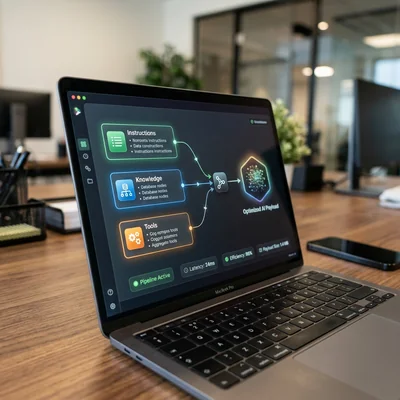
For a long time, “working with AI” meant one thing: write a clever prompt. In 2025-2026 that is no longer enough. Models call tools, pull documents through RAG, keep session memory, and run in agent stacks. What decides quality is not wording elegance, but context engineering - the discipline of designing exactly what the model sees on every step: instructions, facts, history, permissions, and limits. Below - how it replaced classic prompt engineering and how to apply it in products and internal workflows.
- Prompt - instruction text; context - the full model input on a step
- Shift - from “find a magic phrase” to “assemble the right data package”
- Layers - system, retrieval, memory, tools, task state, policies
- Goal - stability, fewer hallucinations, token-cost control
- Practice - narrow relevant context beats “stuff everything in the window”
- For business - process and architecture beat one lucky ChatGPT chat
What Prompt Engineering Is - and Where It Hit a Wall
Prompt engineering is the craft of phrasing LLM requests to get the right style, format, and behavior: roles (“you are a senior analyst”), few-shot examples, chain-of-thought, rigid output templates.
It works well for:
- one-off chat tasks;
- draft generation;
- teaching teams “how to ask the model”;
- prototypes without access to internal data.
The limit shows up quickly:
| Situation | Why a prompt alone is not enough |
|---|---|
| You need live prices and policies | The model does not know your price list without retrieval |
| Long dialog / agent with tools | The window fills with noise; focus dies |
| Multiple roles and systems | One “universal” system prompt gets muddy |
| Risk and compliance control | Policies and personal data masking are not a “nice phrase” |
| API cost | Extra tokens every turn = direct loss |
The prompt remains part of the system. It stopped being the main quality lever.
What Context Engineering Is
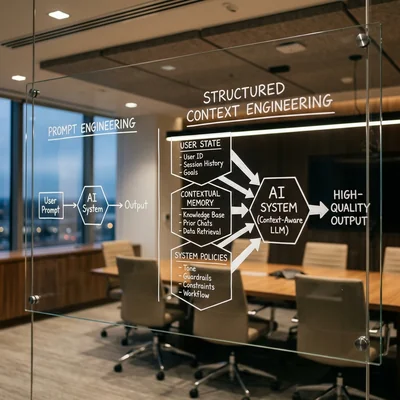
Context engineering is designing the full input package for the model on every call: what goes in system, what to pull from a knowledge base, what to take from memory, which tool results to show, what to drop, and what to forbid.
If a prompt is “how to ask,” context is “in what information environment the model answers.”
Typical context layers:
- Instructions and role - system prompt, answer policy, JSON/Markdown format.
- User task - current request and the minimum needed history.
- Retrieved knowledge - chunks from wiki, CRM, code, FAQ via search/RAG.
- State - funnel stage, deal id, document version, previous-step result.
- Tool observations - API, SQL, browser, MCP tool outputs.
- Constraints - “do not promise a discount,” “do not quote personal data,” “escalate to a human.”
A context engineer thinks like a pipeline designer, not like a copywriter of lucky phrases.
How Context Replaced “Prompt Magic”
| Was (prompt-centric) | Now (context-centric) |
|---|---|
| Long catch-all system prompt | Narrow prompt + dynamic input assembly |
| Paste the whole PDF into chat | Retrieval: only relevant chunks |
| “Remember the entire dialog” | Compression, summarization, selective memory |
| One model - one chat | Agents, orchestrator + subagents, separate windows |
| Quality = wording craft | Quality = relevance, freshness, layer order |
| Debug the prompt text | Debug the source: retrieval miss, tool fail, overflow |
The paradigm shift does not mean prompts “died.” They became one layer next to retrieval, memory, tools, and policies - like a SQL query next to a schema and indexes.
Why the Shift Accelerated in 2025-2026
Several factors landed together:
- Agents and tools - the model acts, not only replies; context must include tool results.
- Long windows - you can put more in, but more without selection = noise and higher cost.
- Enterprise data - without RAG and document versioning, answers are useless for business.
- Multi-agent setups - each subagent needs its own narrow brief, not a shared full log.
- Cost and latency - a context engineer optimizes token budget like a backend optimizes payloads.
So practice moved: from “prompt engineer” toward platform/ML eng and product people who build context pipelines.
Practice: Assembling Context for One Step
A working checklist before an LLM call:
- Step goal - what the output must be (JSON, decision, draft).
- Minimum instructions - no duplicating what tools and data already provide.
- Retrieval - top-k fragments with metadata (source, date, version).
- History - only relevant turns or a short summary, not the whole thread.
- Tool outputs - raw but truncated; no secrets or unused fields.
- Token budget - hard limit; on overflow prioritize: instruction → task → facts → history.
- Policies - what the model must not assert without a human.
Support example:
[system] role + bans + format
[retrieved] 3 knowledge-base chunks (with date)
[state] ticket id, customer plan, language
[user] current question
Not like this:
[system] 4 pages of “be helpful...”
[history] 80 messages in full
[files] the entire Notion workspace
[user] question
Context vs Prompt: What to Fix When the Answer Is Bad
| Symptom | Often fixed by prompt | Often fixed by context |
|---|---|---|
| Wrong tone / format | Yes: tighten the instruction | Rarely |
| Made-up facts | “Do not invent” helps weakly | Retrieval + refuse without a source |
| Stale content | Add a date to the prompt | Document versions + freshness filter |
| Model “forgot” the task | Repeat it at the end | Keep goal/state as a separate block |
| Expensive and slow | Cut politeness fluff | Cut history and retrieval noise |
| Dangerous action | “Be careful” | Remove the tool / require human-in-the-loop |
Debug rule: data and selection first, wording second.
What This Means for Business
If you put AI into CRM, support, internal search, or coding agents:
- Budget shifts from “prompt courses for managers” to corpus quality, indexing, logging, and access policies.
- Quality KPIs: retrieval hit-rate, share of answers “with a source,” cost per scenario, human escalations.
- Prompt playbooks still help staff for manual chats - but product-grade AI is built as a context pipeline.
- Choosing long context vs RAG vs fine-tuning is a separate architecture call; see the options breakdown.
Owner-level maturity test: can you explain which sources the model used for yesterday’s customer case? If not - you still have prompt engineering in chat, not context engineering in a system.
When This Is Not Worth It (Yet)
Context engineering is not a default first move for every business:
- One-off internal experiments - a careful prompt in chat is enough; a dedicated pipeline won’t pay off.
- Data isn’t in order yet - if policies, price lists, and the knowledge base are scattered or stale, fix the sources first instead of building a pipeline around them.
- Low volume, cheap mistakes - if AI use is occasional and a wrong answer costs little, the architecture’s payoff won’t cover the effort to build it.
- Early hypothesis testing - at the “do we even need AI here” stage, validate demand with a simple prompt first, then invest in infrastructure.
Signal to invest: when request volume, the number of scenarios, and the cost of errors grow together - that’s when a context pipeline pays off faster than manually patching prompts.
Common Mistakes
- Feeding the model “everything you have” because the window is long.
- Keeping one giant system prompt instead of dynamic assembly.
- Not versioning RAG documents - confident but outdated answers.
- Passing a subagent the full orchestrator log instead of a short brief.
- Hiding secrets and personal data in context “because it is convenient for the model.”
- Confusing better wording with fixing a data hole.
Bottom Line
Prompt engineering taught us how to talk to models. Context engineering teaches how to build systems where the model gets exactly the information, tools, and limits needed for the step - no more, no less. In 2026, enterprise AI quality is set not by a “magic phrase,” but by a pipeline: fact selection, memory, tools, policies, and token budget. The prompt remains part of that pipeline - but it is no longer the main character.
If you need help with development, AI implementation, or website support for your project - contact me.
Frequently Asked Questions
How does context engineering differ from prompt engineering?
Prompt engineering focuses on instruction text. Context engineering covers the full model input: instructions + retrieved facts + history + state + tool results + bans. The prompt is a layer; context is the system that assembles that layer and the others.
Is prompt engineering still needed in 2026?
Yes, as a skill and as a layer. Clear instructions, formats, and few-shot examples still matter. But for products and agents, one “perfect prompt” will not stabilize quality without data selection, memory, and policies.
Is this the same as RAG?
No - broader. RAG is one way to fill context with corpus knowledge. Context also includes dialog memory, workflow state, tool outputs, roles, and safety policies. RAG is a typical important component, not the whole discipline.
Where should a company start?
Pick one scenario (support, policy search, sales assistant). Lock down sources of truth, add retrieval with document dates/versions, compress history to a summary, and log “what went into context.” Tune the prompt after the data stops lying.
How do I know the problem is context, not the model?
If switching models (GPT → Claude → Gemini) barely changes the error, but swapping a document / top-k / history trim does - the problem is input assembly. Change providers only after the context pipeline is transparent and measurable.
Terms in this article
RAG — Retrieval-Augmented Generation
prompt engineering — crafting instructions so the model answers reliably
retrieval — finding relevant context before generation
chain-of-thought — step-by-step reasoning before the final answer
LLM — Large Language Model
few-shot — prompting with a few examples
system prompt — hidden instructions that steer the model for a task
knowledge base — structured repository of answers/docs
chunks — small text pieces indexed for retrieval
CRM — Customer Relationship Management
pipeline — sequence of processing stages
MCP — Model Context Protocol
orchestrator — component that coordinates steps/services
latency — delay before a response arrives
backend — server-side logic, APIs and data layer
ML — Machine Learning
top-k — keep only the k most likely next tokens when sampling
human-in-the-loop — human approval before risky agent actions
hit-rate — share of requests served from cache
long context — model that can take a very large prompt in one go
fine-tuning — additional training of a model on domain data