Data Security When Using AI in a Company
Companies increasingly connect AI to CRM, support, marketing, analytics, and internal knowledge bases. As the upside grows, so does the risk: prompts start to include personal data, commercial terms, client correspondence, contracts, and internal documentation. Problems usually come not from "evil AI" but from weak access control, logging, integrations, and employee rules. Below is a practical look at how businesses can use AI without unnecessary leaks and legal surprises.
- the main risk is not the model itself, but what data is sent to it;
- danger comes not only from outside attacks, but also from employee and contractor mistakes;
- public AI services are not always suitable for sensitive information;
- businesses need not only NDAs, but also access rules, masking, and auditing;
- secure AI is a combination of technology, processes, and provider contracts.
Why This Has Become Critical
When AI is used "here and there," the risk seems small: an employee asks a model to draft an email, a manager gets a reply template, a marketer generates text. In reality, prompts quickly start to contain:
- client names, phone numbers, emails, and order history;
- contracts, invoices, prices, and discounts;
- proposals and internal policies;
- code fragments, tokens, access keys, and configs;
- HR data, resumes, and employee evaluations.
If that data goes into the wrong service, remains in logs without control, or becomes visible to too many people, the company no longer has an "AI experiment" but a real information-security incident.
Which Data Is Especially Risky to Send to AI
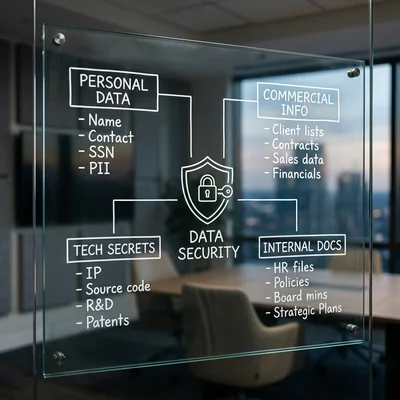
Not all data is equally sensitive. For business, it helps to split it into at least four groups:
| Category | Examples | Risk |
|---|---|---|
| Personal data | Name, phone, email, address, passport details | Legal violations and customer claims |
| Commercial information | Pricing, margin, contract terms, client base | Loss of competitive advantage |
| Technical secrets | Source code, API keys, architecture, passwords | Service and infrastructure compromise |
| Internal documents | Policies, reports, financial models, correspondence | Reputational and operational damage |
A Typical Mistake
An employee copies a client request, a contract snippet, or a sales table into a public chat "to work faster." The model helps, but the company has already transferred data into an external system it does not fully control. Even if the provider promises protection, without a contract, retention policy, and access limits this remains a weak point.
Main Risks of Using AI in a Company
1. Leakage Through Prompts
The most common scenario is sensitive data ending up directly in the request text. This happens in sales, support, HR, accounting, and development. Without clear rules, employees send more information to AI than necessary.
2. Logs and Request History
Even if the model's answer is safe, request logs may store the original data in full. The problem appears when that history is accessible to multiple teams, contractors, or is retained longer than needed.
3. Excessive Access Rights
If an AI bot is connected at once to CRM, email, a knowledge base, and ERP, but permissions are not limited, any failure or bad prompt can expose too much information. For AI, "give access to everything and sort it out later" is especially dangerous.
4. Provider and Cross-Border Transfer
Many models and APIs operate in another jurisdiction. This affects personal data, data-processing agreements, retention periods, and subprocessors. For some use cases this is not a ban, but it does require a deliberate legal and technical setup.
5. Hallucinations With Business Consequences
The problem is not only leakage. If AI confidently invents contract terms, promises a client a non-existent discount, or misclassifies a request, the business suffers direct loss. So AI security is also about quality control of decisions, not only about database protection.
What a Business Should Do Before Launch
Security appears not after the first incident, but at the design stage. A practical minimum looks like this:
- Describe the use cases. Who sends data to AI, why, where the data comes from, and where the answer goes.
- Separate data by sensitivity. What can go to a public model, what only to a corporate one, and what must not be sent at all.
- Limit access. Bots and employees should see only the amount of data required for a specific task.
- Set up masking. Remove names, document numbers, payment details, tokens, and other unnecessary identifiers from prompts.
- Check provider contracts. DPA, log retention, training on your data, processing region, and subprocessors all matter.
Practical Protection Measures
Policy for Employees
You need a short, clear instruction, not an abstract 40-page document. Employees should know:
- which data must not be pasted into public AI;
- when a corporate tool is required;
- when AI answers must be reviewed by a human;
- whom to notify about an error or suspicious response.
Technical Measures
For most companies, these baseline measures help:
- SSO and role-based access control;
- logging of AI interactions;
- automatic masking of personal data;
- blocking transfer of secrets and keys;
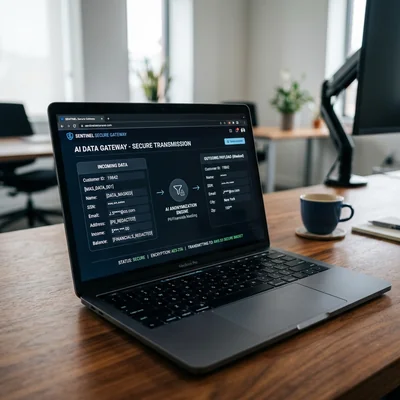
- a separate gateway or middleware before the external API;
- limits on exporting data from internal systems.
Organizational Measures
Even good technology does not work without process. Assign responsibility for:
- approving AI use cases;
- granting access to new employees and contractors;
- periodic review of roles and permissions;
- incident review and policy updates;
- training the team to work with AI safely.
When You Need Corporate AI Instead of Public AI
A public service is not suitable for every task. A corporate setup is better when:
- the workflow contains personal data of clients or employees;
- AI gets access to contracts, financials, or internal analytics;
- answers influence pricing, deal terms, hiring, or legally significant processes;
- you need control over logs, roles, storage region, and disabled training on company data.
For sensitive tasks, companies often use a middleware layer: it cleans the request, hides unnecessary fields, logs the interaction, and only then sends de-identified data to an external model or to an internal RAG setup.
When Not to Overbuild
A full corporate setup isn't necessary for everyone right away. If AI is used only occasionally (draft text, ideas, public information with no client or financial data), and the team is small with prompts that don't reveal specific people or deals, a basic employee policy plus a ban on clearly sensitive categories is enough. Masking, a dedicated gateway, and logging start to matter once AI connects to real systems holding personal or commercial data, or once usage and user numbers start growing - that's when the risk stops being theoretical.
Checklist Before Rollout
Before production, it helps to verify:
- whether there is a data map showing what goes into AI;
- whether sensitive fields are masked;
- whether roles and access are limited;
- whether required provider agreements are signed;
- whether log-retention periods are defined;
- whether there is a button or route for human escalation;
- whether an incident owner is assigned;
- whether employees know the baseline rules.
Summary
Data security when using AI in a company is not a ban on neural networks, but risk management. Business benefits from AI when it clearly understands which data may be transferred, who gets access, where logs are stored, and who is responsible for the outcome. If AI is deployed without those rules, higher speed quickly turns into leakage risk, fines, and operational mistakes. It is much cheaper to build in access control, masking, and human review from the start than to deal with the consequences later.
Need a secure AI implementation for a website, bot, or internal process - contact me.
Frequently Asked Questions
Can employees use ordinary ChatGPT or Claude for work tasks?
Only in scenarios where no sensitive data is involved and clear internal rules exist. If employees paste client requests, contracts, pricing, or internal documents into public AI, that creates leakage risk and legal exposure. For regular work with company data, a corporate setup or a dedicated middleware layer is a better choice.
Which data should not be sent to AI without separate review?
First of all, personal data, contracts, financial information, API keys, passwords, commercial terms, and internal correspondence. Even if the model is needed "just for a draft," sending such data without masking and an approved process creates unnecessary risk. The easier it is to identify a person, client, or system from the data, the more cautious the workflow should be.
Is it enough to sign an NDA with employees and contractors?
No. An NDA helps, but it does not replace technical protection. If an employee can access every system and there are no limits on copying data into AI, paperwork alone does not solve the problem. You still need roles, logging, export restrictions, and a clear AI-usage policy.
How can we reduce leakage risk if AI is already connected to CRM and the knowledge base?
Start with least-privilege access: AI should receive only the fields and documents required for the task. Then add personal-data masking, interaction logging, role restrictions, and manual review in critical scenarios. A strong practice is to place a separate layer between internal systems and the model so requests are filtered and extra data cannot be sent out.
Does a small company need a separate AI security owner?
Yes, at least as a role, not necessarily as a separate job title. Someone must be responsible for access rules, scenario approval, provider management, log review, and incident handling. In a small business this can be a project lead, CTO, or external contractor, but the responsibility should be explicitly assigned.
Terms in this article
CRM — Customer Relationship Management
API keys — secret tokens that authenticate API callers
retention — keeping users/customers over time
knowledge base — structured repository of answers/docs
ERP — Enterprise Resource Planning
DPA — Data Processing Agreement
baseline — reference measurement before changes
middleware — code layer between request and business logic
SSO — Single Sign-On
RAG — Retrieval-Augmented Generation
production — live environment serving real users
human review — manual check by a person
NDA — non-disclosure agreement