Tilda for Business: What It Is, Who It Fits, and How Much It Costs

Tilda is a cloud website builder (SaaS): pages are assembled from ready-made blocks in a visual editor, with hosting and SSL included. For business it is a fast path to a landing page, company site, promo page, or simple catalog without a development team. Tilda's strength is design and launch speed; its weakness is the platform ceiling for complex stores, heavy integrations, and aggressive SEO. Below - what Tilda is in plain terms, who it fits in 2026, what ownership really costs, and when WordPress, Wix, or custom development is the better deal.
- Tilda fits - ad landing pages, service websites, events, product MVPs, catalogs up to a few hundred SKUs
- Plans - Free ($0), Personal (~$10/mo billed yearly), Business (~$20/mo, up to 5 sites)
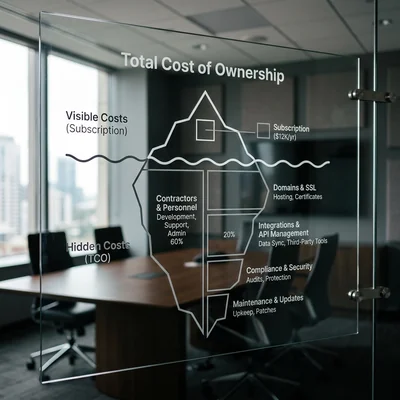
- Hidden costs - domain, contractor, Zero Block design, payment fees, integrations
- Strengths - blocks, Zero Block, forms, payments, HTML export on Business
- Weaknesses - vendor lock-in; store, SEO, and custom logic weaker than a CMS
- When to leave - complex client portals, ERP, thousands of SKUs, strict speed/SEO needs
What Tilda Is in Plain Language
Tilda Publishing is a "website in the browser" service. You pick a template or build a page from blocks (text, gallery, form, pricing, cart), publish on a *.tilda.ws subdomain or your own domain - and the site already runs on Tilda's servers. You do not buy hosting separately, install a CMS, or update PHP the way you would with WordPress.
Technically Tilda is a proprietary no-code / low-code platform: layout is generated inside the editor. For a business owner that is a plus (less tech overhead) and a minus (dependence on the plan and platform rules). How Tilda sits among other builders - in the overview of Tilda, Nethouse, Wix, Webflow.
Zero Block and How Tilda Differs from "Just a Template"
| Tool | What it gives the business |
|---|---|
| Block library | Fast landing pages without a designer |
| Zero Block | Freeform layout "like Figma," pixel-accurate design without code |
| Forms / Leads | Leads to email, CRM, Google Sheets, messengers |
| Catalog / Store | Products, checkout, simple orders on Business |
| Code export | HTML/CSS export on Business - partial layout takeaway |
Zero Block is why many agencies and freelancers pick Tilda over rigid builders: visually the site can look more premium than a typical Wix or Nethouse template.
Who Tilda Is For
Ideal scenarios
- Ad landing pages - one or a few pages, lead form, analytics pixels, block-level A/B.
- Service websites - clinic, lawyer, studio, B2B: 5-20 pages, portfolio, reviews, contacts.
- Events and promos - conference, campaign, product pre-launch for 1-3 months.
- Education and digital products - course, webinar, lead magnet with payment.
- MVP and niche tests - validate demand before investing in WordPress or custom.
- Small catalog - dozens to hundreds of SKUs without complex warehouse or ERP.
When Tilda is a poor fit
- Complex business logic - subscriptions, multi-step portals, RBAC, B2B rule calculators.
- Heavy integrations - two-way sync with ERP / accounting, custom backends.
- Large e-commerce - thousands of SKUs, complex discounts, marketplace logic; look at Shopify or WooCommerce instead.
- Aggressive SEO - thousands of URLs, fine HTML control, Core Web Vitals on your own stack.
- Compliance - strict data residency and code-audit requirements.
If 2-3 items from the second list are already on a 12-month horizon - plan migration early or compare stacks in Tilda vs WordPress vs Django.
How Much Tilda Costs in 2026
Total cost of ownership is platform plan + domain + contractor work + operating fees (payments, email).
Tilda plans (USD, approx. from the official price page)
| Plan | Annual billing | Month to month | Sites | Key points |
|---|---|---|---|---|
| Free | $0 | $0 | 1 | Tilda subdomain, limited blocks, platform branding |
| Personal | ~$10/mo | ~$15/mo | 1 | Custom domain, full block library, forms |
| Business | ~$20/mo | ~$25/mo | up to 5 | Store, members/courses, code export |
| Business 10-30 | higher | higher | 10-30 | For agencies and multi-project networks |
Local currency totals depend on FX and promotions - always recheck tilda.cc/pricing.
What the plan does not include
| Item | Rough range | Note |
|---|---|---|
Domain .com etc. |
$10-20/year | Connected in site settings |
| Contractor "landing on Tilda" | $300-1,500 | Template + copy; complex Zero Block costs more |
| Multi-page corporate site | $1,000-5,000+ | Design, copy, several landings |
| Integrations (CRM, webhooks) | $100-800+ | n8n, Zapier, contractor API work |
| Payment fees | 2-4%+ | Depends on the payment provider |
| Content and photography | $200-2,000+ | Often the biggest hidden budget |
| SEO and analytics | $300-2,500 | Goals, meta, content |
Minimum yearly TCO (total cost of ownership) for a simple DIY landing: Personal or Business (~$120-300) + domain. Realistic budget with a contractor: $500-3,000 to launch + subscription.
Tilda Capabilities for Business
What the platform covers out of the box
- Design - hundreds of blocks, responsive layout, animation, Zero Block.
- Lead gen - forms, quizzes, pop-ups; spam controls on paid plans.
- Payments - payment systems for products and services (limits by plan).
- Catalog - product cards, cart, order statuses for a simple store.
- Integrations - email, Telegram, popular CRMs, Google Analytics / ad pixels.
- Multilingual - separate pages or projects per language (not a magic translate button).
- HTML/CSS export on Business - useful for partial migration or handing off layout.
Limits teams hit most often
- Store - fine for a small assortment; warehouse, complex promos, and wholesale price lists hit the ceiling fast.
- Speed and SEO - usually enough for landings; for large content projects control is weaker than on your own hosting.
- Team workflows - collaboration exists, but it is not Git or full CI/CD.
- Vendor lock-in - leaving means rebuilding; even code export does not move forms, store, and platform logic one-to-one.
Tilda or an Alternative: Quick Fork
| Need | Common pick | Why |
|---|---|---|
| Landing in 3-7 days, strong visuals | Tilda | Blocks + Zero Block |
| Universal site + app market | Wix | Many apps, global market |
| Store with growing SKUs | Shopify / WooCommerce | E-commerce-centric stack |
| Blog + flexibility + own hosting | WordPress | Plugins, portability |
| Portal, API, unique processes | Django / custom | Full code ownership |
Rule of thumb: if the site is a showcase and lead engine, Tilda is often optimal. If it is the core of sales and processes for years - compare TCO with WordPress and custom early.
Checklist Before Launching on Tilda
- Site goal - leads, sales, event, or brand (one primary metric).
- Plan - Personal for one landing; Business for store, several projects, or export.
- Domain and email - your domain + mailbox on that domain (not only
@gmail). - Forms → CRM - where leads land and who owns follow-up.
- Analytics - goals, pixels, privacy / cookie consent.
- Content - copy, photos, offer and prices before polishing design.
- Plan B - what you do if in a year you need a portal, ERP, or 5,000 products.
Bottom Line
Tilda for business is a fast, visually strong way to launch a site without a developer: landings, company pages, promos, and a small catalog. Platform pricing is relatively low (about $10-25/mo plus domain), but real ownership almost always includes a contractor, content, and integrations.
Before you pay for a plan, answer three questions:
- do you need a lead channel or a long-term sales platform;
- will Tilda's store and forms cover the next 12-24 months;
- is there budget for migration if the business outgrows the builder.
If answers favor speed and design - start on Tilda. If ERP, a complex portal, or a large catalog is already visible - look at WordPress, Shopify, or custom and do not accumulate technical debt on a builder.
If you need help with development, AI implementation, or website support for your project - contact me.
Frequently Asked Questions
Can I use Tilda for free with my own domain?
Not on Free. The free plan is for testing and learning: a Tilda subdomain, limited blocks, and platform limits. To connect your own domain, remove Free restrictions, and run serious lead/payment flows, you need at least Personal (~$10/mo billed yearly) or Business if you need a store and multiple projects. The domain is paid separately at a registrar.
Is Tilda good for an online store?
Yes for a small assortment - dozens or hundreds of products, standard payment and shipping, no complex warehouse. The Business plan includes a store module and payments. For thousands of SKUs, wholesale rules, accounting sync, and omnichannel, Shopify or WooCommerce is usually better. If catalog and orders are the core of the business - not a "landing add-on" - a builder becomes a bottleneck quickly.
What is Zero Block, and does a business owner need it?
Zero Block is Tilda's freeform layout editor: elements sit on a canvas, not only as ready-made sections. A business owner does not have to learn it - the block library is enough. Zero Block matters when you need a unique visual brand (agency look, non-standard landing). Zero Block projects usually cost more than assembling library blocks; demand project access and a clear page structure from the contractor.
Can I move a Tilda site to WordPress or another stack?
Yes, but not in one click. Business includes HTML/CSS export, yet forms, store, dynamic features, and platform integrations do not migrate automatically. Content is moved manually or with scripts, design is often rebuilt, and 301 redirects are mandatory. Typical migration budget for a landing/company site is $1,500-5,000; stores and large sites cost more. Plan the move before you accumulate hundreds of pages only on Tilda.
Tilda or Wix - what should a small business choose?
Tilda - if you care about visuals, landings, and Zero Block, and want fast ad-page launches. Wix - if you need a more universal builder with a large App Market, booking apps, and global templates. Both create vendor lock-in; for growing e-commerce also compare Shopify, for content flexibility - WordPress. Deeper alternatives - in the posts on website builders and Wix.
Terms in this article
Tilda — block-based website and landing page builder
SaaS — Software as a Service
landing pages — pages built for conversion goals
Zero Block — Tilda freeform block editor for custom layouts
vendor lock-in — hard to leave a vendor without costly rewrite
CMS — Content Management System
ERP — Enterprise Resource Planning
no-code — building apps with visual tools, little or no programming
low-code — building apps mostly visually, with some custom code
Webflow — visual website builder with hosting and CMS
CRM — Customer Relationship Management
B2B — Business to Business
e-commerce — online selling of goods or services
Core Web Vitals — Google metrics for loading, interactivity, and visual stability
MVP — Minimum Viable Product
data residency — requirement to keep data in a specific country/region
RBAC — Role-Based Access Control
Zapier — SaaS that connects apps with no-code automations
n8n — open-source workflow automation platform
DIY — Do It Yourself
lock-in — hard to leave a vendor or stack without costly rewrite
CI/CD — Continuous Integration / Continuous Delivery
app market — marketplace of apps/extensions
technical debt — shortcuts in code that cost extra work later
canvas — visual editor canvas for flows or layouts