When It Is Time to Leave Tilda: 7 Signs Your Business Needs Its Own Website
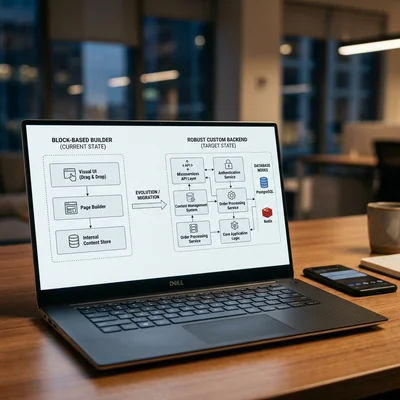
Tilda is excellent for getting started: you can quickly build a landing page, showcase, or simple catalog without a developer. But a growing business often hits the website builder's ceiling - in integrations, SEO, speed, access rights, and the cost of changes. Below are seven practical signs that it is time to move from Tilda to your own website (often Django/Python or WordPress + custom development), how to distinguish “we are tired of the builder” from a real need, and how to migrate without losing traffic.
- Tilda is suitable - for a landing page, MVP, local service, or simple content website
- It is time to move - when your product, sales, or operations become more complex than block templates
- 7 signs - integrations, SEO, load, roles, store, technical debt, economics
- Your own website - not “prettier,” but control over the stack, data, and logic
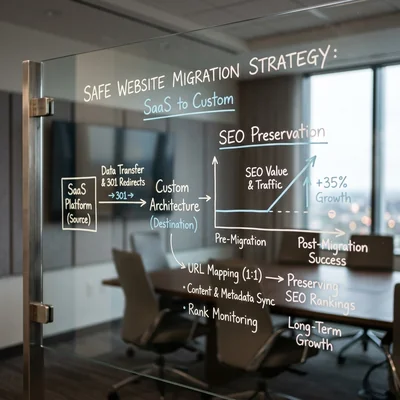
- Migration - gradual: preserve URLs, SEO, and forms; do not rebuild the site overnight
- Alternatives - Tilda vs WordPress vs Django for the task, not “because it is trendy”
Why the Question “Should We Leave Tilda?” Appears at All
A website builder works well while the task fits into blocks and ready-made modules. Problems begin when one of these scenarios emerges:
- a catalog with hundreds of products, filters, and stock levels;
- a personal account, subscriptions, complex calculations;
- deep integration with CRM, ERP, warehouse systems, 1C, and payments;
- several roles: marketing, sales, content, partners;
- organic traffic that depends on fine-tuned SEO settings.
Simply wanting “something prettier” is a weak reason to migrate. A strong reason is when the cost of workarounds (Zero Blocks, third-party scripts, manual exports, hacks in Zero Block) already exceeds the cost of proper development and the risk of errors is growing.
Sign 1. Integrations Have Become More Important Than “Blocks”
A typical signal: every new integration is a quest. You need to automatically:
- create deals in CRM from different form types;
- synchronize prices and stock levels with the warehouse;
- send orders to fulfillment or telephony;
- build reports in real time, not as “an Excel export once a week.”
On Tilda, some scenarios are covered by webhooks and ready-made integrations, but non-standard business logic runs into platform limitations. When every change requires a hack or an external service “in the middle,” you are already paying as if for development - only without proper code and tests.
What to do: document 3-5 critical integrations and estimate them on a custom backend. If at least two cannot be maintained reliably on the builder, that is a strong signal to move.
Sign 2. SEO Has Hit the Platform Ceiling
Tilda handles basic SEO: title, description, clean URLs, sitemap, Open Graph. That is enough for a landing page and a small blog. The ceiling becomes visible when you need:
- programmatic landing pages for thousands of queries;
- a complex filter structure without duplicates;
- fine control of index/noindex, canonical, hreflang;
- speed and Core Web Vitals on heavy pages;
- a “hub + clusters” content architecture with strict internal linking.
If the organic channel is your main lead source and SEO changes come down to “whatever the platform allows,” compare its capabilities with an SEO audit of a standalone website. Migration for SEO does not always pay off - but “growth through template pages” on a builder is often more expensive than it looks.
Sign 3. Speed, Stability, and Load Have Become Visible to Customers
Signs from real life:
- pages become “heavy” because of animations, widgets, and Zero Block;
- peak campaigns (advertising, sales) cause slowdowns or form failures;
- you cannot properly cache/shard key sections;
- the mobile version looks beautiful but is slow by performance metrics.
A website builder is optimized for the mass-use scenario, not for your specific peak load. When conversion drops because of speed, not because of the offer, it is time to evaluate a custom frontend/backend with performance control.
Sign 4. Roles, Access Rights, and Editing Processes Conflict
At first, one person manages the whole website. Then a content manager, marketer, partner portal, franchise, or multisite setup appears. You need:
- roles with different permissions (not everyone can change prices or SEO);
- drafts, moderation, page versions;
- several domains/brands from one admin panel;
- a predictable release process without “someone accidentally broke a block on the homepage.”
If website changes are always risky and always go through one “Tilda keeper,” the business has already grown into a CMS/admin panel with proper permissions. This is not about “a prettier admin panel,” but operational security.
Sign 5. An Online Store Has Grown Beyond a Showcase
A simple store on Tilda (product cards, cart, payment) is fine for a small assortment. Red flags:
- hundreds/thousands of SKU, variations, bundles;
- promo rules more complex than “-10% on everything”;
- B2B pricing, deferred payments, different contracts;
- returns, partial shipments, multiple warehouses;
- deep product-funnel analytics is needed, not just “orders came in.”
At this stage, businesses more often compare specialized platforms and custom development. The important thing is not to “escape Tilda at any cost,” but to answer honestly: is the website a showcase or the core of sales? If it is the core, the builder will sooner or later become a bottleneck.
Sign 6. Technical Debt from Workarounds Costs More Than Development
An honest checklist:
| Workaround | Why it is a signal |
|---|---|
| A pile of third-party scripts in Zero Block | Breaks during updates; nobody owns the code |
| Manual Excel exports every day | The process depends on people, not the system |
| Data duplicated in 2-3 services | Prices, stock levels, and statuses get out of sync |
| “Do not touch this block - everything will break” | No tests, no reproducible release |
| A new landing page is copied manually 20 times | No templates/data-driven generation |
If the team spends more time maintaining workarounds than growing the product, migration is economically justified even without a “trendy” stack.
Sign 7. Subscription + Change Economics No Longer Add Up
Calculate not only the Tilda plan, but the total cost of ownership:
- Subscription and paid modules.
- Marketer/freelancer hours for Zero Block and layout work.
- Middleware services for integrations.
- Losses from limitations (rejected features, slow releases).
- The risk of platform lock-in (vendor lock-in).
When the annual total is comparable to developing your own MVP website on Django/Python or a well-designed CMS + custom setup, the question “is it time to move?” becomes financial rather than emotional.
What “Your Own Website” Means - and Why You Cannot Dismiss It as “Expensive”
In this context, “your own website” means control over:
- code and data (export, backups, migration);
- business logic (not just block layout);
- SEO and speed at the level the channel requires;
- integrations without workaround intermediaries.
Options after Tilda (simplified):
| Approach | When it fits |
|---|---|
| WordPress + targeted custom development | Content, blog, mid-sized service website, familiar admin panel |
| Django/Python (or another framework) | Complex logic, user accounts, API, non-standard processes |
| Headless + separate frontend | Strong marketing website + separate application/API |
| Keep Tilda for landing pages | The main product is already on its own platform; Tilda is only for promotion |
Often the best answer is a hybrid: the main product runs on your own stack, while promo pages remain on Tilda for some time. Moving does not have to be “all or nothing.”
How to Leave Tilda Without Losing Traffic and Leads
A practical plan:
- Inventory. List URLs, forms, analytics goals, redirects, and emails.
- Priorities. Start with pages that bring traffic and revenue, not “let’s redraw the entire website.”
- Preserve SEO. Keep the same URLs where possible, use 301 for the rest, migrate meta data and structure.
- Parallel launch. Run the new website on a subdomain/in hidden mode -> check forms and metrics.
- Migrate integrations. CRM, payments, webhooks - with tests on real scenarios.
- Train the team. Decide who publishes content and how after migration.
- Turn off Tilda. Only when KPIs (leads, payments, indexing) are stable for 1-2 weeks.
An abrupt “Tilda yesterday, a new domain today without redirects” almost always hurts organic traffic and customer trust.
Common Mistakes That Make Migration More Expensive
Even when the decision to leave is correct, businesses usually lose money not on the move itself, but on execution:
- changing the domain, design, and URL structure all at once - afterward it is impossible to tell what actually caused the traffic drop;
- underestimating the volume of data to migrate - product cards, texts, forms, and analytics tags get treated as “one evening's work”;
- choosing a vendor based on experience building sites from scratch rather than migrations - these are different skills: redirects, preserving SEO equity, and moving integrations without downtime matter here;
- skipping the parallel-launch stage - without a test period, form and payment errors get discovered by customers instead;
- not assigning a process owner on the business side - decisions on priorities and deadlines keep getting delayed, and the migration drags on.
Most of these mistakes are not about technology but about project management - a checklist and one accountable owner on the business side can prevent them.
When It Is Still Too Early to Leave
Stay on Tilda if:
- you need a fast campaign landing page for 2-8 weeks;
- the assortment and processes are simple, and leads come from advertising rather than SEO;
- there is no budget to support your own website after launch;
- the team is not ready to maintain CMS/code;
- you want “your own website” for status, not because of limitations.
A bad reason to leave: “a competitor has custom development.” A good reason: your product and sales regularly hit platform limitations.
Bottom Line
It is time to leave Tilda when several signs accumulate: integrations, SEO, load, roles, a mature store, expensive technical debt, or ownership economics. The website builder is not “bad” - it solves the startup phase very well. You need your own website when it becomes a business system, rather than a set of attractive blocks. Calculate the full cost, migrate gradually, and choose the stack for the task - from WordPress to Django, not based on the slogan “anything but a website builder.”
If you need help with development, AI implementation, or website support for your project - contact me.
Frequently Asked Questions
Is It Mandatory to Leave Tilda If the Business Has Grown?
No. Growth by itself is not a reason. It makes sense to leave when growth runs into platform limitations: integrations, roles, SEO, the store, or the economics of changes. Sometimes it is enough to simplify processes or move the complex part to a separate service while keeping Tilda for the showcase.
Can We Keep Tilda for Landing Pages and Move Only the Catalog?
Yes, and this is a common sensible hybrid. Promotion and fast campaigns stay on the builder, while the core (account, orders, API) runs on your own stack. It is important to plan unified analytics, domains, and the user journey between the platforms in advance.
How Long Does Migration from Tilda Take?
A benchmark for a small business: 3-8 weeks for a typical service website/showcase with SEO preserved; 2-4 months if there is an account area, complex integrations, or a large catalog. The timeline depends not on “moving blocks,” but on moving logic and data.
Will We Lose Google Rankings When Moving?
There is a risk if you change URLs without 301 redirects, hurt speed, or disable indexing for too long. With a careful migration (the same addresses where possible, redirects, sitemap, Search Console monitoring), a decline is usually temporary. Allow 2-6 weeks for stabilization and do not change everything at once: design, domain, and URL structure.
What Should We Choose Instead of Tilda: WordPress or Django?
It depends on the task. WordPress is for when there is a lot of content, a familiar admin panel is needed, and logic is moderate. Django/Python is for when you need custom processes, API, roles, calculations, and tight integration with business systems. Compare scenarios in Tilda vs WordPress vs Django and calculate ownership costs over 12-24 months, not only the launch price.
Terms in this article
Tilda — block-based website and landing page builder
MVP — Minimum Viable Product
technical debt — shortcuts in code that cost extra work later
CRM — Customer Relationship Management
ERP — Enterprise Resource Planning
webhooks — HTTP callbacks when events happen
backend — server-side logic, APIs and data layer
Open Graph — meta tags that control link previews in social apps
landing pages — pages built for conversion goals
Core Web Vitals — Google metrics for loading, interactivity, and visual stability
Zero Block — Tilda freeform block editor for custom layouts
frontend — client-side UI of a site or app
CMS — Content Management System
SKU — Stock Keeping Unit
B2B — Business to Business
middleware — code layer between request and business logic
lock-in — hard to leave a vendor or stack without costly rewrite
headless — backend CMS/API without a built-in public frontend
downtime — period when the service is unavailable