CRM for an Online Store: Orders, Repeat Sales, Segments

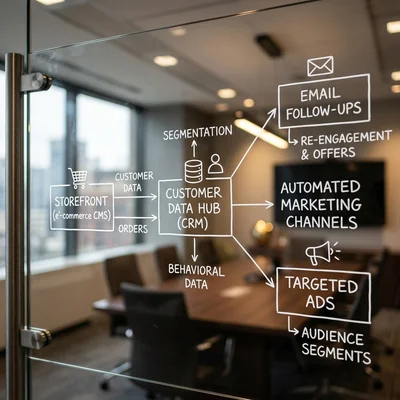
CRM for an online store is not a duplicate of the CMS admin panel - it is a system where an order lives next to the customer history, delivery status, follow-ups, and segments for campaigns. Without CRM a customer is just an order number in WooCommerce or Shopify; with CRM they are LTV, repeat-purchase probability, and a playbook like "abandoned cart → reminder → upsell." Below - how to connect orders, repeat sales, and segments in one logic, and why e-commerce needs CRM when the CMS already has orders.
- Orders - status, items, payment, and delivery in the customer card, not only in the CMS
- Repeat sales - reminders, post-purchase triggers, upsell and cross-sell
- Segments - RFM, purchase frequency, average order value, abandoned carts
- vs CMS - CRM owns relationships and marketing; the storefront owns catalog and checkout
- Start - order sync + 3-5 segments + 2-3 follow-up flows
- Stack - store → CRM → email/messengers; as you grow - CRM integration and n8n
How Store CRM Differs from the Orders Admin
WooCommerce, Shopify, OpenCart, or a custom storefront already list orders. That is enough while:
- volume is low and one manager handles everything;
- there is no omnichannel (site only, no WhatsApp or offline);
- marketing means "one blast to everyone once a month."
As soon as repeat purchases, campaigns, segments, and support appear, the CMS admin stops working as a CRM:
| Job | CMS / admin | E-commerce CRM |
|---|---|---|
| Take payment and update stock | Excellent | Via integration |
| See customer LTV for the year | Hard / manual report | Card + segments |
| Segment "bought 2+ times, silent 60 days" | Usually missing | Core playbook |
| Abandoned cart → touch sequence | Plugin or manual | Pipeline + tasks |
| One history: site + chat + call | Scattered | Single timeline in the card |
| Forecast repeat sales | No | Reports, RFM, cohorts |
Bottom line: the CMS closes the transaction; CRM closes the customer lifecycle after the first payment.
Orders in CRM: What Belongs in the Card
Minimum field set for an online store:
Order data
- order ID and date, source (organic, ads, UTM);
- line items: SKU, qty, amount, discounts, promo code;
- payment and shipping status;
- payment method and carrier / pickup point;
- customer and manager notes.
Customer data
- contacts (phone, email, messenger);
- shipping address and city;
- tags: VIP, wholesale, complaints, newsletter;
- marketing consent (opt-in) - critical for GDPR and local rules.
History
All of the customer's orders in one card, plus support tickets, cancellations, returns. The manager sees not "order #4812" but "customer with 4 purchases, AOV $85, last order 45 days ago."
Practical rule: the order is created in the CMS and appears in CRM within minutes (webhook, API, n8n / Zapier). Statuses flowing back (shipped, returned) must sync too - otherwise manager and customer live in different realities.
Repeat Sales: Where CRM Makes Money
The first purchase in e-commerce is often unprofitable or break-even because of ads. Profit shows up on the 2nd and 3rd purchase - if the store can bring the customer back.
Flows that work in CRM
- After purchase - confirmation, tracking number, review request after N days (when the product is usually in use).
- Consumables cycle - pet food, cosmetics, filters, cartridges: remind on the average repurchase interval.
- Abandoned cart - 1-3 touches: email / push / WhatsApp with a soft CTA, no spam.
- Order upsell - "customers who bought this often add X" in email or a manager task for high-ticket carts.
- Reactivation - "was active, went quiet": a personal offer or useful content, not a blunt "−20% for everyone."
| Flow | Trigger | Channel | Success metric |
|---|---|---|---|
| Abandoned cart | Cart idle > N minutes unpaid | Email / messenger | % recovered carts |
| Repeat order | Days since last purchase ≥ cycle | Email / SMS | Repeat purchase rate |
| VIP service | LTV or frequency above threshold | Manager task | VIP retention |
| Win-back | No purchases for 60-90 days | Email + offer | Reactivation rate |
Without CRM these flows live in a marketer's head or in five different plugins. In CRM they become shared triggers, tasks, and reports.
Segments: Who Not to Mix in One Campaign
Segmentation is why store CRM pays back faster than "just an email list."
Starter segments
- New - 1 purchase, within 30 days of the first order.
- Repeat - 2+ purchases.
- Dormant - had purchases, silence for 60-90+ days.
- VIP - top by LTV or frequency (your bar: often top 5-10% of the base).
- Abandoned carts - added to cart, did not pay.
- By category - browsed / bought category A (do not make B the main topic for them).
RFM - a simple, useful frame
- R (Recency) - how recently they bought;
- F (Frequency) - how often;
- M (Monetary) - how much they spent.
RFM maps to actions: high M + low R = reactivation; high F + high M = VIP and personal service; low F after one purchase = onboarding toward a second order.
Do not invent 40 segments in week one. 5-7 segments + 2-3 flows beat a complex matrix nobody uses.
Store → CRM → Marketing Stack
Typical architecture:
Storefront (CMS)  →  webhook / API  →  CRM
                                        ↓
                           segments, tasks, pipelines
                                        ↓
                      email / SMS / WhatsApp / push
Automate first:
- Create / update contact on order.
- Attach order to the card and change status.
- Tag or enter segments by rules (repeat, VIP, dormant).
- Start a sequence or a manager task.
Complex chains and custom fields are easier with n8n or Zapier when built-in CMS ↔ CRM connectors are not enough. For custom warehouse and account logic, see CRM integration with Python.
Which CRM to Choose for an Online Store
Pick by orders + segments + channels where your customer lives - not by brand fame:
| Situation | Common pick | Why |
|---|---|---|
| CIS, WhatsApp/Telegram, short cycles | amoCRM | Messengers, fast start |
| Need tasks, portal, telephony in one | Bitrix24 | CRM + company processes |
| Strong email/content, EN market | HubSpot | Segments, nurturing, Marketing Hub |
| Shopify-centric stack | Klaviyo + CRM or HubSpot | E-commerce marketing + profiles |
| Own stack, data control | CRM + integrations | Flexibility to your processes |
Full comparison of popular systems - in Bitrix24 vs amoCRM vs HubSpot. If you are still unsure CRM is needed - check the 7 signs it is time and the cost ranges.
2-4 Week Rollout Checklist
- Map the order path - from cart to "delivered" / "returned" (5-8 statuses, not 20).
- Connect sync of orders and customers CMS → CRM.
- Build 5 segments - new, repeat, dormant, VIP, abandoned carts.
- Launch 2-3 flows - abandoned cart, post-purchase, reactivation.
- Assign a CRM owner - marketer or ops lead, not "everyone."
- Audit opt-in - do not message people who never consented.
- After a month review - repeat purchase rate, recovered carts, % empty cards.
A pilot on real orders beats a year-long "future" license. Budget year one using the article on CRM implementation cost.
Who Doesn't Need CRM Yet
Rolling it out isn't always worth it - sometimes it's just money and time you won't get back:
- fewer than 50-100 orders a month and no clear bet on repeat sales or paid traffic;
- one manager and one channel (site only, no WhatsApp or offline) - handled fine from memory;
- nobody to own the cards, segments, and flows - a CRM without a process owner turns into a dead database;
- right now the priority is fixing the order flow and warehouse, not customer analytics.
In these cases a spreadsheet or a simple abandoned-cart automation works better; come back to CRM once order volume or channel count grows. Rolling it out isn't just a subscription - it takes time for integrations and team training, so weigh that alongside the license cost.
Bottom Line
CRM for an online store covers three jobs: orders in customer context, repeat sales, and segments that do not dump the whole list into one blast. The CMS admin stays the source of transactions; CRM is the system of relationships and post-payment playbooks.
Before you launch, answer three questions:
- how fast an order from the storefront lands in CRM;
- which 3 segments will earn in month one;
- who owns daily follow-up.
If answers are vague - start with order sync and one abandoned-cart sequence, not the most expensive marketing platform.
If you need help with development, AI implementation, or website support for your project - contact me.
Frequently Asked Questions
Why CRM if WooCommerce / Shopify already has orders and customers?
The CMS stores transactions: payment, stock, shipping status. CRM stores relationships: every touch, segments, manager tasks, repeat-sale playbooks, and one history across site + chats + calls. With 5+ orders a day and active marketing, you outgrow plugins and manual exports fast - especially when you need RFM and reactivation.
Which segments should an online store start with?
Five is enough: new (1 purchase), repeat (2+), dormant (silent 60-90 days), VIP (top LTV/frequency), and abandoned carts. RFM can come next. The key is attaching one action to each segment (email, task, offer) - otherwise segments stay pretty filters with no revenue.
How do you avoid annoying customers with CRM emails?
Respect opt-in, cap frequency (e.g. no more than 1-2 non-transactional touches per week), personalize by segment, and stop sequences after purchase or unsubscribe. Abandoned cart means 1-3 useful messages, not "reminder #7." Keep transactional mail (order, tracking) separate from promotions.
Do you still need a separate CRM if you already use Klaviyo / Mailchimp?
Email platforms excel at campaigns and e-commerce triggers but are weaker as one system for tasks, telephony, and omnichannel history for managers. Many stores keep CMS + email tool + CRM for sales/support. If channels are email-only and volume is low - start with the email tool; with WhatsApp, calls, and a team of 2+ - CRM is almost required.
How many orders per month before CRM makes sense?
A rough bar is 50-100+ orders per month or a clear bet on repeat sales and paid traffic. Below that, a spreadsheet plus simple cart recovery often works. Above it, manual segmentation and follow-up usually cost more than the subscription. For budget ranges see CRM implementation cost.
Terms in this article
CRM — Customer Relationship Management
CMS — Content Management System
LTV — lifetime value of a customer
upsell — selling a higher-tier offer
e-commerce — online selling of goods or services
storefront — customer-facing shop UI
RFM — Recency, Frequency, Monetary
OpenCart — open-source PHP e-commerce platform
n8n — open-source workflow automation platform
plugin — installable extension module
pipeline — sequence of processing stages
SKU — Stock Keeping Unit
opt-in — user must explicitly agree before you act or message them
GDPR — General Data Protection Regulation
AOV — Average Order Value
retention — keeping users/customers over time
CTA — Call To Action
SMS — Short Message Service
Zapier — SaaS that connects apps with no-code automations
Bitrix24 — suite with CRM, tasks, chat, and site tools
amoCRM — CRM popular in CIS markets for sales pipelines
marketing hub — marketing CRM hub/module
HubSpot — CRM and marketing platform for inbound growth