Docker for Business: Why Containers Matter for Your Site and Bot
Docker is a way to package a Telegram bot, an API, a job queue, or a bundle of services into a container: the same code, dependencies, and environment on a developer laptop, on a VPS, and in the cloud. An ordinary business site does not need Docker by default - the normal setup is a VPS with nginx, PHP/Python, and a database without containers; most projects run fine that way. Containers make sense when you also run a bot, several services, frequent releases, or a team that needs identical deploys. Below - where Docker actually helps and where it is better not to add complexity.
- Container - an isolated process with the app and its dependencies; lighter than a full VM
- Image - a template for how to build and run; a container is a running instance of an image
- Ordinary site - VPS + web server + PHP/Python + DB without Docker; a working default, not an “outdated” approach
- For a bot - stable runtime, restarts, secrets kept apart from code; here Docker pays off more often
- Compose - one file for several services (bot + API + DB), not required for a simple site
- Not a silver bullet - if a site already runs stably on a VPS, containers add a layer without clear upside
What Docker Is in Plain Language
On a server you usually have the OS, a web server, a language runtime (PHP, Python, Node), libraries, and a database. If versions are “slightly different” from the developer machine, the site returns 500, the bot crashes on a package import, cron behaves oddly.
Docker fixes this by describing the environment once (Dockerfile), building an image, and running a container. Inside - the exact software versions you need; outside - networking, data volumes, and environment variables (passwords, bot tokens). A neighboring container with another Python version will not break your bot.
| Approach | Business upside | Downside |
|---|---|---|
| Site on a VPS without containers | Familiar setup, easier ops for a typical project | Dev and prod can drift without discipline |
| Full virtual machine | Strong isolation | Heavier, costlier, slower to boot |
| Docker container | Consistent deploys, easier CI/CD | Needs discipline around images, volumes, and secrets |
A container is not a replacement for a VPS. It is a layer on top of a Linux server: the VPS provides CPU and disk; Docker provides a standard way to run apps when a plain “bare server” deploy is no longer enough.
A Site on a VPS Without Docker - and When Containers Still Make Sense
By default, an ordinary site does not need Docker. A catalog, blog, landing page, WordPress, or custom PHP/Python on a VPS runs fine the classic way: code on disk, nginx, cron, database backups. For small business and a typical vendor that is easier to maintain than images and Compose.
A business site is more than HTML. There is a backend, payments, CRM integrations, cache, sometimes queues. Containers for a site make sense not “in general,” but when all of this matters at once:
- Environment parity - staging and production differ as little as possible; bugs show up before release.
- Fast rollback - you can run the previous image again in minutes, instead of recalling “what we tweaked on the server.”
- Multiple services - site, worker, and scheduler sit side by side without fighting over library versions.
- Scale - under traffic growth it is easier to run a second container instance behind a load balancer.
- Vendor change - the repo has Dockerfile/Compose; a new team can onboard faster.
If the whole business is a one-pager on a site builder or a simple site on a VPS without a bot or worker - keep the server without Docker. Containers are justified for “site + API + bot + queue” or for a team with regular CI/CD, not as a mandatory layer for every web project.
Why Containers Help a Telegram Bot and Similar Bots
A bot is a long-running process: token, webhooks or long polling, sometimes a DB and a queue. Without containers, common business pain looks like this:
- the bot “dies” after a system package update on the VPS;
- a second bot pulls different library versions and breaks the first;
- secrets and code live in one folder with no clear scheme;
- recovery after a crash means manual SSH at 3 a.m.
With Docker the bot becomes a service: an image with dependencies, BOT_TOKEN / DATABASE_URL outside the image, a restart policy (restart: unless-stopped), and a separate DB container when needed. An update means build a new image, stop the old container, start the new one. Logging and monitoring are easier to standardize.
For webhooks, a bot container pairs well with a reverse proxy (nginx/Caddy) on the same host or in the same Compose stack as the site.
Docker Compose: Site, Bot, and Database as One Product
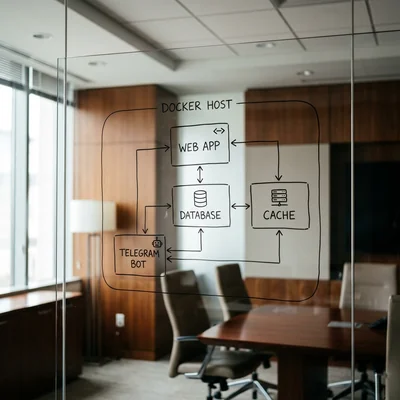
For small and mid-size businesses, Docker Compose is usually enough: one docker-compose.yml, several services.
Typical layout (not dogma):
web- site or API;bot- Telegram/Max/another messenger;db- PostgreSQL/MySQL;redis- cache and queues.
Owner upside: the vendor explains a service map, not “magic SSH commands.” Backups are clearer: DB volumes separate from app images. Do not store passwords in git or bake production tokens into the image - use env/secrets only.
When Docker Pays Off - and When It Is Too Early
It makes sense if you:
- run a bot, API, worker, or another bundle of services, not a single “plain” site;
- update code more than once a month and need identical deploys for the team;
- already use a VPS or the cloud, but the manual server setup is getting in the way;
- want fewer “manual fixes in prod” and fast rollback via images;
- expect team growth or a vendor change.
You can wait if:
- an ordinary site on a VPS already runs stably without containers;
- you have a landing page or simple blog on a builder / shared hosting;
- one small PHP/Python site without CI, bot, or worker;
- nobody owns image maintenance and base-image updates;
- shipping the product matters more now, and infra comes in the next phase.
Docker adds a layer: an image registry, base OS-layer updates, log policies. That is a fair price for repeatability - but the price should match product size.
Disadvantages of Docker
Containers fix “environment parity,” but Docker has real downsides for business - better to budget time and skills for them before you adopt it.
- Complexity and learning curve - you need Dockerfiles, images, networks, volumes, and a registry. A Compose mistake can become “the site won’t start,” and debugging without container skills takes longer than fixing PHP on plain hosting.
- Ongoing maintenance cost - base images age, CVEs pile up, image size grows. Without regular updates and tag discipline (uncontrolled
latest) production surprises appear. - Data lives outside the container - databases, uploads, and sessions are not fixed by “just restarting the container.” You need volumes, backups, and a clear restore path; otherwise the deploy looks clean while business data is lost or broken.
- Performance and debugging - overhead is usually small, but on a tiny VPS extra layers and volume I/O are noticeable. Logs are spread across containers; “SSH in and look around” is no longer enough - you need centralized logs and metrics.
- Security is not automatic - process isolation is not a bulletproof vest. Wrong ports, root in the container, secrets baked into the image, or open Docker socket access create new attack paths.
- Heavy tooling for a light job - for one WordPress on shared hosting or a small bot under systemd, Docker can add friction without measurable gain. Orchestrators (Kubernetes) on top of Compose are another class of complexity and cost.
Bottom line on the cons: Docker pays off when repeatable deploys and multiple services matter more than a simple “one PHP + one DB on one server” setup. If the team or vendor cannot maintain images, the downsides outweigh the upsides faster than a slide deck suggests.
Security and Operations Without Surprises
A container does not make an app secure by itself. Sensible rules still apply:
- do not run containers as root unless needed;
- limit open ports; do not expose the DB to the internet;
- secrets in env/Vault/CI secrets, not in the Dockerfile;
- regular base-image updates (OS and runtime CVEs);
- scheduled DB volume backups and restore drills;
- monitoring: container down → alert, not “customers messaged support.”
Docker plus Linux on a VPS is strong because you control both the VM and how apps run. The weak spot is a Compose file written once and base images left unpatched for a year.
Bottom Line
Docker is a tool for bots, APIs, and several services together - not a mandatory layer for every site. An ordinary site on a VPS without containers is the normal default: nginx, language runtime, DB, backups - and it works. Add Docker when a bot, worker, or frequent releases appear, or when the team needs identical deploys via images; start with Compose on one server and only then look at Kubernetes if load and team truly require it.
If you need help with development, AI implementation, or website support for your project - contact me.
Frequently Asked Questions
Does an ordinary site on a VPS need Docker?
By default - no. A typical site (WordPress, PHP, Django, landing page) on a VPS runs fine without containers: web server, language, DB, backups. Docker makes sense when a bot, API, or worker sits alongside, or when the team wants image-based deploys - not “because it is trendy.”
How is a container different from a virtual machine?
A VM emulates hardware and a guest OS - heavier and slower to start. A container shares the host kernel with other containers and isolates the app process: faster start, less resource use. For most sites and bots, containers are enough; keep VMs for hard isolation or special security requirements.
Can one Compose stack run both the site and a Telegram bot?
Yes - a common, practical setup for small business: one host, one service map, shared network and DB when needed. Separate secrets, prevent one service from starving CPU/RAM, and configure restarts and logs for the bot apart from the web app.
Will Docker replace a server engineer?
No. Docker standardizes how apps start, but someone still configures the VPS, firewall, SSL, backups, updates, and monitoring. Containers reduce “manual tweak” chaos; they do not remove ownership of infrastructure - yours or a vendor’s.
How should we introduce Docker into an existing project?
Document the current runtime (language, DB, queues), write a Dockerfile for the app, move secrets to environment variables, add Compose for app + DB on a test VPS. Verify DB backup/restore, then cut over production. Do not jump to Kubernetes early - for one or two services, Compose is usually enough.
Terms in this article
VPS — Virtual Private Server
CI/CD — Continuous Integration / Continuous Delivery
landing page — page built for a single conversion goal
backend — server-side logic, APIs and data layer
CRM — Customer Relationship Management
staging — pre-production environment for final checks
production — live environment serving real users
rollback — revert to a previous working version after a failed change
scheduler — component that schedules jobs
worker — background job processor
long polling — client waits on an open request until the server has news
webhooks — HTTP callbacks when events happen
reverse proxy — front server that routes requests to backends
overhead — extra cost beyond useful work
restore — recover data from backup/snapshot
backup — copy kept for recovery