What Are LangChain and LangGraph?
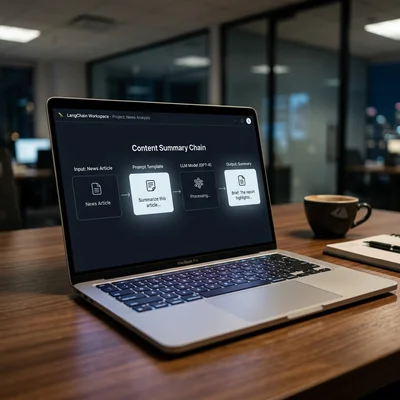
LangChain and LangGraph are open-source frameworks for Python (with JavaScript support as well) for building applications on large language models: from simple RAG to AI agents with tools, memory, and branching workflows. LangChain provides building blocks (models, prompts, chains, retrievers); LangGraph is a state graph for complex agent flows where you need control, loops, and human approval. Below - how they differ, when to pick which, and what businesses should watch for.
- LangChain - a component library: LLMs, prompts, chains, embeddings, vector search, tools
- LangGraph - orchestration via a node graph: state, branches, loops, retry, human-in-the-loop
- Chain - a fixed pipeline “input → steps → answer”
- Agent - the model decides which tool to call and when to stop
- Not a smarter model - the framework does not make GPT/Claude “smarter”; it helps wire APIs, data, and logic
- Practice - simple RAG and FAQ often need only LangChain; complex support routes and multi-agent setups are LangGraph territory
What LangChain Is in Plain Language
One model API call is “ask → answer.” A real product is broader: pull documents from a knowledge base, call a CRM, check an order, keep history, count tokens, and stop the model from hallucinating from thin air.
LangChain is a set of abstractions over providers (OpenAI, Anthropic, Gemini, local LLMs, and others) so you do not rewrite the same glue code by hand:
| Component | What it is for |
|---|---|
| Chat model / LLM | One interface to different APIs |
| Prompt templates | Prompts with variables and roles (system/user) |
| Retrievers | Finding relevant chunks for RAG |
| Tools / functions | Calling external APIs, DBs, calculators |
| Memory | Dialog history and short-term context |
| Output parsers | Turning the model reply into JSON/structure |
A typical LangChain flow: the user asks → a retriever finds documentation chunks → a prompt joins the question + context → the model answers with sources. That is classic RAG, and for many business cases it is enough.
What LangGraph Is and How It Complements LangChain
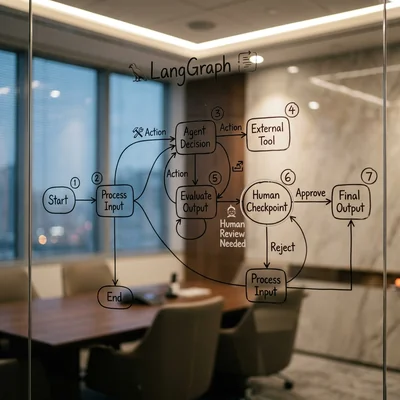
LangGraph is a library from the same LangChain ecosystem for building agent applications as a graph: nodes run steps, edges define transitions, and shared state is updated along the way.
Why a graph if you already have chains:
- Branching - if confidence is low → escalate to a human; if the customer asks for a refund → another path.
- Loops - the agent calls a tool, reads the result, thinks again, calls another tool.
- Control - explicit stop points, retries, step limits; less of a “black box.”
- Multi-agent - several roles (researcher, editor, moderator) pass results to each other.
- Human-in-the-loop - before sending a customer email or charging money, the system waits for an operator.
Simply put: LangChain = constructor parts, LangGraph = assembly blueprint for a complex machine. They are often used together: graph nodes call models, retrievers, and tools from the LangChain ecosystem.
LangChain vs LangGraph: When to Choose Which
| Task | Usually enough | Better to lean toward |
|---|---|---|
| FAQ / RAG over a knowledge base | LangChain (+ vector DB) | LangGraph if many branches and escalations |
| One fixed pipeline (summarize → translate) | LangChain | - |
| Agent with tools and “think → call → verify” loops | LangChain Agent or LangGraph | LangGraph as complexity grows |
| Support with ticket routing | Can start with chains | LangGraph for statuses and human-approve |
| Several agents and long-running jobs | Hard with plain chains | LangGraph |
Practical rule: start with the simplest pipeline. If the logic already looks like a flowchart with conditions and loops - move to a graph instead of stacking “if chains in one file.”
What a Typical Stack Looks Like
A minimal working set for business:
- Model - GPT / Claude / Gemini or a local one via Ollama;
- LangChain - prompts, retriever, tools;
- Vector store - for embeddings and knowledge search;
- LangGraph (when needed) - agent and branch orchestration;
- Observability - step logs, latency, token cost, error tracing;
- Integrations - CRM, helpdesk, Telegram bot, internal DB.
Important: a framework does not replace clean data and product sense. A weak knowledge base + strong LangGraph still yields weak answers. Estimates of RAG system cost and a turnkey AI agent almost always hit data, integrations, and quality control - not only the choice of library.
Pros and Cons for a Project
Pros:
- fast Python prototypes;
- ready integrations with popular LLMs and vector DBs;
- one coding style for prompts, tools, and RAG;
- LangGraph makes the agent scheme explicit - easier to explain to a client and to debug;
- a mature ecosystem with many examples and docs.
Cons and risks:
- abstraction tax: beginners can drown in layers when 50 lines of direct API would do;
- ecosystem APIs change - pin versions and watch for breaking changes;
- looping agents can burn tokens without limits;
- without tests and evals the product degrades quietly;
- not every business case needs an agent - often a deterministic script + LLM on one step is better.
When Business Needs This - and When It Is Early
It makes sense if you:
- build RAG, an assistant, or an agent on top of your data and APIs;
- the team already writes Python/JS and wants a standard frame, not ad-hoc scripts;
- need branches, human approval, and multi-step scenarios (LangGraph);
- plan to maintain the product for months - explicit architecture pays off.
You can wait if:
- the job is one or two API calls with a good prompt;
- there is no stable knowledge base or integrations - a framework will not fix empty data;
- the team has not yet learned basic LLM calls and embeddings;
- you only need a no-code chatbot without custom logic.
Bottom Line
LangChain is a way to assemble LLM apps from ready blocks: models, prompts, RAG, tools. LangGraph is a way to orchestrate complex agent logic as a state graph with branches, loops, and checkpoints. For FAQ and document search, LangChain is often enough; for support agents, multi-step processes, and human-in-the-loop, design the flow on LangGraph from the start. Library choice is secondary to data quality, metrics, and token budget - but the right frame saves months of chaotic code.
If you need help with development, AI implementation, or website support for your project - contact me.
Frequently Asked Questions
Are LangChain and LangGraph separate products or one thing?
They are a connected ecosystem: LangChain provides components, LangGraph orchestrates complex flows. You can use them separately, but in practice graph nodes often call models and tools from LangChain. Think “blocks + blueprint,” not strictly “either-or,” when the scenario gets harder.
Do I need LangGraph for ordinary RAG?
Not necessarily. Classic RAG (question → retrieve → answer) works fine on LangChain or even direct API calls + a vector DB. LangGraph helps when RAG gains branches, follow-up questions, several agents, fact-checking loops, or mandatory human approval.
How is a LangGraph agent different from “just calling ChatGPT”?
One ChatGPT call is a model reply inside one context window. A LangGraph agent can call tools many times, update state, branch on conditions, and pause for an operator. That is closer to a workflow engine with an LLM inside than to a normal chat.
Which language is better - Python or JavaScript?
For backend, data pipelines, and most ecosystem examples, teams usually pick Python. JavaScript/TypeScript fits when the agent lives next to a Node site stack. Functionally the approaches are similar; choose the team language and the service you embed the LLM into.
How much does a LangChain / LangGraph rollout cost?
The framework itself is open source - you pay for model APIs, infrastructure (vector DB, hosting), and development/ops. A RAG prototype can take days and a modest token budget; a production agent with CRM, monitoring, and evals is a weeks-long project with a noticeable agent budget. The main hidden cost is unbounded agent loops and bloated context.
Terms in this article
LangChain — framework for building LLM applications
LangGraph — framework for stateful AI agent workflows
open-source — software with publicly available source code
RAG — Retrieval-Augmented Generation
vector search — finding nearest neighbors in embedding space
orchestration — coordinating multiple services or workflow steps
embeddings — numeric vectors that capture text meaning
human-in-the-loop — human approval before risky agent actions
retry — automatic repeat of a failed request or job
pipeline — sequence of processing stages
knowledge base — structured repository of answers/docs
GPT — Generative Pre-trained Transformer
CRM — Customer Relationship Management
glue code — thin code that only connects systems and APIs
chunks — small text pieces indexed for retrieval
LLM — Large Language Model
vector db — database for similarity search over embeddings
observability — logs, metrics and traces to understand system behavior
vector store — database optimized for similarity search over embeddings
Ollama — tool to run local open-weight LLMs on your machine
abstraction tax — cost of extra framework layers vs direct code
breaking changes — updates that break existing clients or integrations
latency — delay before a response arrives
evals — quality checks and test suites for model outputs
ad-hoc — one-off, without a reusable system
no-code — building apps with visual tools, little or no programming
chatbot — conversational bot interface
context window — maximum text a model can process at once
backend — server-side logic, APIs and data layer
production — live environment serving real users