WordPress for PHP Developers: How It Differs from Laravel and Where to Find Work

You know PHP and Laravel (or Symfony) - routing, MVC, Eloquent, middleware, tests. WordPress looks like the same PHP at first glance, but it is a CMS with event-driven architecture, not an application framework. The typical mistake is dragging Laravel habits into WP: rewriting core, stuffing business logic into a theme's functions.php, ignoring hooks and capabilities. Below - how to get productive in WordPress as a developer, how it differs from Laravel, what clients actually order, 2026 price ranges, and where to find clients without racing to $5 on freelance marketplaces.
- WordPress - CMS on hooks +
WP_Query, not MVC; core and plugins run in one process - Main difference from Laravel - no single entry point and router; everything goes through
add_action/add_filter - Typical jobs - child theme, custom post type, WooCommerce, CRM integration, performance, security audit
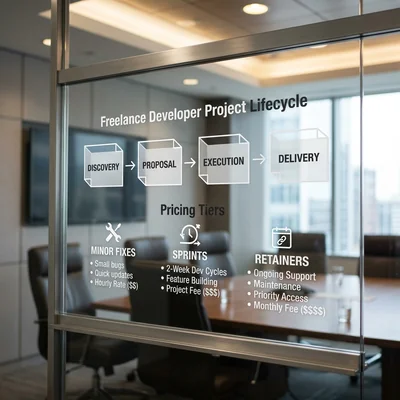
- Price ranges - small fix $300-1,500; sprint $2,000-8,000; retainer $300-800/mo
- Where to find work - maintaining existing WP sites, WooCommerce, white-label for agencies, local business
- When to walk away - if the client needs a product with API and enterprise roles - see WordPress migration
WordPress Is Not "Laravel with an Admin Panel"
Laravel is a framework for applications: you design structure, routes, controllers, models, migrations. WordPress is a ready-made CMS: content, users, media, REST API already exist; you extend the system via hooks instead of building from scratch.
| Aspect | Laravel | WordPress |
|---|---|---|
| Entry point | public/index.php + routes |
index.php + rewrite rules + template hierarchy |
| Data | Eloquent, migrations | wpdb, CPT, meta, options API |
| Extension | Service providers, packages | Plugins, themes, mu-plugins |
| Queries | Query Builder | WP_Query, get_posts, $wpdb |
| Permissions | Policies, Gates | Roles, capabilities, nonces |
| Updates | Composer, your cycle | WP core + plugins, staging is mandatory |
Practical takeaway: in WordPress you do not "write an application" - you plug into the CMS lifecycle. Code runs on events: init, wp_enqueue_scripts, save_post, woocommerce_checkout_order_processed. If you are used to defining every URL in routes/web.php, the first days will feel disorienting. That is normal.
How a Request Flows in WordPress
A simplified chain - the map that keeps you from editing the wrong layer:
- Web server (Nginx/Apache) passes the request to
index.php. wp-load.phpboots core, config, MySQL.wp-settings.phploads must-use and active plugins, then the theme.- Parse request - WordPress decides: post, page, archive, 404?
WP_Queryfetches posts from the DB.- Template hierarchy -
single.php,page.php,archive.php,front-page.php. - Hooks along the way - content filters, scripts, SEO, cache.
Where a developer should edit:
- child theme - layout, templates, light display logic;
- custom plugin - business logic, integrations, CPT, shortcodes, REST;
- mu-plugin - code that must not be disabled in admin (use carefully, infrastructure only).
Do not touch: core files in wp-admin, wp-includes - updates will wipe them.
What to Build for Each Task
| Task | Right layer | Why |
|---|---|---|
| New design, markup | Child theme | Parent theme updates will not erase changes |
| Custom post type, fields | Plugin (or CPT UI + ACF at start) | Logic not tied to theme switch |
| CRM integration | Plugin + webhook/cron | Isolated, versioned in Git |
| Production speed fix | Cache plugin + query audit | Do not spread across theme |
| "Urgent form fix" | Minimal patch in child theme | Fast, but document and move to plugin |
Rule: if code survives a theme change - it belongs in a plugin. If display only - child theme.
Typical Jobs and Price Ranges
The WordPress market for PHP developers in 2026 is not "build a landing page" - it is customization, integrations, and support. Owners already read that plugins may be enough - they come to you when that stopped being true.
Level 1: targeted fix - $300 - $1,500
Timeline: 1-5 days.
Examples:
- custom post type + archive template;
- form tweak (validation, webhook to Telegram);
- fix conflict between two plugins;
- child theme setup to match brand guidelines.
Stack: PHP 8.0+, hooks, sometimes ACF. No heavy architecture.
Level 2: sprint with business logic - $2,000 - $8,000
Timeline: 2-6 weeks.
Examples:
- WooCommerce: non-standard discounts, B2B pricing, stock sync;
- REST endpoint for mobile app or external storefront;
- integration with amoCRM, Bitrix24, ERP via API;
- data migration, redirects, cleanup of a "zoo" of 20 plugins.
Price drivers: number of integrations, staging environments, logging and rollback requirements.
Level 3: retainer - $300 - $800/mo
Includes:
- WP and plugin updates on staging;
- monitoring forms and checkout;
- small fixes, consultations;
- emergency fix after update breakage.
Sell to: agencies, e-commerce with revenue, ad-driven sites - where downtime means lost leads.
| Job type | Budget | Timeline | Who pays |
|---|---|---|---|
| Theme / CPT tweak | $300 - $1,500 | 1-5 days | Small business, marketer |
| WooCommerce / API | $2,000 - $8,000 | 2-6 weeks | E-commerce, B2B |
| Audit + refactor | $1,500 - $5,000 | 1-3 weeks | Site on "duct tape" |
| Retainer | $300 - $800/mo | ongoing | Those burned by "simple" before |
Laravel Developer Mistakes in WordPress
- Rewriting core or forking plugins - updates become a nightmare. Write a thin adapter plugin.
- SQL without
$wpdb->prepare()- XSS and SQL injection; in Laravel you rely on ORM, here raw queries are easy to get wrong. - Ignoring capabilities -
current_user_can('edit_posts')instead of homemadeif ($user_id == 1). - Loading everything on
init- heavy queries on every hit. Use transients, object cache, cron. - 40 plugins "like microservices" - client asks for speed, you install off-the-shelf; a year later support is unbearable. Sometimes one custom module is honest.
- No staging - updated WooCommerce on prod Friday night. Minimum: copy on subdomain, VPS for $10-30/mo.
Tools and Pre-Production Checklist
Local dev: Docker (official WP docker-compose.yml), Local WP, DDEV - do not edit prod via FTP.
Debugging:
WP_DEBUG+WP_DEBUG_LOGinwp-config.php(dev/staging only);- Query Monitor - slow queries, duplicate hooks;
- Plugin Check / PHPCS with WordPress Coding Standards.
Handoff checklist:
- [ ] Code in Git, not hosting file editor
- [ ] Child theme or separate plugin, not parent theme edits
- [ ] Nonces on forms, sanitize/escape on output
- [ ] Test after disabling trial plugins
- [ ] Backup and rollback plan
- [ ] Docs: what is enabled, which crons, which external APIs
Where to Find Work
1. Maintaining existing sites - steadiest flow. Owners fear updates; you sell "calm Mondays." Look for: local business, clinics, developers, B2B catalogs.
2. WooCommerce and marketplaces - checkout, shipping, payments, ERP sync. Higher ticket, higher responsibility.
3. White-label for web agencies - agency sells the site, you do PHP without client contact. Lower rate, steadier volume.
4. Audit and refactor - "site is slow / hacked / freelancer left a mess." Fixed diagnosis $500-1,500, then sprint.
5. SEO and ads partners - they need fast landings and tech fixes; you get a stream of small and medium tasks.
Where not to compete: "build WordPress for $100" on marketplaces - wins are not quality, but race to the bottom. Position as PHP developer on WordPress, not "theme installer."
First steps: 2-3 portfolio cases (CPT, integration, speedup with before/after numbers), profile with PHP 8 + WP + WooCommerce, bids on "customization", "integration", "broken after update."
When to Honestly Walk Away from WordPress
Not every client is for you, and not every project should stay on WP.
Decline or suggest Django/Python if:
- complex roles, approval flows, enterprise-level audit log are required;
- the product is API + mobile app, site is secondary;
- ERP integration is real-time two-way, not hourly CSV;
- annual "patching" budget rivals migration ($15,000-40,000).
Stay on WordPress if the job is content, catalog, typical store, one or two integrations. Stack comparison - Tilda vs WordPress vs Django.
Summary
WordPress for PHP developers is a separate discipline: same if and foreach, different architecture. Laravel teaches you to build an application; WordPress teaches you not to break someone else's ecosystem and to embed code so updates do not kill the business.
Developers should:
- put logic in a plugin, layout in child theme;
- sell ranges and retainer, not "$15/hour";
- have staging and Git - your edge over "a friend who installed plugins";
- know when migration pays off more than endless patches.
To clients you look like someone who understands both Laravel and WP - and will honestly say which tool fits. That costs more than "one more plugin" and less than a rebuild a year later.
Need a WordPress audit or task estimate - contact me.
Frequently Asked Questions
Does a Laravel developer need to learn WordPress from scratch?
Not PHP from scratch - syntax is the same. You need the WordPress model: hooks, template hierarchy, WP_Query, options/meta API, roles. Usually 1-2 weeks of active practice on a test project (child theme + custom plugin + one integration) is enough to confidently take $300-1,500 jobs. WooCommerce and heavy integrations - another 2-4 weeks with docs and real cases.
How much can you earn on WordPress as a PHP developer?
Freelance: small tasks $300-1,500, 2-4 per month - $1,500-4,000; sprints $2,000-8,000 - 1-2 per quarter. Retainer $300-800/mo with 5-10 clients - $1,500-8,000 steady. Agency / white-label - lower rate, higher load. Ceiling without WooCommerce and enterprise is lower than Laravel SaaS; "WP support" flow is often more stable.
Child theme vs plugin in practice?
Child theme inherits parent styles and templates - for design, page-templates, single-{post-type}.php. Plugin lives independent of theme - CPT, shortcodes, REST, cron, integrations. Mistake: all logic in child theme functions.php - switch to Elementor/another theme and everything disappears. Rule: data and business rules in plugin, display in theme.
Should you take "fix after WordPress hack" jobs?
Yes, if budget covers full cycle: cleanup, password rotation, updates, plugin audit, backup, hardening. A $50 fix without analysis - repeat hack and reputation risk. Quote $500-2,000 for a serious incident + retainer. If site runs 15 outdated plugins on $3/mo hosting - offer audit with move to proper VPS or refactor.
When should a WordPress PHP developer suggest Django migration to a client?
When symptoms are systemic: 10+ plugins for business logic, every update is a lottery, mobile API needed, complex roles, two-way ERP sync. If annual WP support budget is $8,000-15,000+ and growing - show migration comparison. If they need one fix (checkout, CRM) - stay on WP, faster and cheaper for the client.
Terms in this article
Eloquent — Laravel ORM for database access
middleware — code layer between request and business logic
CMS — Content Management System
child theme — WordPress theme that safely overrides a parent theme
router — routes requests or dialog turns
CRM — Customer Relationship Management
white-label — product rebranded under another brand
retainer — fixed monthly fee for ongoing support
template hierarchy — order WordPress resolves templates
REST API — HTTP API that exposes resources via URLs and verbs
mu-plugins — WordPress must-use plugins loaded for every site
staging — pre-production environment for final checks
plugin — installable extension module
production — live environment serving real users
landing page — page built for a single conversion goal
webhook — HTTP callback when an event happens
storefront — customer-facing shop UI
endpoint — specific API URL that accepts requests
e-commerce — online selling of goods or services
Bitrix24 — suite with CRM, tasks, chat, and site tools
rollback — revert to a previous working version after a failed change
B2B — Business to Business
amoCRM — CRM popular in CIS markets for sales pipelines
ERP — Enterprise Resource Planning
object cache — fast store for computed objects (often Redis/Memcached)
downtime — period when the service is unavailable
XSS — Cross-Site Scripting
ORM — Object-Relational Mapping
VPS — Virtual Private Server
handoff — pass control to a human agent
FTP — File Transfer Protocol
backup — copy kept for recovery
audit log — chronologically recorded trail of who did what
real-time — processed with minimal delay
Tilda — block-based website and landing page builder
embed — embedded snippet or integration
hardening — security baseline: updates, least privilege, locked configs
SaaS — Software as a Service