Blog

"Just hosting" is a provider plan: you pay $5-30 per month, click "Install WordPress," and your site runs on someone else's server alongside hundreds of other clients. A Linux server (VPS, cloud VM, dedicated server) is your virtual machine with the Linux operating system, where you (or your contractor) decide which software is installed, how backups, SSL, and load limits are configured. For a business owner, the difference is not "love for the penguin" but control, scale, and responsibility: when shared hosting stops being enough and a move to Linux is postponed "until better times," the site goes down during peak sales and recovery costs more than a year of VPS.

  • Shared hosting - cheap start for WordPress, landing pages, blogs; minimal setup, maximum limits
  • Linux VPS - from $10-50/mo: your own IP, root access, MySQL, Nginx, cron, Docker
  • When hosting is enough - up to 5,000-10,000 visits/day, simple catalog, no heavy integrations
  • When you need a Linux server - custom backend, Django/Python, API, queues, multiple sites, strict SLAs
  • Main advantage of Linux - flexibility and predictable cost as you grow; open-source stack without Windows licenses
  • Main risk - without an admin or managed service, you are responsible for updates, backups, and security

Read more

Microsoft SQL Server (often called "MS SQL" or simply SQL Server) is the database at the center of Microsoft's ecosystem: Dynamics 365, Azure, Power BI, .NET, SharePoint, and 1C on Windows. If you already have Active Directory, Exchange mail, Microsoft CRM, and Power BI reports, there is a high chance that your core business data lives in MS SQL - not in MySQL on a Linux host and not in Google Sheets. You do not need to write T-SQL, but understanding why a contractor proposes SQL Server, how much licensing costs, and what happens when you migrate to Azure cloud means making decisions without budget surprises.

  • MS SQL - Microsoft's relational DBMS: tables, relationships, transactions, reports
  • Where it appears - Dynamics 365, 1C (standard setups), .NET sites, Power BI, internal ERP
  • Ecosystem - single sign-on (Azure AD), integration with Excel, Teams, Power Platform
  • Options - SQL Server on your own server (on-prem) or Azure SQL in the cloud
  • Main advantage - "everything from one vendor": fewer integrations, faster rollout in MS environments
  • Main risk - licenses, vendor lock-in, migration to another DBMS costs more than from MySQL

Read more

PostgreSQL and MySQL are the two most popular relational databases for web projects. The choice is made at the start of development and affects hosting cost, ease of hiring developers, analytics capabilities, and migration complexity 2-3 years later. For a business owner this is not a "technical detail" but a decision on the level of "Excel or CRM": a mistake in the spec costs more than an hour of discussion with the contractor before signing the contract.

  • MySQL - the standard for WordPress, PHP hosting, and typical online stores
  • PostgreSQL - often chosen for Django, SaaS, complex analytics, and strict data rules
  • Both - SQL databases: orders, customers, and products live in linked tables
  • Main criterion - not "what is trendier" but project stack, hosting budget, and growth plans
  • Switching DB later - possible, but costs $3,000 - $30,000+ and 2-8 weeks of work
  • Risk - choosing PostgreSQL "for the future" for a simple landing page or MySQL for a complex platform

Read more

Shared hosting is like "a room in a dormitory": your site shares a server with hundreds of neighbors, and the provider updates PHP and handles basic security. VPS (virtual private server) is like "your own apartment": you get a guaranteed slice of CPU, RAM, and disk, but you or your contractor usually manage the OS, updates, and backups. For WordPress/WooCommerce, OpenCart, and Bitrix, the choice affects checkout speed, stability during sale seasons, and how many orders you lose when a shared "neighbor" overloads the server.

  • Shared - cheap ($3-15/mo), fast start, little control, risk of "noisy neighbors"
  • VPS - from $5-40+/mo, predictable resources, needs an admin or DevOps
  • Critical for stores - SSL, MySQL backups, PHP 8.x, cron, transactional email
  • Shared is enough - up to ~500 orders/mo, light catalog, one site
  • VPS is needed - heavy WooCommerce, integrations, traffic spikes, multiple projects
  • Main mistake - saving on hosting and losing conversion because of a slow cart

Read more

HTML is the "skeleton" of a page: headings, text, buttons, forms, links. Without it, the browser does not know where the main heading is, where the product price is, or where the lead form sits. You do not need to write markup yourself as a business owner, but a basic understanding of HTML when accepting a site from a contractor helps catch mistakes before payment: empty headings for SEO, broken forms, "image instead of text" for Google, missing alt on photos, duplicate H1 on every page. This is not a programming course - it is a common-sense checklist for a 30-minute review.

  • HTML - page structure that the browser and search engine read
  • Why owners need it - accept work consciously, do not lose SEO and conversion because of markup
  • What to check - headings, forms, links, image alt, mobile layout
  • Pairing with CSS and JS - HTML defines "what", CSS - "how it looks", JavaScript - "how it behaves"
  • Main risk - a beautiful screen with empty or broken markup underneath

Read more

MySQL is one of the most common databases on the web. On most hosting plans it holds users (logins, email, passwords), products (names, prices, stock), and orders (cart contents, total, payment status). If you run WordPress, OpenCart, Bitrix, or a typical e-commerce site on PHP, the site's "memory" is very likely MySQL. You do not need to write SQL queries as a business owner, but knowing where and how customer data is stored means you will not lose orders when changing hosts, you will back up on time, and you will not confuse "files on disk" with "tables in the database".

  • MySQL - relational database: data lives in linked tables
  • Users - separate table: email, password hash, role, registration date
  • Products - catalog: SKU, price, description, stock quantity
  • Orders - link between customer, products, total, and delivery status
  • Where it appears - WordPress, WooCommerce, OpenCart, Bitrix, Laravel, many hosts
  • Main risk - no DB backup, one login for all projects, outdated MySQL version

Read more

JavaScript is the language that turns a "static brochure" into a working sales tool: cart without reload, service calculator, live chat, catalog filters, forms with field validation. If HTML defines page structure and PHP on the server pulls data from the database, JavaScript handles what the user feels - speed, convenience, response to every click. You do not need to learn JS as a business owner, but understanding its role means you will not lose conversions to "slowness", you will not install unnecessary widgets, and you can tell "connect analytics" apart from "build a single-page app".

  • JavaScript - client-side language: code runs in the visitor's browser
  • Why business needs it - convenience, conversion, interactivity without page reload
  • Where it appears - cart, sliders, chats, CRM widgets, user account
  • Main risk - extra scripts slow the site and hurt SEO
  • Pairing with PHP - server delivers data, JavaScript presents it conveniently

Read more

A database is not a "technical detail for developers" - it is the foundation of any digital business: orders, customers, inventory, finance, marketing. SQL is the language analysts, CRM systems, websites, and management reports use to talk to that data. You do not need to write queries yourself, but understanding why your company needs a single source of truth and when Excel stops being enough is critical for decisions based on facts, not guesses.

  • Database - structured storage where one customer record is not duplicated across five spreadsheets
  • SQL - standard language for querying and analysis: "how much did we sell by region this quarter"
  • Why the business needs it - one truth for sales, warehouse, marketing, and finance
  • Typical systems - CRM, ERP, online store, warehouse, BI dashboards
  • Signal to switch - departments report different revenue; reports take 3 days to build
  • Budget - from $0 (cloud tiers at start) to $5,000 - $50,000+ for custom development

Read more

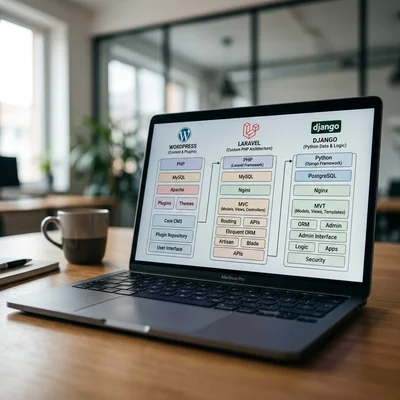
PHP is the language behind most websites on the internet. If you use WordPress, 1C-Bitrix, or OpenCart, PHP is the engine under the hood: it assembles the page, talks to the database, handles forms and the shopping cart. You do not need to learn PHP as a business owner, but understanding its role means you will not overpay for maintenance, you will update hosting on time, and you can tell "install a plugin" apart from "write code". Below is what PHP means in the context of three popular CMS platforms, how they differ, and when you need a developer.

  • PHP - server-side language: code runs on hosting, the user sees finished HTML
  • WordPress - blog and corporate site on PHP + MySQL, plugin ecosystem
  • 1C-Bitrix - PHP business CMS for the Russian market, 1C integration
  • OpenCart - PHP store with catalog, cart, and payments
  • Main risk - outdated PHP version, unpatched plugins, and undocumented custom code

Read more

Python is one of the most practical languages for business automation: fast to start, a huge library ecosystem, and easy integration with APIs, Excel, databases, and cloud services. You do not need to hire a team for a year - many tasks are solved with a 50-300 line script or a small service in 1-4 weeks. Below are seven typical processes that e-commerce, services, logistics, and B2B companies automate with Python in 2026, with complexity, stack, and ROI estimates.

  • Task 1 - reports and analytics: pandas, openpyxl, auto-export to dashboards
  • Task 2 - parsing and monitoring: prices, competitors, catalogs
  • Task 3 - documents and email: PDF, invoices, OCR, email classification
  • Task 4 - CRM and sales: leads, statuses, manager reminders
  • Task 5 - finance: invoices, reconciliation, payments, receivables control
  • Task 6 - warehouse and logistics: stock, supplier orders, tracking
  • Task 7 - notifications and bots: Telegram, email alerts, webhooks

Read more

Contacts