Blog — page 4

Rufat Nuriyev updated

Interface of a visual website builder on a laptop screen

Tilda is a cloud website builder (SaaS): pages are assembled from ready-made blocks in a visual editor, with hosting and SSL included. For business it is a fast path to a landing page, company site, promo page, or simple catalog without a development team. Tilda's strength is design and launch speed; its weakness is the platform ceiling for complex stores, heavy integrations, and aggressive SEO. Below - what Tilda is in plain terms, who it fits in 2026, what ownership really costs, and when WordPress, Wix, or custom development is the better deal.

  • Tilda fits - ad landing pages, service websites, events, product MVPs, catalogs up to a few hundred SKUs
  • Plans - Free ($0), Personal (~$10/mo billed yearly), Business (~$20/mo, up to 5 sites)
  • Hidden costs - domain, contractor, Zero Block design, payment fees, integrations
  • Strengths - blocks, Zero Block, forms, payments, HTML export on Business
  • Weaknesses - vendor lock-in; store, SEO, and custom logic weaker than a CMS
  • When to leave - complex client portals, ERP, thousands of SKUs, strict speed/SEO needs

Read more

Rufat Nuriyev updated

Interface of an AI context assembly pipeline on a laptop screen

For a long time, “working with AI” meant one thing: write a clever prompt. In 2025-2026 that is no longer enough. Models call tools, pull documents through RAG, keep session memory, and run in agent stacks. What decides quality is not wording elegance, but context engineering - the discipline of designing exactly what the model sees on every step: instructions, facts, history, permissions, and limits. Below - how it replaced classic prompt engineering and how to apply it in products and internal workflows.

  • Prompt - instruction text; context - the full model input on a step
  • Shift - from “find a magic phrase” to “assemble the right data package”
  • Layers - system, retrieval, memory, tools, task state, policies
  • Goal - stability, fewer hallucinations, token-cost control
  • Practice - narrow relevant context beats “stuff everything in the window”
  • For business - process and architecture beat one lucky ChatGPT chat

Read more

Rufat Nuriyev updated

Dashboard of a multi-agent system with an orchestrator and subagents on a laptop screen

A single AI agent handles a narrow task well. When the scenario grows - tickets, documents, code, CRM, support - one “universal” agent starts mixing roles, bloating context, and getting more expensive on every step. A multi-agent system solves this differently: an orchestrator takes the goal and coordinates the work, while subagents run narrow roles with separate tools and instructions. Below - how this works in practice, when the pattern pays off, and which mistakes kill a pilot.

  • Orchestrator - plan, routing, limit control, and result assembly
  • Subagents - narrow roles: research, code, review, writing, CRM
  • Context - each agent gets only what it needs for its step
  • Control - human-in-the-loop on critical actions
  • Start - 2-4 roles and one measurable scenario, not an “agent zoo”
  • Risk - infinite loops, tool races, and blurred ownership

Read more

Rufat Nuriyev updated

Comparison of traditional code and vibe coding with an AI assistant on a laptop screen

Vibe coding is an approach where you do not write code line by line - you talk to AI: describe the desired behavior, accept the model’s suggestion, check the result “by feel,” and refine the prompt. The term was popularized by Andrej Karpathy: you no longer hold the whole codebase in your head - you steer intent. For business this speeds up prototypes and internal tools - and at the same time creates hidden debt if the artifact lands in production without review, tests, and an architecture owner.

  • Core idea - code via prompts in Cursor, Copilot, Claude Code, and similar assistants
  • Upside - speed for MVPs, landing pages, scripts, and admin panels “needed yesterday”
  • Downside - AI confidently writes code that “works” but is weakly secured and hard to maintain
  • Danger zone - money, personal data, payments, CRM and server access
  • Safe zone - drafts, one-off utilities, pilots under strict code review
  • Rule - vibe for speed of an idea; engineering for code that carries the business

Read more

Rufat Nuriyev updated

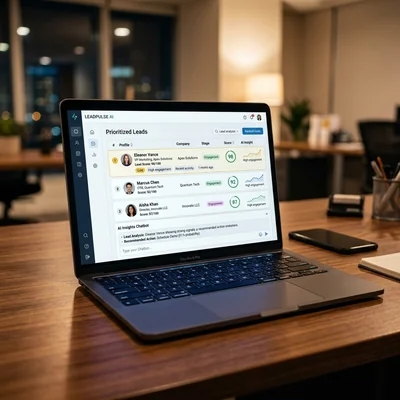
CRM dashboard with AI lead scoring and chatbot activity on a laptop screen

AI in CRM in 2026 is no longer a “website joke bot” - it is three working scenarios: a chatbot that writes leads and replies into the deal card; lead scoring that ranks requests by probability of payment; and RAG over a knowledge base that answers managers and clients from policies, price lists, and case studies without inventing facts “from thin air.” If you already have a CRM, AI boosts speed and quality - it does not replace the pipeline. Below - what to connect first, what it costs, and where the real ROI is.

  • Chatbot - 24/7 qualification, CRM write-back, escalation to a human manager
  • Lead scoring - prioritize “hot” leads, spend less time on empty chats
  • RAG - answers from your docs, not generic model phrasing
  • Start - one channel + one pipeline, then scale
  • Risk - bad CRM data makes any AI useless
  • Effect - 30-60% less time on first-touch handling with clean data

Read more

Rufat Nuriyev updated

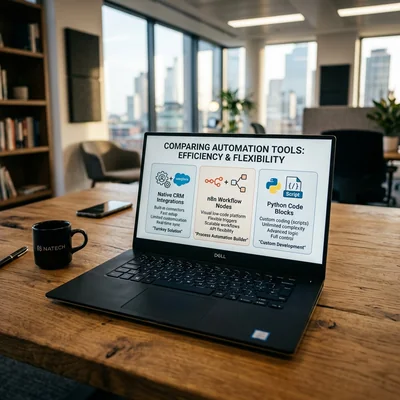
Comparison of CRM automation tools: native, n8n, and Python on a laptop screen

When CRM is already in place, the next step is automation: a site lead becomes a card at once, order status notifies the manager, an invoice goes to ERP, a ping goes to Telegram. The question is not whether you need it, but with what you connect the services. Three working paths - native CRM integrations, no-code/low-code tools like n8n, and custom Python. Below - when each tool pays off, where savings are illusory, and how to build a stack without years of technical debt.

  • Native integrations - fastest when the scenario is standard and covered by the vendor
  • n8n - flexible orchestrator between services without heavy development
  • Python - when you need complex logic, volume, unique APIs, or control
  • Hybrid - often the best TCO: native + n8n for edges, Python for the core
  • Mistake - scripting everything while ignoring built-in CRM robots

Read more

Rufat Nuriyev updated

E-commerce CRM dashboard with segments and LTV on a laptop screen

CRM for an online store is not a duplicate of the CMS admin panel - it is a system where an order lives next to the customer history, delivery status, follow-ups, and segments for campaigns. Without CRM a customer is just an order number in WooCommerce or Shopify; with CRM they are LTV, repeat-purchase probability, and a playbook like "abandoned cart → reminder → upsell." Below - how to connect orders, repeat sales, and segments in one logic, and why e-commerce needs CRM when the CMS already has orders.

  • Orders - status, items, payment, and delivery in the customer card, not only in the CMS
  • Repeat sales - reminders, post-purchase triggers, upsell and cross-sell
  • Segments - RFM, purchase frequency, average order value, abandoned carts
  • vs CMS - CRM owns relationships and marketing; the storefront owns catalog and checkout
  • Start - order sync + 3-5 segments + 2-3 follow-up flows
  • Stack - store → CRM → email/messengers; as you grow - CRM integration and n8n

Read more

Rufat Nuriyev updated

Comparison of Bitrix24, amoCRM, and HubSpot philosophies on a laptop screen

Bitrix24, amoCRM, and HubSpot are the three most common candidates when a business decides to adopt CRM. But they are not three identical boxes at different prices: each system has its own philosophy, strengths, and hidden costs. Bitrix24 is an all-in-one portal (CRM, tasks, chats, site). amoCRM is built for sales and messengers in the CIS region. HubSpot is the standard for inbound marketing and B2B in Western markets. Below is an honest 2026 comparison: who each fits, full TCO, and how to avoid a wrong choice.

  • Bitrix24 - CRM + tasks + portal; free up to 12 users; strong in CIS and corporate processes
  • amoCRM - short pipeline, WhatsApp/Telegram, fast start for sales teams
  • HubSpot - free CRM, powerful marketing; gets expensive as you scale; best for EN markets
  • Choice - not by ratings, but by lead channels, team, budget, and region
  • Pilot - 2-4 weeks on one CRM with real deals, then scale

Read more

Rufat Nuriyev updated

Dashboard with 7 signs of needing CRM implementation on a laptop screen

As a company grows, sales chaos builds up quietly: leads come from the website, Instagram, phone, and WhatsApp - while the owner is "somewhere in a chat." Managers call the same client twice, hot leads go cold without follow-up, and the owner learns about a lost deal after the fact. CRM is not trendy software - it is a way to put clients, deals, and tasks in one system and stop losing money at the "lead arrived - lead lost" stage. Below are seven concrete signs that without a CRM you are already paying hidden costs - and it is time to act.

  • Sign 1 - leads get lost across channels
  • Sign 2 - two or more managers without a shared database
  • Sign 3 - follow-ups are regularly forgotten
  • Sign 4 - no pipeline or sales forecast for leadership
  • Sign 5 - ad spend grows but conversion falls
  • Sign 6 - long sales cycle, clients go cold
  • Sign 7 - client data in Excel, messengers, and notebooks

Read more

Rufat Nuriyev updated

Infographic of CRM Total Cost of Ownership (TCO) on a laptop screen

CRM implementation is not a single budget line of "$30 per user" - it is the sum of licenses, setup, integrations, training, and support. A company buys a $150/month subscription and six months later discovers it spent $8,000 on contractors and integrations - and the CRM is still half empty. Below are realistic ranges for 2026: what each block costs, where you can save without losing results, and how much to budget for year one for teams of 3, 10, and 25 people.

  • Licenses - from $0 (free tiers) to $50-150/user/month; a team of 5 - $75-750/month
  • Setup - $0-500 DIY, $1,000-5,000 with a contractor, $8,000-25,000 for complex processes
  • Integrations - $0-300 (no-code) up to $1,500-15,000 (website, ERP, telephony, custom)
  • Year one (TCO) - typical small business: $3,000-12,000; mid-size: $15,000-45,000
  • Main mistake - buying a license without budgeting for rollout and team discipline

Read more

Contacts